

kentmcpherson
Inspiring
August 21, 2018
Answered

LR/Instagram plugin just starting giving an error

  • August 21, 2018
  • 40 replies
  • 37446 views

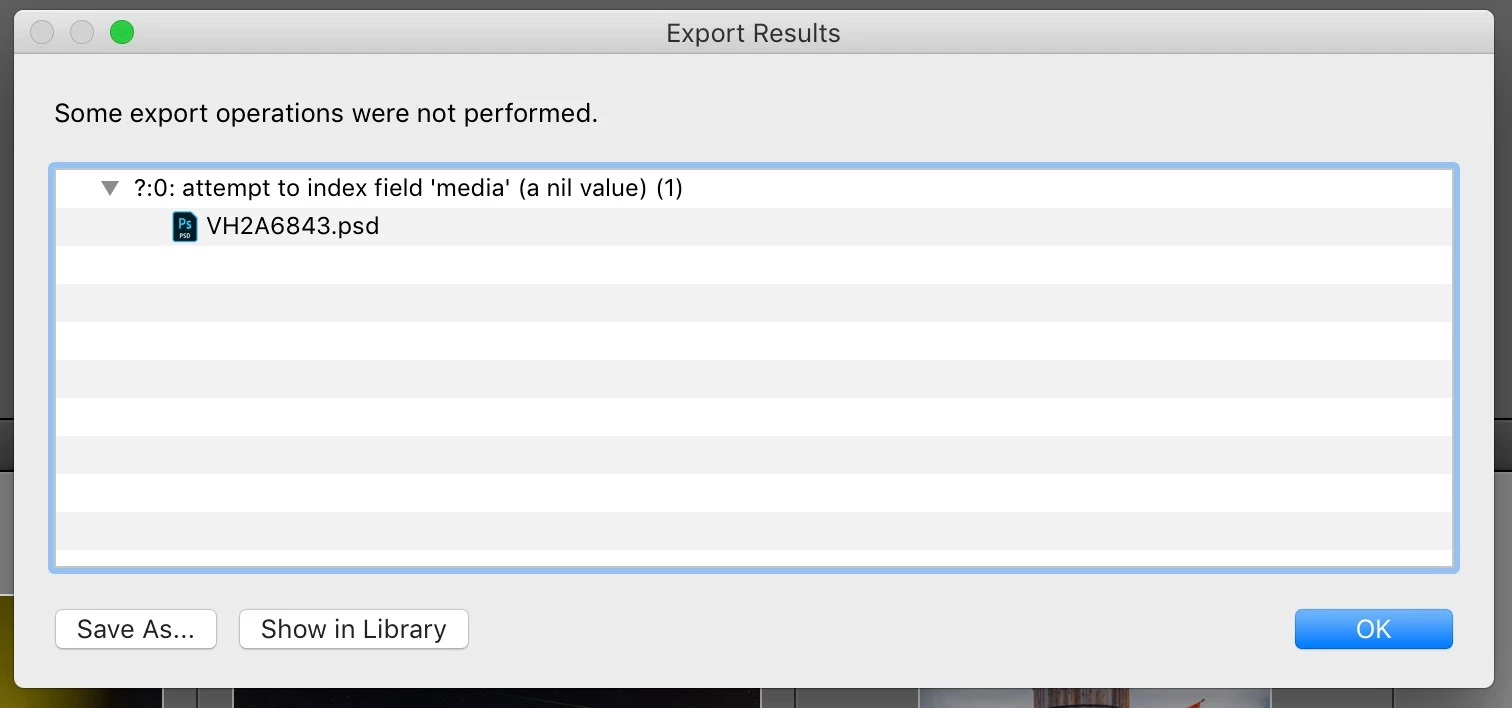
I have been using the LR/Instagram plugin (registered) for some time.  Today, when I tried to publish, I got this popup and the photo in my library still says it's unpublished. However, it actually is on my Instagram account.  Anyone else seeing this?   How to fix?
This topic has been closed for replies.
Correct answer StefanWieser

Looks like Facebook is blocking direct upload from third-party developers like lightroom since August 2018 on their services (like instagram)

See here for more details:

Facebook authentication check failed

40 replies

Participant
September 8, 2018

Same here.... so frustrating. I can't even log back into the Instagram from the Plublishing Manager.

Participant
September 8, 2018

Just installed latest version - 1587 - and still no joy... Same 408 error. Have reported to the developer site.

CapeCodFrank
Known Participant
September 8, 2018

Same problem for me as well.

CapeCodFrank
Known Participant
September 9, 2018

Vers 1592 seems to work!

Participating Frequently
September 6, 2018

This what I got from Jarno on the 4th:

Oops, the released version 1581 did not work at all.  My apologizes for that, there is now a version 1582 available.

Jarno

Replied to him saying that 1582 was coming up with the 408 error message. Haven't heard back...

Not able to post for 3 days now. Just great.

Participant
September 6, 2018

Find in another thread, from the plugin support:

"I'm receiving quite a lot of user reports of HTTP error 408, which means a request timed out.  Currently I have no idea why it is happening ....  It could be a problem with Instagram's servers, in that case there is very little I can do."

I think we can wait for a long time

Participant
September 6, 2018

I started using gamblr yesterday to get my pics from the desktop to Instagram. Another step, not as convenient, but works very well.

John Eckhardt
Participant
September 4, 2018

MAC OS 11.6 / LR 6.6 - if at all, i thought i'll be the last one to not get it back to work - but as of today, with r1582, it's working normally. relieved to say the least - thanks everyone at LRi to work around those instagram monopolist maniacs! it's probably only a matter of time until we run into this kind of trouble again...

Participating Frequently
September 4, 2018

Hi to all from Down Under (first time posting on the forum!)

Still cannot post from LR to Insta... for 2 days now    Serge Piastra (@serge_piastra_photos) • Instagram photos and videos

Downloaded the latest release (1581) and now getting this message:

error: status=nil (1)

Two messages to feedback@lrinstagram.com  and no reply yet.

Cheers

Participating Frequently
September 4, 2018

Hi there,

I have the same problem guys... few days ago the LR plugin stopped working, then I downloaded version 1575 and it started working again... but sadly only until this morning !!!

So I checked for the new version and I downloaded the latest version of LR/Instagram 0.6.1581 and I have the same message as SERGEPIASTRA :

error: status=nil (1)

AND IT STILL DOES NOT WORK !!!

Of course I registered my version and I paid 10$ long time ago... @szychowski.artur

I'm really getting tired with all that...

So for now I'm sending photos to my mobile and I'm uploading them to Instagram from there but it's tiring as I have to manually write all hashtags... ;(

Hopefully there will be some solution to this... !!!

martinat83764715
Participant
September 4, 2018

Hello,

I´ve got the same problem and the same message. Version 1581 can´t solve the problem. I´m still waiting for a reply from LRInstagram-support.

Ciao

Participant
September 3, 2018

Well, I'm like everyone else - keep getting the "408" message. I'm running it on a Mac (latest OS), Lightroom Classic 7.5, latest version of LR/Instagram (just re-downloaded it this morning).

- Removed the previous plug-in using the LR Plug-in Mgr.

- Removed the two LR Instagram Publishing Services I had defined - fortunately I elected to keep the images already posted (there's a configuration box for this) so while it removed all my previously posted photos from the LR publishing services (not from my computer files), they are still on Instagram

- Installed latest LR/Instagram (1577)

- Configured the same Instagram publishing services

It sort of works. Very inconsistent though. Sometimes I can upload a photo; other times not. Same photo will fail with the "408" message and the on re-try will upload. But not dependably..

Hopefully there's a fix soon.

johnrellis
Genius
September 3, 2018

Have you contacted the developer?

Participant
September 3, 2018

Yep... sent an email to the "contact" address on the application's website..

UngaBungaBunga
Participating Frequently
September 3, 2018

I also had the same issue as described by the OP. I updated from 0.6.1524 to 1577   (it's 0.6.1577 as of today Sept 3 1018).

Updating resolved my issue. Thankfully!  I depend on this plugin in a BIG way!

Participant
September 3, 2018

Really frustrating. Tried downloading the new version yesterday but hadn’t deleted the old versions. Deleted the old versions I could find, the. Downloaded 1577 this am. Updated the Lightroom classic cc too.

Funny thing is it never had me re enter my registration info, even though I’m prettt sure I deleted all the old versions.

The error now is

http status 408 ? (1)

anybody have any Ideas? Thanks!

johnrellis
Genius
September 3, 2018

Funny thing is it never had me re enter my registration info, even though I’m prettt sure I deleted all the old versions.

The registration is probably stored in LR's preferences along with other plugin data, and that data doesn't get deleted when you remove a plugin from Plug-In Manager.

olgav56290124
Participant
September 3, 2018

It, strangely enough, works perfectly fine on some of my accounts (less than 1000 followers). Just not on my main (business) accounts (over 1000 followers). One way or another, pretty annoying.

Dan-Ryan
Participant
September 3, 2018

This is my third day without access to Instagram via this Lightroom plugin. I did email the developer (feedback@lrinstagram.com) three days ago and got no response. I upgraded to the latest plugin version 1577 this morning but still get 408 and 503 errors.

So I've lost three days of promoting my photojournalism work via Instagram, and actually lost followers because of this.

I may as well go back to Flickr unless this problem gets solved in the next 24 hours.

josea28702606
Participating Frequently
September 3, 2018

i know this is a dumb question but did you remove the old version from the plugin manager?