

kentmcpherson
Inspiring
August 21, 2018
Answered

LR/Instagram plugin just starting giving an error

  • August 21, 2018
  • 40 replies
  • 37446 views

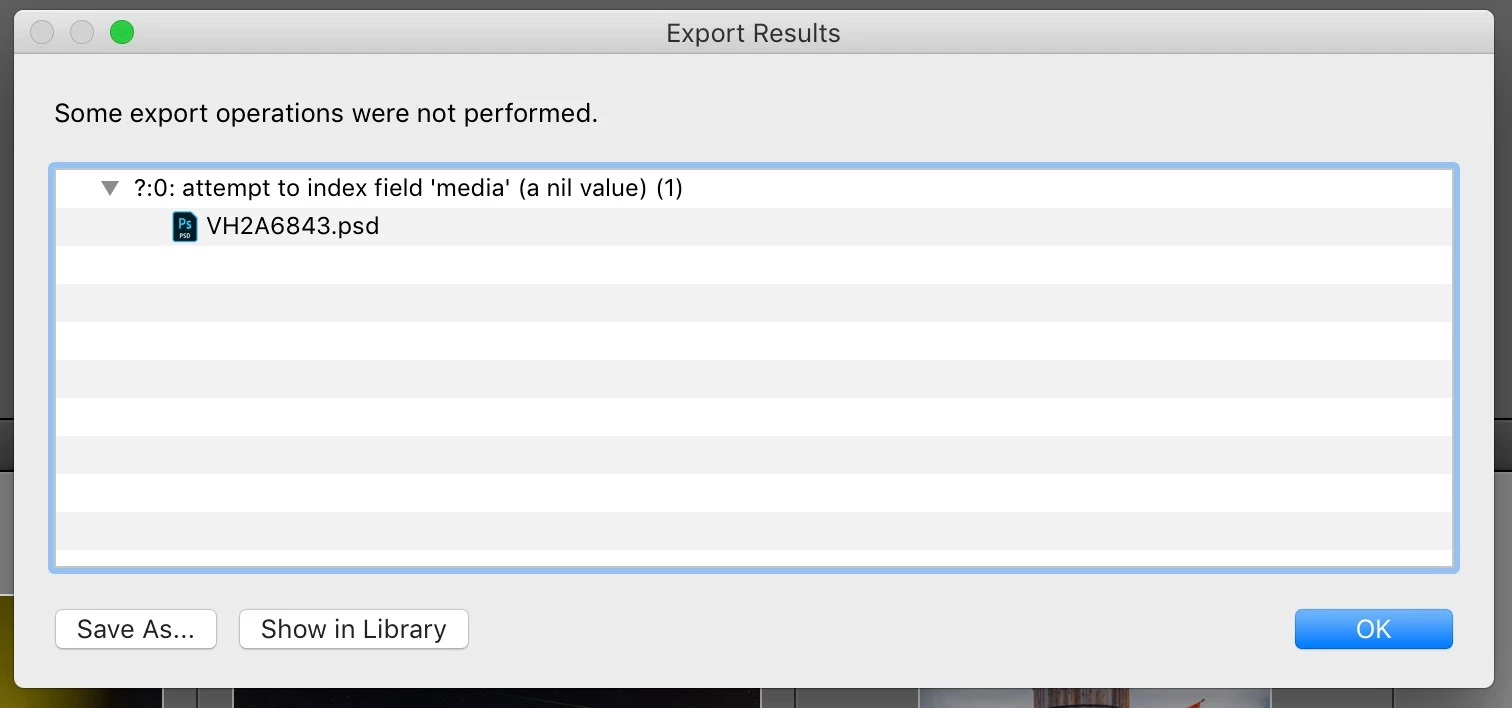
I have been using the LR/Instagram plugin (registered) for some time.  Today, when I tried to publish, I got this popup and the photo in my library still says it's unpublished. However, it actually is on my Instagram account.  Anyone else seeing this?   How to fix?
This topic has been closed for replies.
Correct answer StefanWieser

Looks like Facebook is blocking direct upload from third-party developers like lightroom since August 2018 on their services (like instagram)

See here for more details:

Facebook authentication check failed

40 replies

Participant
August 31, 2018

The same s happening to me since this morning, currently I can't log-in anymore. Actually, looking at the LR's backtrace, the plugin login works (from logs I can see this) but something other blocks everything. It's neither due to the LR catalog nor preferences file up to me, maybe it's due to the new LR 7.5 and LR/Instagram Plugin. I've tried as well to write to Capture Monkey enfolding the backtrace.. up to now no answer at all.

Participant
August 31, 2018

Same problem here as Yardkat has described. This is a huge problem for me as a daily content provider who got used to using LR/Instagram. I emailed developer as well.I don't know if this is worth mentioning, but I also run TTG Publisher plugin for Publisher.

For whatever reason, there is a "Hard Drive" service I have not been able to "remove". The TTG Publisher plugins work fine. Logging in and out of Instagram from the web is fine. Deleting photos from the catalog is fine. I made a donation, and even though I completely removed the LR/Instagram plug in, deleted it from the computer, reinstalled latest version -- it still shows that I am a registered user who made a donation. Guess that's being stored in the registry. Here's a screen shot of where I am now stuck:

whiskeyclaus
Participant
August 31, 2018

I'm also having this same issue. So far no response from Capture Monkey after emailing them over 24 hours ago. At least get back and tell us it's not working and they are working on it.

Edit: Version 1575 fixed it. Thanks to the Dev!

Participant
August 31, 2018

Just to add to the noise, I am also having issues with this plug in. It was publishing, albeit a little glitchy, about two days ago. Then yesterday I got all kids of errors so I deleted the old plug-in, reinstalled a new copy, and now I can't log in. I'm getting "attempt to index field 'logged_in_user' (a nil value)"

Super frustrating because there are so few ways to get images on Instagram from a computer. It was so slick with this plugin. I did email the developer last night, but I guess this morning after finding this thread, I assume it's part of the Facebook issue. Really too bad.

Participating Frequently
September 1, 2018

Same problem here. I've tried everything — reinstalled plug-in, quit/restart LR, quit/restart Adobe Cloud, restart computer, and so on. WTF?!!

alexstirrupphotography
Participant
August 31, 2018

Exact same thing happened to me today. Published a couple of pictures fine then went to published the next and got the error in the OP.

Tried to reinstall the plugin and now getting the logged_in_user error.

I've update LR and mine still unfortunately doesn't work. Highly irritating  particularly if you've registered the plugin.

KR Seals
Community Expert
Community Expert
August 21, 2018

I just re-installed the "lrinstagram.lrplugin a few days ago because I built a new machine.

I posted to IG several days ago and again today from LR CL CC. It's working ok for me. I guess that may be a different plugin than you are using.

My instagram account:  ken.seals

Ken Seals - Nikon Z 9, Z 8, 14mm-800mm. Computer Win 11 Pro, I7-14700K, 64GB, RTX3070TI. Travel machine: 2021 MacBook Pro M1 MAX 64GB. All Adobe apps.
kentmcpherson
Inspiring
August 22, 2018

So what is everyone doing now to post to Instagram from their Mac/PC?  Exporting the photo from LR to your hard drive. Putting it in some shared space your phone/tablet can get to and posting that way?  I tried using the iPhone user agent in Safari which makes the Add button show up when you go to instagram.com but it crops the picture square like the old days and no options to change it.  Ugh.

Participating Frequently
August 22, 2018

I installed the Chrome extension for instagram...it will post an image from your hard drive. Worked a treat.

In saying that I noticed that after today's LR update the instagram plugin is now working...how bizarre! (or not)

StefanWieser
StefanWieserCorrect answer
Participant
August 21, 2018

Looks like Facebook is blocking direct upload from third-party developers like lightroom since August 2018 on their services (like instagram)

See here for more details:

Facebook authentication check failed

kentmcpherson
Inspiring
August 21, 2018

Where does FB get off?  Why do they care where our photos come from?  OMG, it's enough to make you get off FB and Instagram altogether.  So we're supposed to save our photos from LR over to LR Mobile and post from our phone or iPad? 

Participant
August 21, 2018

I am getting the error from the original post AND the failed logged_in_user error as well when I tried to reinstall the plugin. And the image is not posting. Seems like this just popped up the past day or two. I emailed both errors to the developer of the plugin. We'll see what they say.

Participant
August 21, 2018

I am getting the same error, so I followed the steps noted above as well as deleted and re-added the plug-in, now i cannot even authorize, it gives the same error as above, but it says attempt to index "logged_in_user". This is frustrating.

Akash Sharma
Legend
August 21, 2018

Hi Kentmcpherson,

Sorry that the Lightroom/Instagram plugin is not working as you're getting an error message while publishing the images.

Please unauthorized the plugin from the publish service menu and then reauthorize it again. Also, refer the troubleshooting steps mentioned in this article Errors using Publish Services in Lightroom and let us know if that helps.

Thanks,

Akash

josea28702606
Participating Frequently
August 31, 2018

I tried logging out of the plugin and logging back in but now, I can't even login anymore...What do I do?

kentmcpherson
Inspiring
August 31, 2018

I had the same experience today.   So here's what my work-around is until Facebook lightens up.

I have a collection in LR Classic CC called Instagram Photos that is synced with LR Mobile.  I add new photos to publish on Instagram to this collection.  Then from my iPhone, I share the photo to Instagram from LR Mobile.  You have to fill in your description and all your hashtags which is a pain but it will work for now. 

john beardsworth
Community Expert
Community Expert
August 21, 2018

Check with the plugin author. It may be that Instagram changed something (as did Facebook) to prevent uploading from computers.