
Leo1024
Known Participant
June 16, 2019
Question

LR Katalog Performance - low speed of selection of fotos

  • June 16, 2019
  • 4 replies
  • 1237 views

Dear LR Community,

I have problems with the catalog performace. There is not about development modul, but about library modul.
Problem: select several fotos in folder -> next action, e.g marking of fotos with red or declaned is available after 5 seconds. Sometimes I see shortly background picture of windows or application opened before. Looks so LR rebuild the grafic.

Turn on or off the GPU support does not influence the situation. The delay was more than 8 seconds, it was much better (up to 5 seconds) after the Power Plan based on "High Performance" was choosed.
Problem get starting after upload more than 15 000 pictures into the cloud using LR CC and synchronize them with the LR Classic. There is only way to upload originals into the cloud. Problem in LR Classic happened also in case that catalog sync is paused.

Following actions was done and does not help:
- Katalog optimieren (Optimize Catalog)
- Cache leeren (empty cache)

Further information:
LR Catalog: 54500 fotos, 20700 synchronized, Catalog file is 546 MB, Cash 20 GB
Monitor Samsung FullHD
Laptop HP EliteBook 850 G5, 32 GB Memory (used 41%), Processor i7-8650U, SSD 512 GB (free space 277GB)
So the hardware is OK.

Fotos are stored on Sandisc Extreme Portable SSD 1 TB, connected to USB3.0.
But.. Catalog and previes are stored on local drive. And operation is purely
catalog operation, if previes are created. What is the reason of delay?
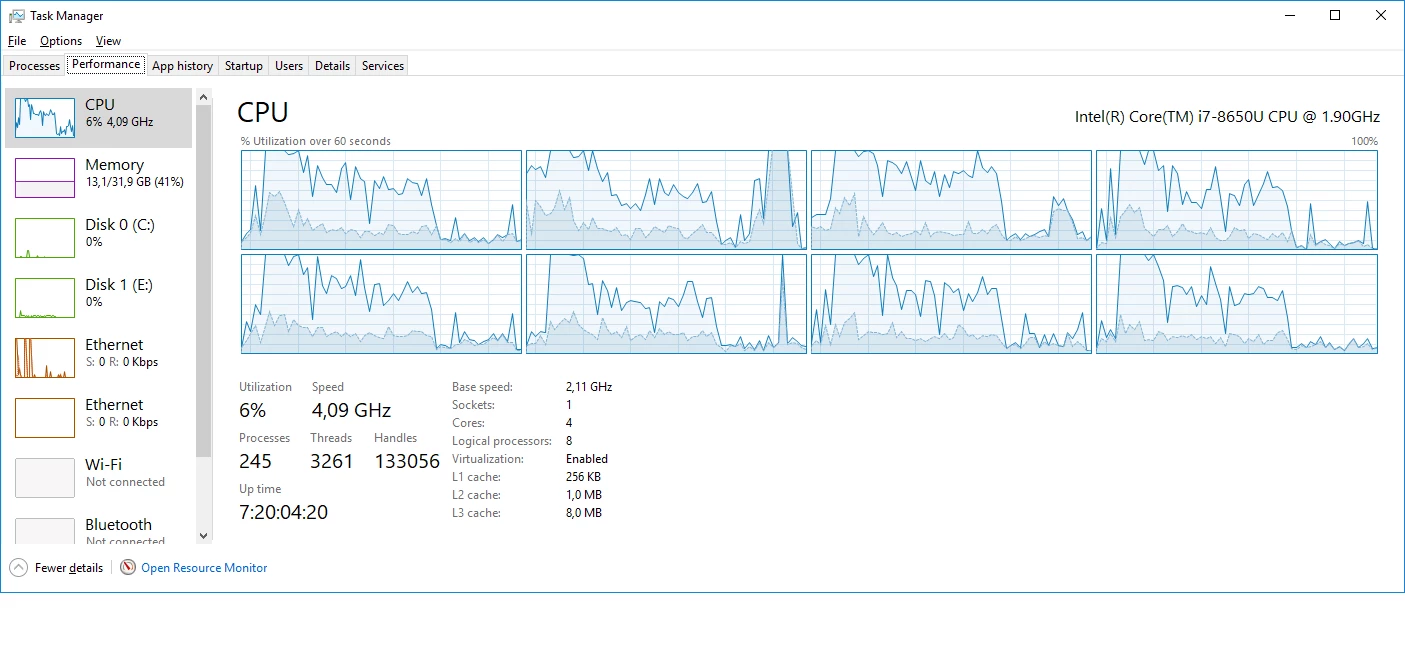
Screenshot of task manager is attached. Seems CPU is highh loaded by selecting
of few fotos (up to 20).

Could somebody help? Seems to be a perofmance issue, because operation is very easy: select 15 fotos.

Kind regards, Leo
    This topic has been closed for replies.

    4 replies

    GoldingD
    Legend
    June 17, 2019

    So, I am totally confused.

    1. If you are working in Lightroom Classic, and you keep images on an external hard drive, why are you sending those images to the cloud?

    Oh, I can understand exporting final images to the cloud to share, but syncing originals?

    This brings me to the next inquiry

    2. After you accomplished that, when you work on an image in Lightroom Classic, is that image the one on the external hard drive, or the one on the cloud?

    If it is an image on the cloud, then expect it to be sloooooow.

    might want to have lightroom show you where it thinks the image is stored.

    Leo1024
    Leo1024Author
    Known Participant
    June 17, 2019

    1. I want to keep images in cloud because I want to have backup of images with automatically synchronization. I need original image on harddrive because process them not or not only by LR. Is not feasable?

    2. Image is marked as synchronizes. I Assume LR must know already where it is. To mark image with flag or color must be no difference where image is. It is purely catalog action. But ok selection takes time. This is really terrible.

    but image is on hard drive. It is same also for not synchronized images.

    so I did Test LR on my old laptop with i5 and 16 GB memory with the same catalog. Problem does not occure. I will try to reinstall of all applications. I will also check if catalog is scanned by antivirus. But the same is also with my old laptop: I did not exclude folder with catalog.

    Leo1024
    Leo1024Author
    Known Participant
    June 18, 2019

    Problem is solved after new installtaion. Works fine with turned on synchronization and also with in-time preview creation. How it must be.

    Many thanks to all who tried to help me.

    Just Shoot Me
    Legend
    June 17, 2019

    Also the only time I see the CPU usage go up in the Library module is when I am Actively Scrolling through the images in the Grid View. Doing that in the Film strip not so much except if the images I'm scrolling to don't have previews. I deleted my preview folder a few days ago.

    Are you SURE, Really Really SURE, your Anti virus program is not scanning your images and or the LR Catalog file?

    Leo1024
    Leo1024Author
    Known Participant
    June 17, 2019

    Now when you ask ... It is laptop from firma and installed is antivirus from Symantec. I do not really find the pathes where scan is actve, but it says the sast scan was done 1.06.2019. For custom scan and start-up scan is taying NEVER. Only monthly scan. So I amy to try to add exception. Will look if problem will occure. Thanks.

    Just Shoot Me
    Legend
    June 17, 2019

    Leo1024  wrote

    Dear LR Community,

    Screenshot of task manager is attached. Seems CPU is highh loaded by selecting
    of few fotos (up to 20).

    Could somebody help? Seems to be a perofmance issue, because operation is very easy: select 15 fotos.

    Kind regards, Leo

    No CPU usage seen on my system by just Selecting several, 10-20, photos. something else is going on.

    When you say Uploaded from LR CC do you mean the Desktop (Computer) Cloud Centric version or the Mobile iOS + Android version?

    Leo1024
    Leo1024Author
    Known Participant
    June 17, 2019

    I mean Desktop (Computer) Cloud Centric version. But I never run both applications LR CC and Classic at the same time.

    Just Shoot Me
    Legend
    June 17, 2019

    Leo1024  wrote

    I mean Desktop (Computer) Cloud Centric version. But I never run both applications LR CC and Classic at the same time.

    That is NOT a suggested workflow and could be part of your problem.

    So you have 2 subscriptions and or an Add-On payment for more storage space?

    dj_paige
    Legend
    June 16, 2019

    Some things to check

    • Make sure face recognition is turned off
    • Make sure Lightroom Classic is not synchronizing photos with the cloud
    • Make sure LR Classic is not building previews
    • Make sure your virus checker is not scanning the catalog file or the folders with the photos
    • If you have a very large number of photos in a folder (like several thousand photos or more), that could be a problem
    Leo1024
    Leo1024Author
    Known Participant
    June 16, 2019
    • Make sure face recognition is turned off - is turned off
    • Make sure Lightroom Classic is not synchronizing photos with the cloud - sync paused
    • Make sure LR Classic is not building previews - no progress bar left on top, is any other way to check?
    • Make sure your virus checker is not scanning the catalog file or the folders with the photos - not scanned
    • If you have a very large number of photos in a folder (like several thousand photos or more), that could be a problem - happened with flader with 5000 photos as well es for 300 photos. Also for 50 photos.
    Leo1024
    Leo1024Author
    Known Participant
    June 17, 2019

    Should I contact offical Adobe Service or this is done already with this thread?

    Kind regards, Leo