Participant
May 9, 2023
Question

LR lists external hard drive in folders but not the sub folders

  • May 9, 2023
  • 3 replies
  • 616 views

I am a PC Windows11, user on LRClassic V.12.

LR is periodically not able to find the folders on my external hard drive. This appears to occur after I conduct a backup to a seperate hard drive. I do eventually fix it after some time, however I can't recall how - next time I'll certainly take notes. When I 'show in explorer' I can direct it to the drive and folders, but am unable to click on anything.

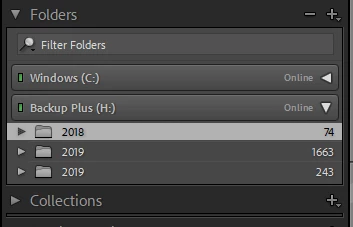
This snip from LR shows my hard drive, but the folders are not complete or the actual ones on that hard drive. They are the result of uploading a catalogue in a last ditch attempt to find my images. 
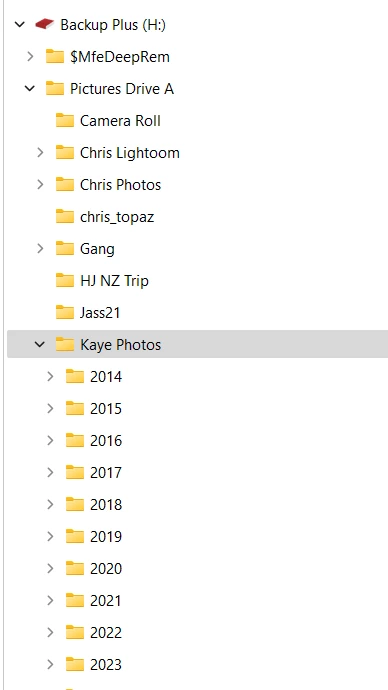
Below is a snip from windoews explorer indicating the hierarchy on this hard drive and the directory I should be able to open is highlighted.
 

[moved from bugs to discussions - Mod]

This topic has been closed for replies.

3 replies

JohanElzenga
Community Expert
Community Expert
May 9, 2023

If you mean that you are missing the 2014 - 2017 folders in Lightroom, then the answer is simple. You haven't imported any of the photos in these folders yet. If you mean you are missing the 'Kaye Photos' parent folder, then right-click on one of the year folders and choose 'Show Parent Folder'.


-- Johan W. Elzenga
Participant
May 9, 2023
I have re-opened LR and now the only folders showing are 2 that I created since this occurrence of the problem. I have been using LR for 4 years and have only recently started having this problem.


Sent from Mail for Windows
F. McLion
Community Expert
Community Expert
May 9, 2023

... in addition, you need to click the triangle on the left of the folder to open the subfolders.

--- Got your issue resolved? Please label the response as 'Correct Answer' to help your fellow community members find a solution to similar problems. ---
Participant
May 9, 2023
When I click on the triangle to open the folders, they are not the folders they should be.
I have previously imported all of the photos into folders that are showing in the Explorer snip. When LR recognises the drive correctly, as it has done for the 4 years I’ve been using LR, the folders have been there.

Sent from Mail for Windows
F. McLion
Community Expert
Community Expert
May 9, 2023

Are you aware that the folder panel only shows folders that contain photos you have imported?

It is not an "Explorer" like you know it from Windows Explorer.

--- Got your issue resolved? Please label the response as 'Correct Answer' to help your fellow community members find a solution to similar problems. ---