


Participant
Oct 18, 2024 10:09 PM UTC
Answered

LR selects 2 photo's

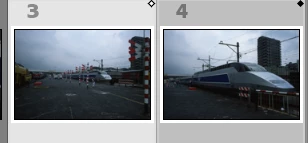
Since today LR selects sometimes 2 photo's (not in compare mode).

1 photo with a white and  1 with a black mark in the upper right corner.

Due to this problem it's no longer possible to choose new photo's with the cursor keys. It's only switching between the 2 selected photo's.



GoldingD
GoldingDCorrect answer
Legend
Oct 19, 2024 4:08 AM UTC

Those itty bitty diamonds in the upper right of the thumbnails mean that you are in compare mode. (Keyboard shortcut C)


4 replies

Participant
Nov 3, 2025 6:54 AM UTC

If Lightroom selects two images in Develop mode even when you click one just go to View → Loupe View or press E in Library mode
It resets the selection and keeps only one photo active. 


Translate
Community Expert
Oct 19, 2024 7:20 AM UTC

If pressing the shortcut C to get out of the Compare mode doesn't help try to reset the preferences of Lightroom Classic:  How to reset Lightroom Classic preferences (adobe.com) 


It's recommended to backup your preferences before you reset the preferences to the default settings: 

https://helpx.adobe.com/lightroom-classic/kb/preference-file-and-other-file-locations.html


Translate
My System: Intel i7-8700K - 64GB RAM - NVidia Geforce RTX 3060 - Windows 11 Pro 26H2 -- LR-Classic 15 - Photoshop 27 - Nik Collection 9 - PureRAW 6 - Topaz Photo AI
GoldingD
GoldingDCorrect answer
Legend
Oct 19, 2024 4:08 AM UTC

Those itty bitty diamonds in the upper right of the thumbnails mean that you are in compare mode. (Keyboard shortcut C)


Translate
Participant
Oct 19, 2024 6:24 PM UTC

My 2nd screen (switched off) was in compare mode.
Thanks for your tip!

Translate