
LR sometimes imports some (not all) duplicates from my iPhone 13 Pro Max
I've been using LR Classic for quite a while (2011 I think), first with a Canon, then added an iPhone and an Olympus. I have only one cagtalog to keep life simple.
I always click "don't import susptected duplicates"
For the Canon and the Olympus never a problem.
With various iPhones I have to pay close attention because sometimes it WILL import SOME duplicates, sometimes it gets it exactly right with no intervention.
I have all the latest operating systems and versions as of 13 August 2024
- iOS 17.6.1
- macOS Sonoma 14.6.1
- LRC 13.4
- Camera RAW 16.4
I'm on a 2020 M1 Mac Mini and using an iPhone 13 Pro Max.
Typically I format the SD cards on my Olympus after import.
But I like having as much history on my iPhone as possible so I don't delete much.
Today I did all the steps very slowly and carefully - I have screenehots along the way.
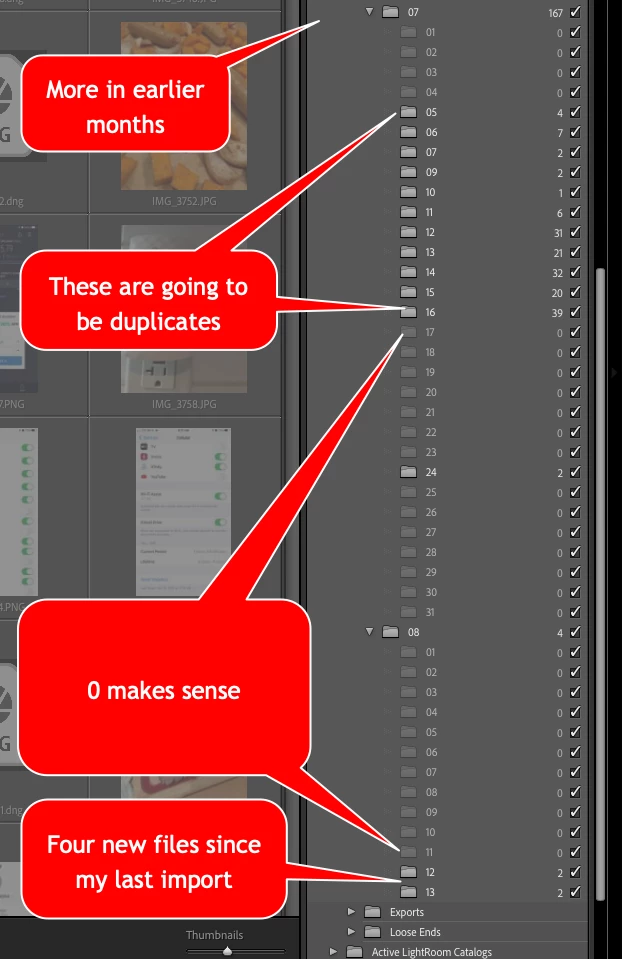
I did an import from the iPhone just yesterday, so there were only about 4 images to import
But LR wanted to import many more.
I unchecked some of the days and let two of the days go through - sure enough there are a bunch of files with -2 at the end of the filename. Easy enough to search and delete.
But why do I have to be so careful?
There have been times when this isn't a problem - it seems to be intermittent.
Do I need to wait some minutes for LR to figure out the duplicates?
Here's an image of the sidebar showing what LR wants to import from my iPhone when I just did an import yesterday.


 AdChoices