

LR WAV audio files have gotten detached from image files in LR Classic--but they are on drive.
I am using AnyFilter from @johnrellis for locate audio files I've made while shooting still images with my Fujifilm cameras.
When I used the AnyFilter plug-in today, it reported just 8 images among my 115,000+ images as having associated WAV files. I have way more than that.
I checked a specific directory and found this example of image #64251 that has an associate .wav file. But in LR, it does not show up in Metatdata. When I search with AnyFilter from John R Ellis, this image/audio combination does how show up either.
How can I re-associate these orphaned .wav files to their image counterparts so LR recognizes their presences?
If I locate one of the combos in Finder and I open in the LR CC and then go into the Develop module, the audio file reassociates in LR. But I have to know there is such an orphaned audio file to do that.
Note in metadata snips that 64251 has an audio file in LR but 64250 does not, yet both audio files exist on my SSD. 64251 audio now shows up in metadata because I opened it in Develop module
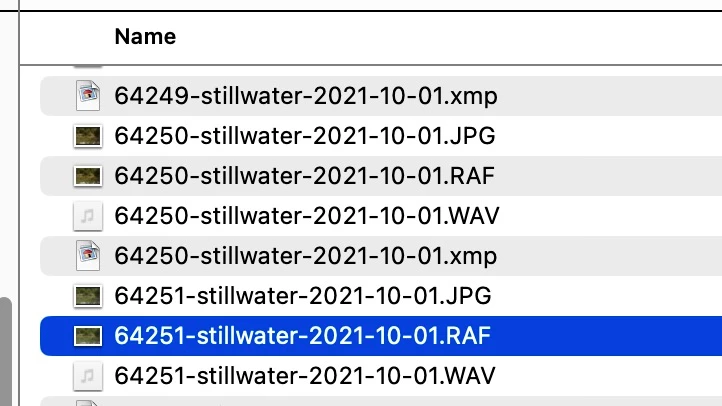
Screenshots attached.
 AdChoices