
Participant
September 6, 2023
Answered

LR will not open as it keeps trying to install a corrupt catalogue

  • September 6, 2023
  • 1 reply
  • 148 views

When I hide the corrupt catalogue or try to open another catalogue it still tries to open the corrupted catalogue.  I have reinstalled LR, moved catalogue files to a different location, and copied more recent catalogue files from my old computer, but it still tries to open the first "corrupt" catalogue and keeps on reinstating it in the folder (despite being deleted each time).  Please help
This topic has been closed for replies.
Correct answer D Fosse

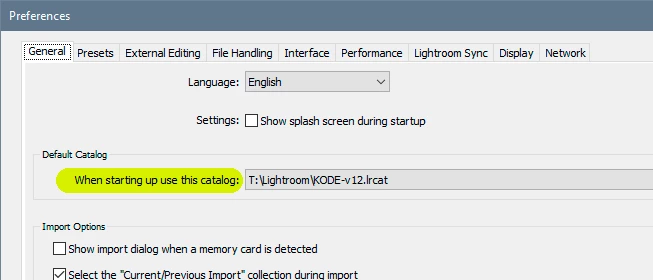
Find a good catalog and open it directly by double-clicking it. Then change in Preferences > General > Default Catalog.


You don't necessarily need to open the application first. You can open a catalog directly.


1 reply

D Fosse
Community Expert
D FosseCommunity ExpertCorrect answer
Community Expert
September 6, 2023

Find a good catalog and open it directly by double-clicking it. Then change in Preferences > General > Default Catalog.


You don't necessarily need to open the application first. You can open a catalog directly.


GeofflAuthor
Participant
September 6, 2023

Thank you for the response.  Unfortunately, no matter which catalog I click on the original message remains: Lightroom - Opening Catalog: Lightroom Catalog -V12.lrcat  Nothing happens. Even if I re-install the software it comes back and prevents me from opening LR. I am still stuck