Inspiring
August 10, 2017
Answered

LR won't print to photo paper on Epson Artisan 730 printer.

  • August 10, 2017
  • 1 reply
  • 3185 views

I am using LR 6.12 on Windows 10 with an Epson Artisan 730 printer.  It will only print to plain paper 8 1/2 x 11.  I have the proper profile setup 4x6 photo paper.  I have set the photo paper as the default in Windows and LR still picks plain 8 1/2 x 11 paper.  I have tried everything I can think of to get it to print on photo paper.

I currently have to Edit In PS CS-6 and print.  That works fine.

I don't know what else to try?  Help please!

Thanks!

Gary.
This topic has been closed for replies.
Correct answer GaryKuep

Man , you are having troubles!

Re-install LR may help.

Resetting the Preferences file is often an answer to unusual 'bugs'.

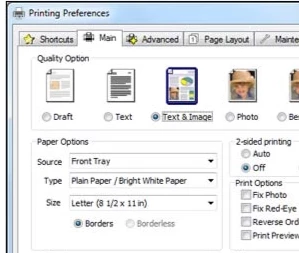
Can you post a screen clip of your settings in the  Printing Preferences- Paper options?

Like this screen clip-


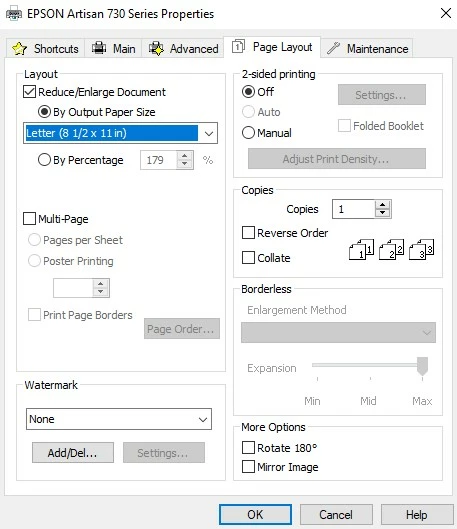
I just stumbled upon the problem.  See the screen clip:

I don't know how the layout item got checked, but unchecking the Reduce/Enlarge Document corrected the problem.  I can now print to 4x6 photo paper.  This was definitely a strange problem.  I only saw this because I was looking at all the tabs to ensure all is correct.  I wondered what this was checked for and with it saying Letter (8 1/2 x 11in), I thought what would happen if I unchecked it.  Well it fixed the problem.

I still don't know what that Layout item is for and I don't recall ever checking it, so it is still a mystery to me.

I do appreciate your help with this!  Without you asking for me to check this and that, I would never have found the problem.  Thank you very much for all your help!!!!

I can now say Problem Solved!

1 reply

Rob_Cullen
Community Expert
Community Expert
August 10, 2017

The "8 1/2 x 11"  suggests to me you may be selecting a preset from the Template Browser panel. These Lightroom default templates are mostly (if not ALL) set to 8 1/2 x 11.   Do NOT choose a template (unless it is one YOU have created).

You must choose your paper size, etc, from the [Page Setup]  which opens a printer dialog and set the paper in this dialog, then set margins, etc, in the Print Layout panels.

Is this something you have not thought of?

Regards. My System: Windows-11, Lightroom-Classic 15.3, Photoshop 27.5, ACR 18.3, Lightroom 9.3, Lr-iOS 10.4.0, Bridge 16.0.3 .
GaryKuepAuthor
Inspiring
August 11, 2017

I am using a 4x6 template in LR.  I have [Page Setup] set for 4x6 photo paper.  I double checked that all is set for 4x6 photo paper.  I print and the Epson print window opens and says printing to plain paper and 8.5x11.  Sure enough, it prints to 8.5x11 plain paper.

I can't find any setting in LR that is not set to 4x6 photo paper, but it still doesn't work.

GaryKuepAuthor
Inspiring
August 11, 2017

Just thought you should know, I am not a new user.  I have been using LR from version 4 and PS since CS 4.  This problem only started a week ago.  I can't figure out what has happened to cause this.  I have not done anything new.  No upgrades recently.