
martin-a
Known Participant
January 31, 2017
Answered

Lr5 shows wrong color for imported sRGB photos

  • January 31, 2017
  • 6 replies
  • 2355 views

I have Windows 7 x64 SP1 Home Premium, Lightroom (Lr) 5.7.1, camera Lumix TZ7 (Panasonic DMC-TZ7).
Camera takes photos in sRGB. I installed Lr5 to try it.

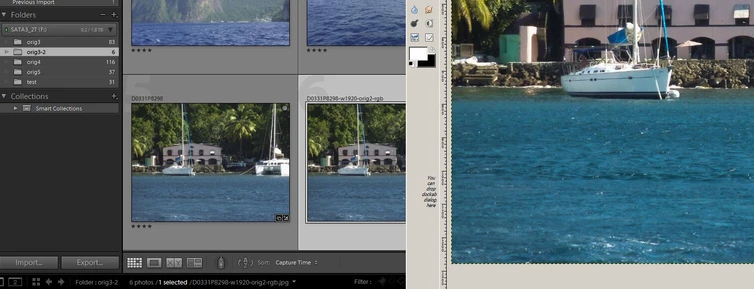
I imported photos and after editing and export (to sRGB), I found out that colors are different in other programs.

I 've read some forums/articles to find solution. I re-calibrate monitor w/ Spyder3 and created new monitor color profile.

Colors in Lr5 changed a little bit but still big difference w/ other SW.

I use usually SW for photos: Gimp 2.8.18, DPP 4.4.30.2 (Digital Photo Professional 4, Canon)

All my SW is set to work in sRGB color space and until Lr5 I have no issue w/ colors. Exported photos looks ok on all devices.

What I'm doing wrong or is there bug in Lr5?

[Pic. left: Lr5, right: Gimp]
This topic has been closed for replies.
Correct answer Todd Shaner

Your standard gamut monitor is close to sRGB gamut. If the sRGB color profile is working then you can use it for now with good results until a monitor calibrator can be obtained.

EDIT

I  just checked the Dell 2407WFP-HC specifications at TFT Central and its gamut is closer to the Adobe RGB color profile (90%). You will need to assign the Adobe RGB color profile and NOT sRGB for the best color match.

Dell 2407WFP-HC Review

Another option is to download the ICM color profile available on the TFT Central website. This is a profile is created using a monitor calibrator and It may provide slightly more accurate results. You'll find it in the list with instructions on how to install it here.

ICC Profiles and Monitor Settings Database

http://www.tftcentral.co.uk/icc_profiles/dell_2407wfp_hc.icm

6 replies

martin-a
martin-aAuthor
Known Participant
February 14, 2017

Hi all,

I would like to say thanks to all who answered me. But we don't have right answer yet.

We just tried RGB color space. And I don't have access to HW calibration now. And I suppose, Adobe doesn't expect that all users have it. So, I have question which I hope will help me fix my issue.

How to create good icc file for my monitor Dell 2407WFP-HC ? Such good that Lr5 will work good w/ it.

Does Adobe can help me w/ that?

Thanks,

Martin

Per Berntsen
Community Expert
Community Expert
February 14, 2017

martin-a wrote:

We just tried RGB color space. And I don't have access to HW calibration now. And I suppose, Adobe doesn't expect that all users have it. So, I have question which I hope will help me fix my issue.

How to create good icc file for my monitor Dell 2407WFP-HC ? Such good that Lr5 will work good w/ it.

The only way to create a custom profile for your monitor is by hardware calibration.

If that's not possible, use sRGB - it's a known, good profile, and reasonably close to your monitor's color gamut.

You may be concerned that your photos now look different in LR, but you should trust the sRGB profile, and re-edit the photos if necessary.

martin-a
martin-aAuthor
Known Participant
February 2, 2017

Would be helpful to upg to Lr6 ?

martin-a
martin-aAuthor
Known Participant
February 1, 2017

May I ask someone from Adobe to review my question?

Per Berntsen
Community Expert
Community Expert
February 1, 2017

The icc version number will be an option in the calibration process, so to find out, you would have to recalibrate.

Also follow the advice given by jao vdL and make sure color management is enabled in the apps you use.

martin-a
martin-aAuthor
Known Participant
February 1, 2017

Per Berntsen  napsal(a):

The icc version number will be an option in the calibration process, so to find out, you would have to recalibrate.

Also follow the advice given by jao vdL and make sure color management is enabled in the apps you use.

I cannot re-run calibration, I had to return hw for calibration. But I would say it's ver 2.4. If it's critical, pls tell me how to check ICC ver? I used ICC Profile Inspector and it says 0x240000. (that's way I think it's 2.4).
I already answered reg. my Gimp and DPP, both are set to use color management.

Could be issue w/ how Lr read embedded profile in my jpg photos?

Brad_Polt-Jones
Participating Frequently
February 1, 2017

Another possibility is experimenting with Camera Calibration profile in Lightroom. This can have a big impact on perceived color. The Camera Calibration panel is at the bottom of the Develop Module. If it is currently set to Adobe Standard, then try changing it to Camera Standard see if that helps.  This only impacts the color seen on the screen while in Lightroom.

martin-a
martin-aAuthor
Known Participant
February 1, 2017

There is only 1 option: Profile: Embedded. What does it mean?

JP Hess
Inspiring
February 1, 2017

It means that you are probably looking at a JPEG file. The JPEG file will  have the profile "embedded" that was chosen in the camera. That doesn't happen with raw images.

Community Expert
February 1, 2017

It's highly unlikely that LR is showing you the wrong thing. Are you sure gimp is set up to color manage correctly? If I remember correctly from years ago, you have to actually point it to the correct icc profile for your monitor.

martin-a
martin-aAuthor
Known Participant
February 1, 2017

Hmm, you can check forums here or google to see how many issues are w/ colors in Lr or Ps.
I changed my color profile for monitor - I used Spyder3 for it. (as I already noted).

JP Hess
Inspiring
January 31, 2017

Lightroom works in a wider color space, more like Prophoto. This could be one contributing factor. What other software are you using besides Gimp to look at your images?

martin-a
martin-aAuthor
Known Participant
February 1, 2017

I already said: DPP4. And some non-color managed viewers like XnView.