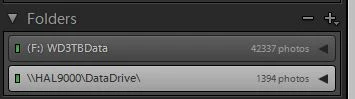
LR6 showing me both drive letter and UNC path as two locations
Hi, apologies if I'm not in the correct place for this question. I'm new here.
Background:
Been using LR for a number of years now. Currently using LR 6.6.1. and Windows 10.
I store my photos on external USB drive (F) and share it so that the shareable pics are visible on the TV via my home network.
I store my photos chronologically with a high level folder for each year, then within that, each photo event as a specific date/description.
Issue/Question:
a) I don't know why LR is showing me both the drive letter version and the UNC version of the supposedly the same folders. Interestingly, the F: one shows them in cascading/nested format, while the UNC shows a flat format. (anyone know why?) How do I make the UNC version go away? I don't need/want it in LR.
b) I noticed that the supposedly same folder in both of those locations is NOT showing the same photos, despite doing SYNC in both locations. For example, in the folder 2013-08-23 in F: it shows 1 photo (Windows explorer shows 88). And the UNC folder of the same, is showing 87 photos - and NOT the one shown in the F: version.
I don't use stacking and went through the unstacking exercise just in case - no difference.
I tried dragging pics from UNC to F: version but it wouldn't let me.
On the high level, the F: drive shows a photo count of 42,343 photos and the UNC version shows 1,402.
How do I unify and remove the UNC version?
Thanks
 AdChoices