Participant
January 10, 2019
Question

LR6 suddenly won't export

  • January 10, 2019
  • 1 reply
  • 154 views

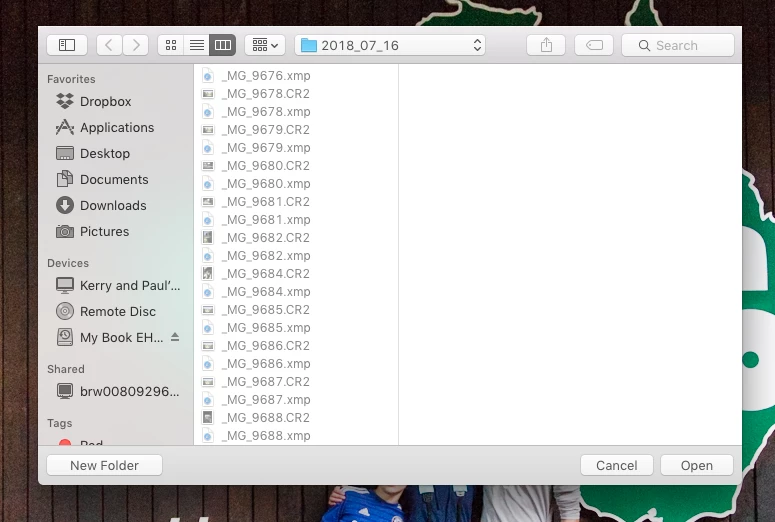
I was using LR5 on a Mac desktop, and have been using it without trouble for years.  Tonight, I went to try and export a photo (did not change anything), and instead of exporting, it brought up a Finder window, with "open" and "cancel" buttons at the bottom, like it wanted me to find photos?  I tried restarting LR5, and that didn't work.  Then I remembered that I had recently bought the LR6 upgrade, so I installed it.  .....and the problem is still there.  I have never seen this before!  Any idea what might be causing it and/or what may have changed?  (see screenshot below).  I have not moved any photos, and they are all still in the same location on the HD. 

I am running OX 10.11.6 (el capitan), 16GB of memory. 
This topic has been closed for replies.

1 reply

GoldingD
Legend
January 10, 2019

Did you initiate the export attempt via your mouse (right click on image(s), select export),  or a shortcut (keyboard sequence)?

Participant
January 10, 2019

Well, I feel silly now!  I said I hadn't changed anything....well, I was wrong.  I DID change something several weeks ago, when I consolidated all my 2018 folders under a new parent folder.  I moved all my images via LR so my catalog didn't lose track of the images, but tonight I was trying to export to a specific folder (it was still saved in my export dialog box) and I had ALSO moved that folder, so the path for where to export the file to was wrong!  

I guess that's what I get for trying to do things late at night when I'm tired.... 

Thanks for trying to troubleshoot my "issue"!