
shikamu
Known Participant
December 14, 2024
Question

LrC 14.1 quit unexpectedly message

  • December 14, 2024
  • 7 replies
  • 2397 views

I updated to LrC 14.1 yesterday.  Since then everytime I quit and have it do a backup I get this error window:
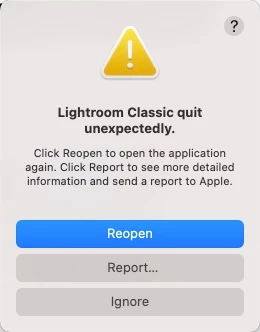


Since updating to 14.1 it has happened 4 times.  I have never gotten this message before.  I am on an M2 Pro Mac 32gb, Ventura 13.7.1.  I have clicked on Report and sent a report to Apple multiple times.


One time I quit without doing the backup and I did not get the error.


Anyone else having this new problem?  Any ideas?

7 replies

Participant
January 6, 2025

same problem here - OS 13.7.2...upgraded to LR Classic 14.1.1 and now LR will not launch.  logo bounces for a few seconds, then quits.  Tried Adobe Help chat for several hours with 5 agents, no solution. They have kicked it up to a "senior specialist" who is supposed to call me.


shikamu
shikamuAuthor
Known Participant
December 19, 2024

In order to keep this thread updated, I will report the latest.


A couple of days ago I updated from Ventura 13.7.1 to 13.7.2.  No change with regards to this problem.


Today I updated from LrC 14.1 to 14.1.1.  No change with regards to this problem.

Ian Lyons
Community Expert
Community Expert
December 22, 2024

Have you tried resetting the LrC preference file? The procedure is described in Method 1 at below link to Adobe Help document.


https://helpx.adobe.com/lightroom-classic/help/reset-preferences.html

shikamu
shikamuAuthor
Known Participant
December 16, 2024

A few minutes ago when I quit I unchecked the test integrity and optimize catalog options in the Back Up Catalog window, but I still got the same error.

GoldingD
Legend
December 16, 2024

Contact Adobe. This via a Chat. Before doing so, prepare your notes and information ahead of time as to be more efficient in communicating. Your info that you have posted in your Discussion is a start for the description, and probably have a copy of your LrC /Help/System Info/ as a text document on hand, so that you can paste or attach that into the chat.


To accomplish the Chat, bring up an Adobe webpage, and click on the Chat button. (see image below) This will start a Chat. At first the Chat will be with a chatbot, Typing “Agent” into the chat text field will bypass the initial chatbot. If an agent does not enter the chat then be assertive in requesting an actual Adobe Tech join in the chat.


In the Chat include (as mentioned above) a description of the issue, and probably your System Info. And include a link to your discussion.


You may want to ask for a phone call.


And please keep notes so that you can share them in your post for others to see.


For example, bring up:

https://helpx.adobe.com/contact.html


and click on the Chat button, typically found in bottom right corner


shikamu
shikamuAuthor
Known Participant
December 17, 2024

Yes, that is the next step.


I just quit LrC 14.1 so, of course, I got the same error again.  Only happens with LrC 14.1 and not all earlier versions and doesn't happen with any other software.  Here is a relevant bit of the report:


Crashed Thread: 0 CrBrowserMain Dispatch queue: com.apple.main-thread


Exception Type: EXC_BAD_ACCESS (SIGSEGV)
Exception Codes: KERN_INVALID_ADDRESS at 0x0000000000000047
Exception Codes: 0x0000000000000001, 0x0000000000000047


Termination Reason: Namespace SIGNAL, Code 11 Segmentation fault: 11
Terminating Process: exc handler [4348]

GoldingD
Legend
December 14, 2024

So, that is a report from Apple, from the MACOS. Do you get a error message from Adobe? From LrC?


shikamu
shikamuAuthor
Known Participant
December 15, 2024

That is the only error I get.  It happens each time I quit and when the backup finishes (or at least appears to finish).  The backup folder and backup ZIP file is created.  I hope the backup ZIP file is good.

GoldingD
Legend
December 14, 2024

Does that currently happen every ime, or occasionally?

If it happens every time, then does it happen if you do not choose to backup?

shikamu
shikamuAuthor
Known Participant
December 15, 2024

GoldingD: Does that currently happen every ime, or occasionally?

If it happens every time, then does it happen if you do not choose to backup?


Do these lines in my post that you replied to not answer those questions?


Since then everytime I quit and have it do a backup I get this error window


One time I quit without doing the backup and I did not get the error.


Maybe I am misunderstanding what you are asking?

GoldingD
Legend
December 15, 2024

Ok, apparently does not fail if you simply close and not backup.

Implying that maybe the issue involves backing up.

That brings up an additional inquiry that I failed to ask. In that close LrC, with backup, are you including the check integrity  option? 


Lundeliphoto
Participant
December 14, 2024

I updated to LrC 14.1 today... and straight away it started quiting after a minute or two.. regardless if I was working in the app or not.. this has happened multiple times now... so I dont think I will open the app again before a new fix/update from Adobe is released. Im working on 14" Macbook pro M3 18gb 1tb ssd with original photos on a 4tb external ssd

shikamu
shikamuAuthor
Known Participant
December 14, 2024

No one else has had this happen with 14.1?