



LrC 15.2.1: dynamiclinkmediaserver crashes in mc_mfimport when importing 10-bit HEVC video from Sony a7RV on MacBook with M4 Max
Lightroom Classic 15.2.1 fails to import video files from my Sony a7RV (4K 10-bit HEVC 23.98fps 50Mbps) on my MacBook Pro 14” with M4 Max. The background process dynamiclinkmediaserver (version 24.0.0) crashes immediately upon probing the file, causing an "RPC connection terminated" error (-10001) in the Lightroom output (when I run LrC from Terminal).
System environment:
- Lightroom Classic Version: 15.2.1 (though this has been happening for me since the end of December 2025 using whatever was the latest LrC version at the time)
- OS: macOS 15.7.4 (Sequoia)
- Hardware: MacBook Pro 14", Nov 2024 (Mac16,6) with Apple M4 Max chip
- Camera: Sony a7RV, 3840x2160, 23.98 fps, 10-bit HEVC, 50 Mbps.
Steps to reproduce:
- In LrC, choose File → Import Photos and Video…
- Select a source folder containing video .MP4 files with the characteristics described above.
- With at least one such video checked, click “Import”.
Expected result:
- Selected video files are added to the LrC catalog and copied to the specified destination (assuming “Copy” was selected).
Actual result:
- Popup error like this, showing all the affected video files:
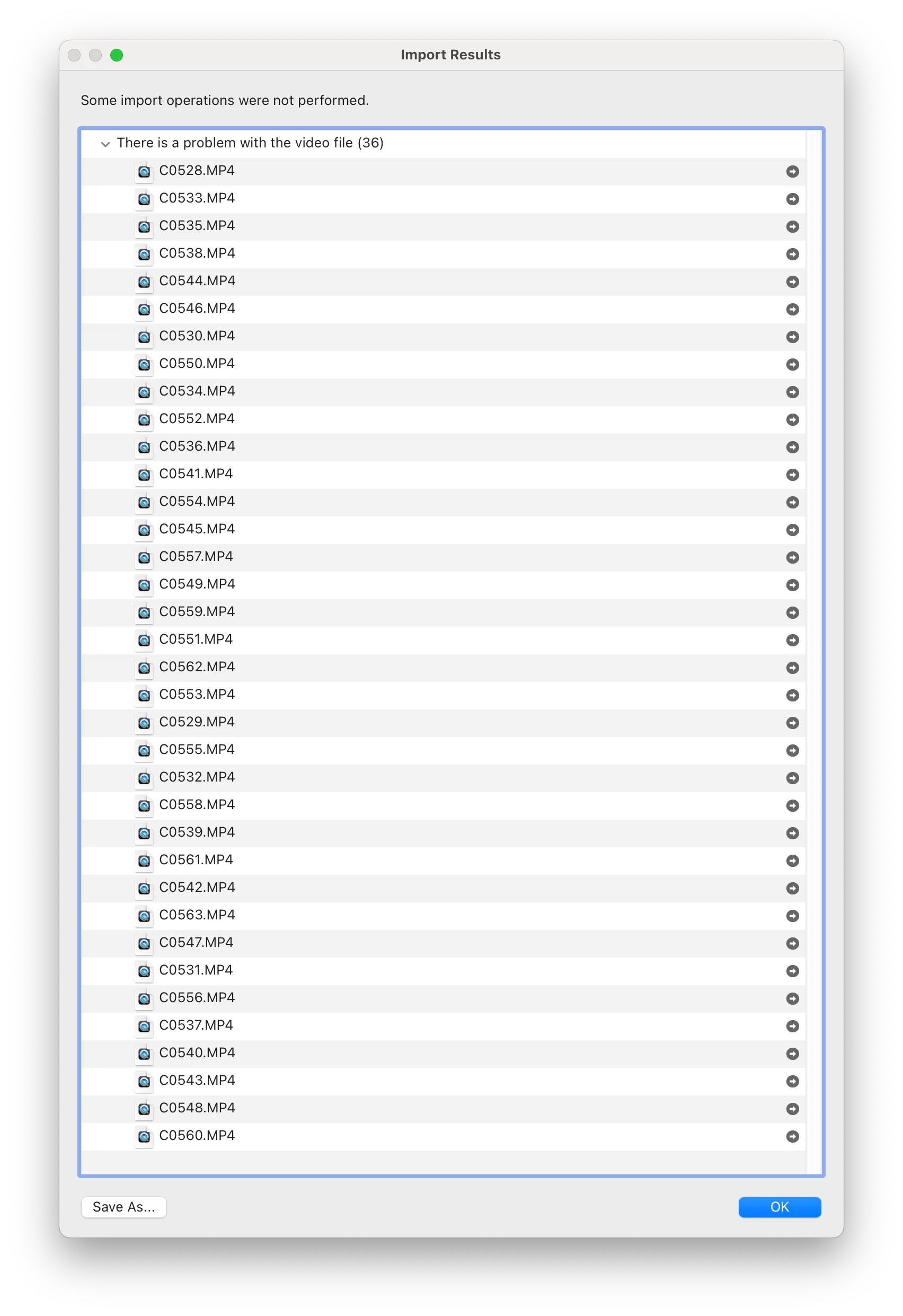
- After this occurs, similar videos already in the LrC catalog fail to play in the Library view, with a message at the top saying, “There was an error working with the video”; this playback problem persists until restarting LrC.
Additional diagnostic notes:
- As soon as the folder with the affected videos is selected in the Import panel, and it tries to render previews of them, if LrC was launched from a Terminal command line, a whole bunch of lines like the following are output, with the names of all the affected video files:
<15763078> <dynamiclink::FileServer> <0> OnSourceOpenFailed - filepath = /###REDACTED###/C0535.MP4 , error code = -10001 errorString = RPC connection terminated
<15763078> <dynamiclink::FileServer> <0> OnSourceOpenFailed - filepath = /###REDACTED###/C0528.MP4 , error code = -10001 errorString = RPC connection terminated
<15763078> <dynamiclink::FileServer> <0> OnSourceOpenFailed - filepath = /###REDACTED###/C0529.MP4 , error code = -10001 errorString = RPC connection terminated
And Console.app shows a new crash of the dynamiclinkmediaserver process—here is the top of one such crash report:
-------------------------------------
Translated Report (Full Report Below)
-------------------------------------

Process:               dynamiclinkmediaserver [58325]
Path:                  /Applications/Adobe Lightroom Classic/Adobe Lightroom Classic.app/Contents/Helpers/DynamicLinkMediaServer/dynamiclinkmediaserver.app/Contents/MacOS/dynamiclinkmediaserver
Identifier:            com.adobe.dynamiclinkmediaserver.application
Version:               24.0.0 (24.0.0.0)
Code Type:             ARM-64 (Native)
Parent Process:        launchd [1]
User ID:               501

Date/Time:             2026-03-27 14:38:11.8076 -0400
OS Version:            macOS 15.7.4 (24G517)
Report Version:        12
Anonymous UUID:        D9725948-341A-E3CF-BC58-A4D343C5DFB6

Sleep/Wake UUID:       ADB0D640-A448-4204-B2E2-DA2C98F7FC29

Time Awake Since Boot: 280000 seconds
Time Since Wake:       9392 seconds

System Integrity Protection: enabled

Crashed Thread:        37  Dispatch queue: com.apple.root.default-qos

Exception Type:        EXC_CRASH (SIGABRT)
Exception Codes:       0x0000000000000000, 0x0000000000000000

Termination Reason:    Namespace SIGNAL, Code 6 Abort trap: 6
Terminating Process:   dynamiclinkmediaserver [58325]

Application Specific Information:
stack buffer overflow
And here’s the trace of the crashed thread:
Thread 37 Crashed::  Dispatch queue: com.apple.root.default-qos
0   libsystem_kernel.dylib        	       0x186bea388 __pthread_kill + 8
1   libsystem_pthread.dylib       	       0x186c23848 pthread_kill + 296
2   libsystem_c.dylib             	       0x186b2ca74 __abort + 132
3   libsystem_c.dylib             	       0x186b1d818 __stack_chk_fail + 96
4   mc_mfimport                   	       0x11279d10c 0x11273c000 + 397580
I’ve reproduced this problem many times, and the crash is always a “stack buffer overflow” in a thread running “mc_mfimport”.
FYI: I migrated my LrC catalog a few months ago from an Intel-based iMac 5K 27” (2019) to this M4 Max MacBook Pro 14”. The existing videos like these already in my catalog were imported successfully on the iMac, and I haven’t been able to import any of them successfully on this MacBook. Just to be sure this problem isn’t stemming from the catalog migration, I also tried importing one of these videos into a separate, newly-created test catalog on the MacBook and got the same failure/crash. Note that I didn’t use Migration Assistant to move any other Adobe-related files (caches, etc.) from the iMac to this MacBook, so I think it started with a clean slate (i.e. not polluted with any Adobe files created for an Intel-based Mac, for what that’s worth).
 AdChoices