Inspiring
July 19, 2020
Answered

LRC 9.3 Does Import All Segments of Trip from Geotag Photos

  • July 19, 2020
  • 2 replies
  • 375 views

This is the 2nd time I'm used Geotag Photo to create a trip log. The first time, I lost service, but Geotag seemed to be able to still find the cell towers. On this 2nd occurence, it looks like the cell towers were lost twice. The resulting GPX file had 3 separate segments.


When I loaded the saved GPX (2020-07-19 Bob Hunter Park.GPX) from Geotag into LR Map Tracklog, it only displayed the last segement in MAP. I'm comfortable with XML so I editted the file  to change it to only had a single segment (2020-07-19 Bob Hunter Park - All Segments.GPX). When I loaded this editted GPX, it had the entire trip.


So, my question is, is the fact that LRC only uses the last segment recorded in a GPX found a bug?


Thanks


P.S. The upload program seems to reject XML files so I had to take screen snaps of the GPX and save them as JPG's
This topic has been closed for replies.
Correct answer johnrellis

[This post contains formatting and embedded images that don't appear in email. View the post in your Web browser.]


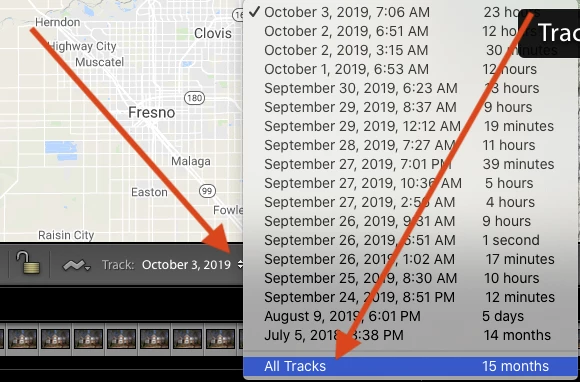
It's a little obscure. Click on the Track popup menu and then select All Tracks:

[Use the blue reply button under the first post to ensure replies sort properly.]

2 replies

johnrellis
johnrellisCorrect answer
Legend
July 20, 2020

[This post contains formatting and embedded images that don't appear in email. View the post in your Web browser.]


It's a little obscure. Click on the Track popup menu and then select All Tracks:

[Use the blue reply button under the first post to ensure replies sort properly.]

DS256Author
Inspiring
July 20, 2020

Wonderful! Thanks JohnRellis. That did it.

Just Shoot Me
Legend
July 20, 2020

So people don't have to download the image you have attached to your post please Edit your post to remove the Attached screen shot and Include it in the body of the text of your post.

You do that by Clicking the "More..." link at the bottom of your post, Selecting "Edit Message" and then use the "Insert Photos" icon in the tool bar at the top of the Post/Reply/Edit dialog box like this.


Thank you.

DS256Author
Inspiring
July 20, 2020

Thanks JSM. Likely I would have done that but got caught up in the &@^@ upload restrictions of files, going through multiple interations of extensions, until I got to JPG.