
Participant
August 22, 2022
Question

LrC does not open and cannot be deinstalled

  • August 22, 2022
  • 2 replies
  • 235 views

Hello, 

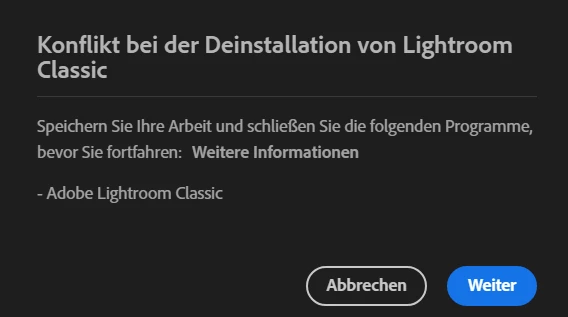
lately Lightroom Classic does not open anymore on my windows 10, in the latest version of LrC (11.5). Also, I cannot uninstall it because of a conflict: According to the error message, I need to save my work in LrC first.  Now I don't know how to save this work without being able to open the programme or what to do to open the programme at all.
I am very grateful for any help on the issue.
 

This topic has been closed for replies.

2 replies

GoldingD
Legend
August 24, 2022

I will assume that you are trying to start Lightroom Classic in the normal way, by double clicking on the shortcut.

I am not sure if you have tried an alternate method, that being bringing up the catalog in your computers file manager, and double clicking on the catalog.


Per Berntsen
Community Expert
Community Expert
August 22, 2022

Your work is saved automatically to the catalog, so there is no need to open the program to save.

What happens when you try to open it? Is there an error message?


Note to moderator: Please move to Lightroom Classic

Participant
August 23, 2022

When I try to open it, it seems like nothing is happening. No window is opening and it is not listed in the task manager. 
I don't even get an error message.

Per Berntsen
Community Expert
Community Expert
August 23, 2022

What happens if you click Weiter in the dialog you posted a screenshot of?

If you cannot uninstall, restart your computer and try again.

If you still cannot uninstall, use the Creative Cloud Cleaner tool to remove Lightroom, then reinstall.