

EMSI68219
Inspiring
November 4, 2022
Question

LrC doesn´t synch KI-Masked photos correctly

  • November 4, 2022
  • 1 reply
  • 155 views

LrC V12.0.1, WIN11


1. I edit a bunch of 300 photos in LrC V12.0.1

2. Some of the photos are edited WITH KI-Mascs, some are edited WITHOUT KI-masks

3. I put all 300 photos into a synched collection

4. WEB-Version of collection: After synching, photos (without KI-masks are synched ok, but some photos with KI-masks are synched, but are shows the original-file like it was not edited.

5. LR-Version of the collection: After synching, photos (without KI-masks are synched ok, but some photos with KI-masks are synched, but are shows the original-file with the following german error-message:
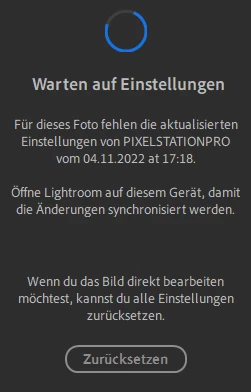
Unfortunatelly I cannot change the language to english in LR.


If I re-open the masking in LrC, change some values and leave the masking tool again and wait for synch. Everything is synched well, also the KI-masked photos are showing the right editing.

This topic is closed to new replies. Start a new post to keep the conversation going.

1 reply

EMSI68219
EMSI68219Author
Inspiring
November 6, 2022

LrC V12.0.1, WIN11 with all latest updates


1. I edit a bunch of 300 photos in LrC V12.0.1

2. Some of the photos are edited WITH KI-Mascs, some are edited WITHOUT KI-masks

3. I put all 300 photos into a synched collection

4. WEB-Version of collection: After synching, photos (without KI-masks are synched ok, but some photos with KI-masks are synched, but are shows the original-file like it was not edited.

5. LR-Version of the collection: After synching, photos (without KI-masks are synched ok, but some photos with KI-masks are synched, but are shows the original-file with the following german error-message:


Unfortunatelly I cannot change the language to english in LR.


If I re-open the masking in LrC, change some values and leave the masking tool again and wait for synch. Everything is synched well, also the KI-masked photos are showing the right editing.