



bellevue scott
Inspiring
August 10, 2026
Answered

LRC facial recognition still on when turned off

  • August 10, 2026
  • 9 replies
  • 105 views

LRC: 13.5.1

Windows 11

Lightroom has been really slow for me, and I was sure that facial recognition was turned off, but today I was scanning some photos that had group pictures, and LRC is still recognizing faces when I’ve explicitly turned it off. Note that it was turned off before this screen capture and has been turned off as long as I can remember, but LRC is clearly still doing it. 

How can I stop this? I don’t want LRC to recognize faces. I don’t want it, don’t need it, and it’s taking computer resources and slowing down my work. 

Thanks
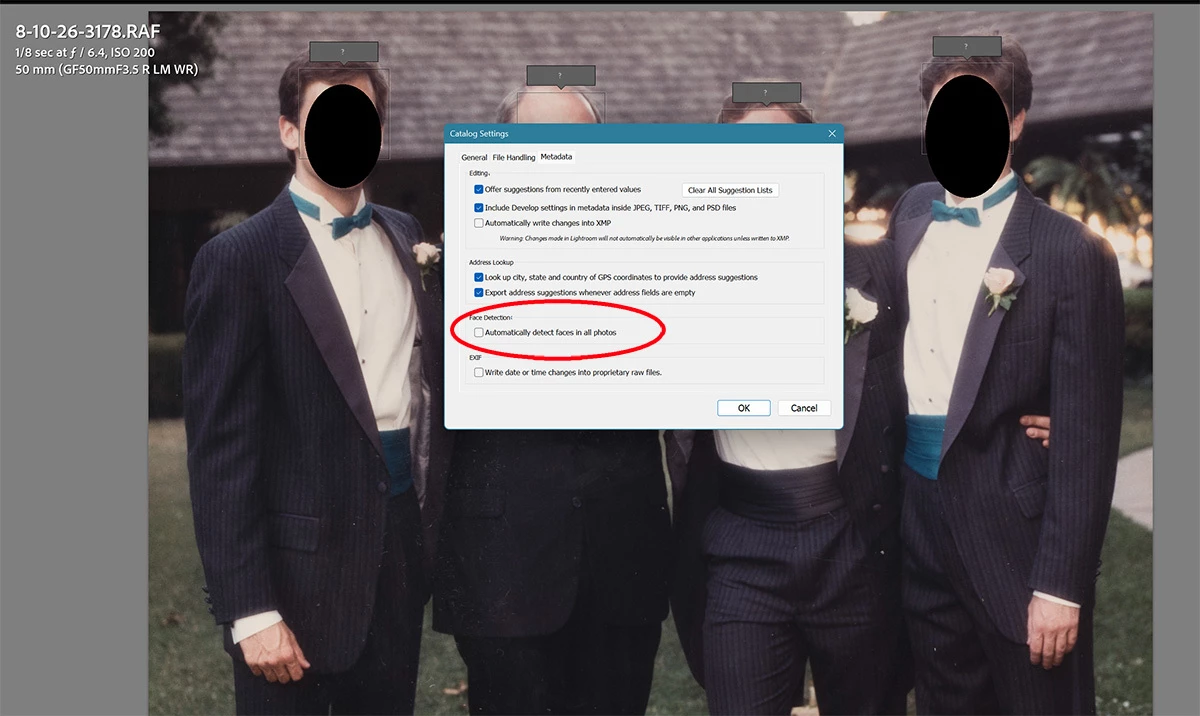


NB: I am not upgrading to the newest version because it is incompatible with my Fuji GFX100 due to LRC’s native tethering causing issues. 

Thanks

    Correct answer Jim Wilde

    @bellevue scott Looking a bit further into this, I can see that with all the settings inactive (Preference setting unchecked, Activity Panel Face Detection option Paused, People mode on the Toolbar unchecked) it is still possible for some scanning to occur. However, that is possible only when in Loupe mode in Library, and the Draw Face Region icon is active (i.e. has been clicked). That icon only appears when in Loupe mode, and the effect when activated is that it will scan the displayed image (but only that one image) for face regions and possible matches with the existing face names in the catalog.

    The fact that you mention that you are seeing face regions (the “grey input box with the “?”) means that you have activated the Draw Face Region icon in the toolbar. Turn that off and the per image scan will not happen. You can also elect to completely hide that icon from the Toolbar, thus making it impossible to inadvertently activate it.

    9 replies

    Jim Wilde
    Community Expert
    Community Expert
    August 12, 2026

    What’s the status of the Face Detection option in the Activity Panel? It needs to be paused if you don’t want facial recognition to happen. Turning off the option in Catalog Settings does not stop all face recognition activity, it simply stops the whole catalog being analysed automatically. But the option in the Activity Panel can be used to stop/start face recognition as required.


    Note, however, that facial recognition can still happen if you click on the People icon on the Toolbar (or press the “O” key in the Library mode), as that will initiate face scanning for the images in the filmstrip at the time.

    The screenshot that you showed does not indicate current scanning activity, rather it is showing the results of scanned faces stored in the catalog from previous scanning. If you don’t want to see those face regions you should not click on the icon on the Toolbar (you can hide that icon by clicking on the drop-down button at the right-hand end of the Toolbar though you would need to be in the Loupe view mode to be able to uncheck the “Draw Face Region” option).

    bellevue scott
    Inspiring
    August 12, 2026

    Thanks for that answer. It was very helpful. I didn’t know about the facial recognition function being turned on and off under my name. I did check it, and it was paused. So it’s never been on, or hasn’t for a very long time. 

    The picture I showed wasn’t of previous images in the catalog. They were of images I had scanned that day, so a few days ago now. But after reading your answer, I think it’s quite possible that I accidentally hit the “O” key while in library mode and that caused it. 

    Thanks for the answer. 

    bellevue scott
    Inspiring
    August 11, 2026

    Does anyone have an answer to this?