

Question
LRC issue with trying to access the local sync database
I switched from MAC to a windows PC a fw days ago. I copied over the Lightroom classic catalog and its associated files. After sorting out differences in drive names all was working well untill today.
LRC now gets in a loop on startup if I click Restart now.
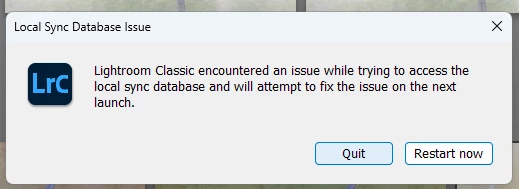
I do sync to Lightroom but not sure if this is the 'sync' its talking about. I have tried :-
- reinstalling Lightroom Classic
- Running the catalog from two days ago on an external drive.
- Seleting the X icon top right, quit and restart
Restart reopens LRC as I expected but with the same error
Quit, Quits 🙂 but when you restart it still 'loops' to this message.
All software uptodate as its been installed two days ago.
Background info :-
PC is runnning Windows 11; i9 processor; 64gb ram; various plugins - NIK; DXORaw4; Topaz Photo Ai; qimage
Any Help Appreciated.
Barry


 AdChoices