


brucekorb
Inspiring
November 19, 2024
Answered

LRc stopped displaying images

  • November 19, 2024
  • 1 reply
  • 624 views

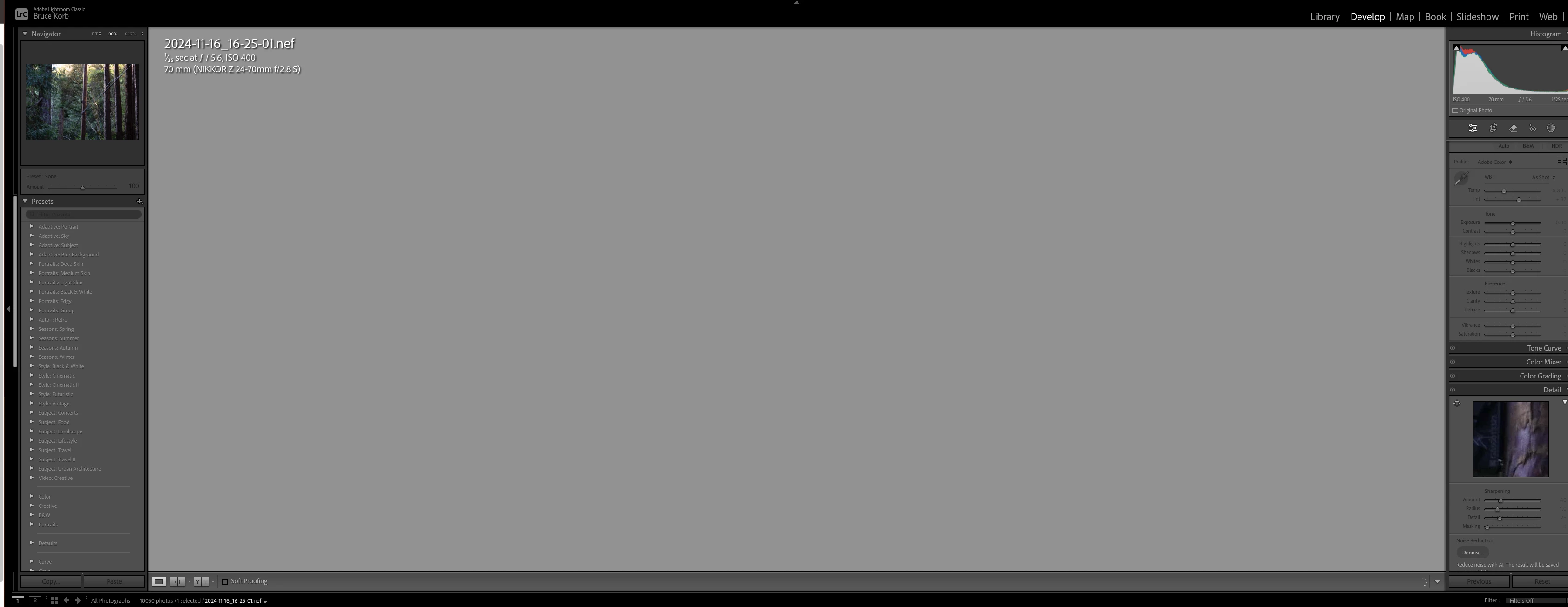
I'm about to leave for an hour. While I'm gone, suggestions for capturing the issue would be welcome. When I get back, I'll close and open it and it will probably go away. If not, reboot.

 

This topic has been closed for replies.
Correct answer brucekorb

OK. I was hoping it was irreproducible. It seems to be some interaction with Topaz Photo AI.

I'll play some more tomorrow.


NB: just because it was an interaction with Topaz software doesn't mean you-all don't have a bug. In fact, you do. There should be no way for an interaction with external software to cause your software to misbehave in this way. Your devs need to find the actual cause, especially now that you know it's caused by interacting with Topaz software. Topaz today, ON1 tomorrow and others after that? Leave this closed, but file an internal bug report that gets run down. There is a bug.

1 reply

CMass
Community Manager
Community Manager
November 19, 2024

Hey @brucekorb

We’d be happy to help troubleshoot.  Can you share your system info? You can find this by going to Help > System Info copying and pasting into a text file and attaching it here. Here to help, just need more info. 🙂 


^CM

brucekorb
brucekorbAuthor
Inspiring
November 19, 2024

Thank you!


Lightroom Classic version: 14.0.1 [ 202410161356-30922cfc ]
License: Creative Cloud
Language setting: en-US
Operating system: Mac OS 13
Version: 13.7.1 [22H221]
Application architecture: x64
Logical processor count: 4
Processor speed: 3.8GHz
SqLite Version: 3.36.0
Built-in memory: 40,960.0 MB
Dedicated GPU memory used by Lightroom: 4,948.4MB / 8,192.0MB (60%)
Real memory available to Lightroom: 40,960.0 MB
Real memory used by Lightroom: 6,663.4 MB (16.2%)
Virtual memory used by Lightroom: 49,283.1 MB
Memory cache size: 6,488.4MB
Internal Camera Raw version: 17.0 [ 2043 ]
Maximum thread count used by Camera Raw: 3
Camera Raw SIMD optimization: SSE2,AVX,AVX2
Camera Raw virtual memory: 868MB / 20479MB (4%)
Camera Raw real memory: 875MB / 40960MB (2%)

Cache1: 
Final1- RAM:365.0MB, VRAM:1,812.0MB, 2024-11-16_16-26-02.nef
Preview2- RAM:23.0MB, VRAM:211.0MB, 2024-11-16_16-25-01.nef
Preview3- RAM:22.0MB, VRAM:235.0MB, 2024-11-16_16-25-03.nef
NT- RAM:410.0MB, VRAM:2,258.0MB, Combined:2,668.0MB

Cache2: 
m:6,488.4MB, n:409.7MB

U-main: 253.0MB

Standard Preview Size: 5120 pixels
Displays: 1) 3440x1440, 2) 5120x2880

Graphics Processor Info: 
Metal: AMD Radeon Pro 580
Init State: GPU for Export supported by default
User Preference: Auto
Enable HDR in Library: OFF

Application folder: /Applications/Adobe Lightroom Classic
Library Path: /Volumes/RAID5-21TB/LR-Pictures-Cat/LR-Pictures-Cat-v13-3.lrcat
Settings Folder: /Users/bkorb/Library/Application Support/Adobe/Lightroom

Installed Plugins: 
1) AdobeStock
2) Aperture/iPhoto Importer Plug-in
3) Flickr
4) ON1 Effects 2023
5) ON1 NoNoise AI 2024
6) ON1 Photo RAW 2024
7) Topaz Photo AI
8) Topaz Photo AI Beta

Config.lua flags: 
brucekorb
brucekorbAuthor
Inspiring
November 19, 2024

Just for additional clarity: I've been using this config for a couple of months. i.e. no recent changes. In fact, I was using it for a couple of hours before this happened. Closing one image and going on to another did not change this behavior.