
Participating Frequently
April 27, 2025
Question

LrC suddenly creates new / double photo folder after import

  • April 27, 2025
  • 1 reply
  • 664 views

I have just fished updating LrC in connection wtih buying a new Mac mini. After the update I imported a folder with photos but they appear in a new "photo" folder. 

I have attached a screenshot with the new folder and subfolder above the "old" just containing a test 

folder
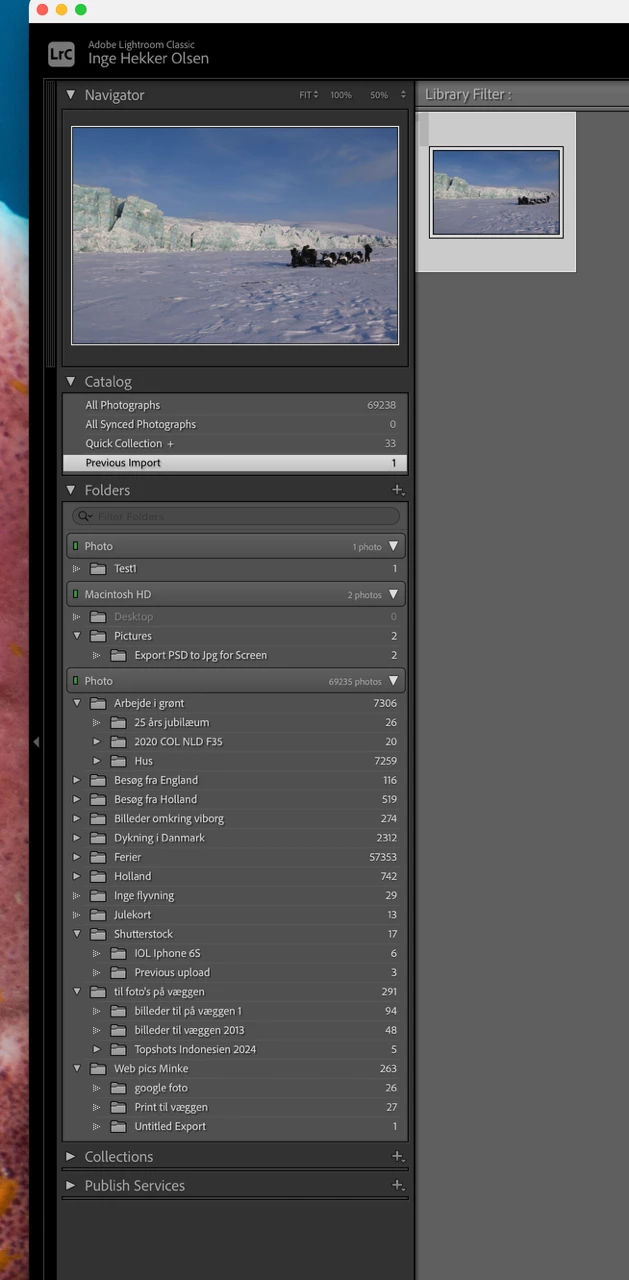
I have all my photos on a shared network drive on a Synology NAS - the shared drive is the "parent folder" for all my subfolders. When I reveal in finder both the "new" and the "old" shared drive points to the same shared drive in finder. The same applies regarding single photos.

Why does LrC see 2 versions of the same shared drive and why does it suddenly decide to link new imports to the "new" shared drive? .... and does anyone have a solution to solve the problem?

Thanks in advance

Carsten - Denmark

1 reply

dj_paige
Legend
April 27, 2025
quote

I have just fished updating LrC in connection wtih buying a new Mac mini. After the update I imported a folder with photos but they appear in a new "photo" folder. 

Carsten - Denmark


By @COL-DK


Most likely the capitalization error. https://www.lightroomqueen.com/capitalization-catalog-error/


COL-DKAuthor
Participating Frequently
April 28, 2025

Thanks for your reply and suggestion. I have tried the solution described but when i point the folder location back again to the shared drive i get the same duplicate shared drive in my LrC library.

One really good information I discovered by following the workflow is that I now am aware that the"old" shared drive is called "/volumes/photo" and the "new" shared drive is called "/volumes/Photo"

I will dig into my Synology NAS to try to find out why the shared drive appears in 2 variations on the same path.

Kind regards

Carsten

dj_paige
Legend
April 28, 2025

Please disregard this message