
Fotograyfox
Participant
February 8, 2024
Answered

LrC und GPS Daten

  • February 8, 2024
  • 3 replies
  • 414 views

Meine Fotos haben GPS Daten, doch werden diese in Lightroom Classic nicht angezeigt. In der Adobe Bridge werden dies Daten sehr  wohl angezeigt. Früher würden diese Daten sofort beim Importieren übernommen und auch in LrC angezeigt.  Jetzt nicht mehr.

Warum?

Die deutsprachige Online Hilfe war bis jetzt auch keine Hilfe. Die Englischsprachige schmeisst dich immer gleich wieder raus. Wirlklich toll.


Helmut
This topic has been closed for replies.
Correct answer johnrellis

[This post contains formatting and embedded images that don't appear in email. View the post in your Web browser.]


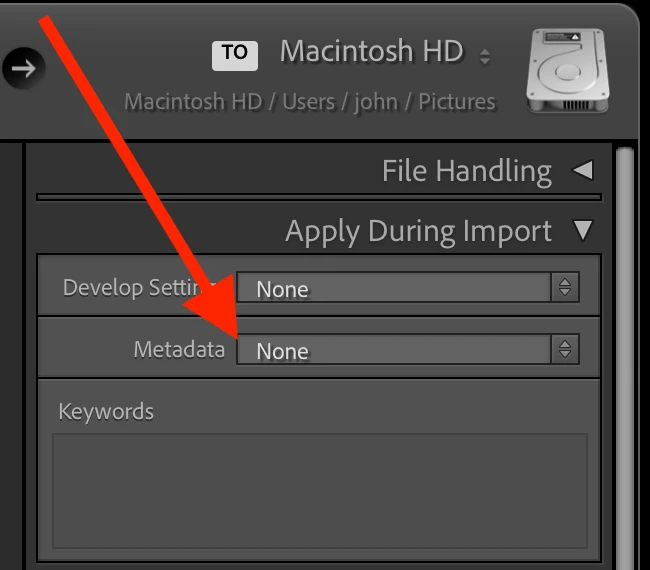
In the Import window's Apply During Import panel, are you applying a metadata preset? If so, set Metadata to None and try to import photos with GPS locations:


If that now works, then edit your Import metadata preset and uncheck the Camera Info > GPS, Altitude, and Direction fields.


3 replies

johnrellis
johnrellisCorrect answer
Legend
February 9, 2024

[This post contains formatting and embedded images that don't appear in email. View the post in your Web browser.]


In the Import window's Apply During Import panel, are you applying a metadata preset? If so, set Metadata to None and try to import photos with GPS locations:


If that now works, then edit your Import metadata preset and uncheck the Camera Info > GPS, Altitude, and Direction fields.


Fotograyfox
Participant
February 10, 2024
Thanks for the tip.

When importing you can only use the standard metadata without presets then
the GPS data will be displayed. Unfortunately, this means that some settings
are missing. Adobe support hasn't been able to help me for months, but now
it works.


Thank you very much.


lg


Helmut
GoldingD
Legend
February 8, 2024
also be displayed in LrC

Displayed where?

A screenshot may help.


kglad
Community Expert
Community Expert
February 8, 2024

in the future, to find the best place to post your message, use the list here, https://community.adobe.com/

p.s. i don't think the adobe website, and forums in particular, are easy to navigate, so don't spend a lot of time searching that forum list. do your best and we'll move the post (like this one has already been moved) if it helps you get responses.


<"moved from cc desktop bugs">