Known Participant
September 2, 2023
Answered
LRC with MAC
- September 2, 2023
- 2 replies
- 847 views

Yes, it is the case. Your screenshot even shows 'Exit Full Screen'! It may be in MacOS full screen however.
Johan is correct, watch the demo below: It starts out like your screen shot, where the middle button is inactive. By choosing Exit Full Screen, you can see that Lightroom Classic exits macOS Full Screen mode, and after that, all three buttons are available.
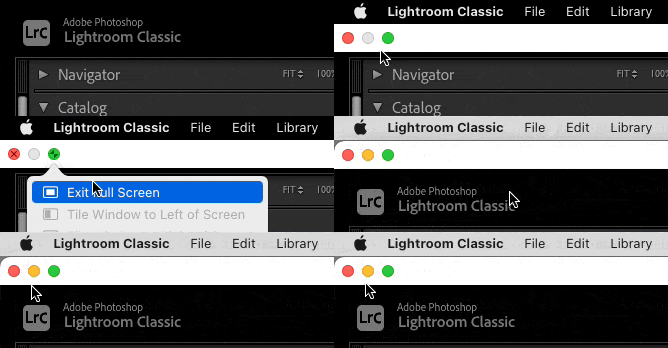
Why the yellow button is missing in macOS Full Screen mode: You cannot minimize a full screen window, so the minimize button (the middle yellow one) cannot be active. Exiting macOS Full Screen mode lets the yellow button be active again. This works the same way in all macOS applications, not just Lightroom Classic. In the screen shots for the other two applications you showed, Lightroom and Photoshop are not in macOS Full Screen mode, so all three window buttons are active. All of this works as expected.
The other important thing to keep in mind is that Lightroom Classic supports two different full screen modes: The standard macOS full screen mode, and its own. The full screen mode in Lightroom Classic has more features than the one in macOS, and is cross-platform, so it was kept. So it’s important to know which full screen mode you have entered:
Other notes, which are important if you try this with the other two applications you showed:
Already have an account? Login
No account yet? Create an account
Enter your E-mail address. We'll send you an e-mail with instructions to reset your password.


 AdChoices