
Known Participant
July 12, 2023
Question

Lua script to create new mask with mask preset

  • July 12, 2023
  • 3 replies
  • 1113 views

I've been able to create a Lua script that creates a new mask that includes mask type but I can't figure out how to add a mask preset (called effect in LrC 11) - by name ideally. Please see the screenshot of what I am referencing. Could anyone help with this?
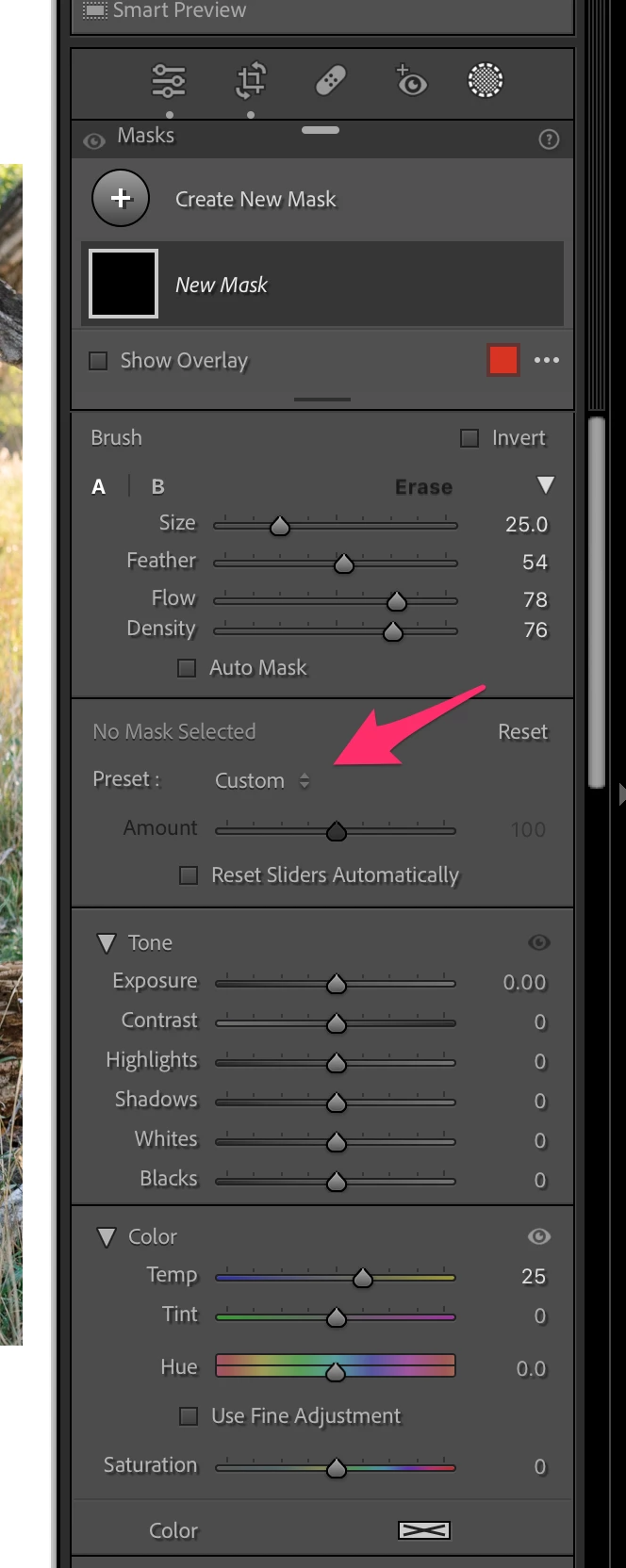


Here is my current script:


local LrTasks = import 'LrTasks'
local catalog = import "LrApplication".activeCatalog()
local LrDevelopController = import 'LrDevelopController'
local LrApplicationView = import 'LrApplicationView'


LrTasks.startAsyncTask( function()
LrApplicationView.switchToModule("develop")
LrDevelopController.createNewMask("brush")
end)

This topic has been closed for replies.

3 replies

johnrellis
Legend
July 12, 2023

I think your plugin will have to read all the local-adjustment presets (effects) and apply them itself. It's quite doable though with a few steps.


The presets are stored in this folder on Mac:


/Users/john/Library/Application Support/Adobe/Lightroom/Local Adjustment Presets


and in a similar folder on Win. Use LrPathUtils.getStandardFilePath() to find the folder on the current system.


The presets are stored in .lrtemplate format, which is a Lua-syntax data representation. It can be easily read using Lua's built-in loadfile().


To apply a preset you've read to a photo's mask, use photo:getDevelopSettings() to get the photo's current develop settings. Grovel through the structure (a table) to find the masks array and then the particular mask's table. You'll see in that table where to apply the local-adjustment settings you've read from the preset.


Then use photo:applyDevelopSettings() to apply the modified develop settings back to the photo.


It helps (rather, it's essential) in reverse-engineering this stuff to have a decent pretty printer for Lua values, e.g. from my Debugging Toolkit. The Zerobrane IDE seems fairly capable, but last I looked at it many years ago, it's pretty printer was primitive.


cwurzbachAuthor
Known Participant
July 12, 2023

Thank you so much @johnrellis!

I have another question that you may be able to help me with. I have created a Lua script to change the temperature and tint while in the Library module using photo:quickDevelopAdjustWhiteBalance("Temperature/Tint", amount), I can't seem to get the script to change the temp or tint by consistent values (for example, 100 in temp, 3 in tint). I'm sure this is because white balance is logarithmic. Any thoughts on how to get consistent adjustment amounts?

johnrellis
Legend
July 13, 2023

See this post for details about how photo:quickDevelopAdjustWhiteBalance() works:

https://community.adobe.com/t5/lightroom-classic-ideas/lightroom-classic-add-to-api-lrdevelopcontroller-quickdevelopadjustimage-smalldecrease-and/idc-p/12664668#M14033


To simply adjust temperature and tint by amounts corresponding to what you see on the sliders, use LrDevelopController.get/SetValue(), or photo:getDevelopSettings() and :applyDevelopSettings().

cwurzbachAuthor
Known Participant
July 12, 2023

To clarify a bit: I am asking how to create a new mask with the mask preset already selected.


cwurzbachAuthor
Known Participant
July 12, 2023

Or, to be more specific. Is there a way to select a mask preset using the SDK?

Ian Lyons
Community Expert
Community Expert
July 12, 2023

I've no idea how you would load your own mask. That being said, the mask Preset drop-down menu that you've highlighted relates to the adjustment sliders (e.g. Exposure +1, Contrast - 10). You cannot load masks from the Preset drop-down menu.