
Participant
October 30, 2025
Answered

Mac/Lightroom Classic Folder Help

  • October 30, 2025
  • 1 reply
  • 124 views

Hi there! I accidentally deleted some documents from my Macintosh HD to make more storage space. I use Aftershoot to cull + edit before opening in Lightroom Classic to finish + export - or I use Lightroom Classic to do all the editing. I’ve used Disk Drill to recover the documents but now I have all these random folders that possibly contain the Aftershoot/Lightroom Classic data in it. The recovered folders are on my external hard drive, but where do I save these folders on my Macintosh HD so all the links match again in Lightroom Classic? I back up all my RAWS to external hard drives(s) and import them to Aftershoot/Lightroom with these too. When I open Lightroom Classic to import more photos, I receive an error message (please see screenshot attached). How can I restore the folder that all my projects are saved to in Lightroom Classic under my user?
Correct answer dj_paige

where do I save these folders on my Macintosh HD so all the links match again in Lightroom Classic?


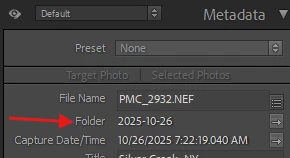
LrC will tell you exactly where the photos go. In the Metadata Panel is the Folder field. If you hover your mouse over this field the full path name will appear. Do NOT import the photos, just copy (not move) them to the folder that LrC thinks they should be in, using your operating system.


I back up all my RAWS to external hard drives(s) and import them to Aftershoot/Lightroom with these too.


Backups should not be used like this, or for any purpose. Backups are supposed to sit there unused and untouched except in the unfortunate situation where you lose the originals, and only then should you try to use the backups.

1 reply

dj_paige
dj_paigeCorrect answer
Legend
October 30, 2025

where do I save these folders on my Macintosh HD so all the links match again in Lightroom Classic?


LrC will tell you exactly where the photos go. In the Metadata Panel is the Folder field. If you hover your mouse over this field the full path name will appear. Do NOT import the photos, just copy (not move) them to the folder that LrC thinks they should be in, using your operating system.


I back up all my RAWS to external hard drives(s) and import them to Aftershoot/Lightroom with these too.


Backups should not be used like this, or for any purpose. Backups are supposed to sit there unused and untouched except in the unfortunate situation where you lose the originals, and only then should you try to use the backups.