Participant
August 15, 2022
Answered

Mac Monterey OS and Lightroom 4

  • August 15, 2022
  • 4 replies
  • 2648 views

recently upgraded my Mac computer. new computer running Monterey OS versus High Sierra previously. Now having problems loading my Lightroom 4 product. (Lightroom 2 + Lightroom 4 upgrade pkg). System loads the Lightroom 2 disc but not the Lightroom 4 upgrade disc. Why? Is there a fix? Other options?

Correct answer Jim Wilde

That's inaccurate information about Lightroom 4. It IS 64-bit code and it WILL install on all versions of MacOS. Up to Monterey it installed and ran OK, with Ventura it started to exhibit some issues so I removed it from my system. I didn't check with Sonoma, but I've just successfully installed it on my M2 Max MBP running Sequoia 15.5, as per this screenshot:
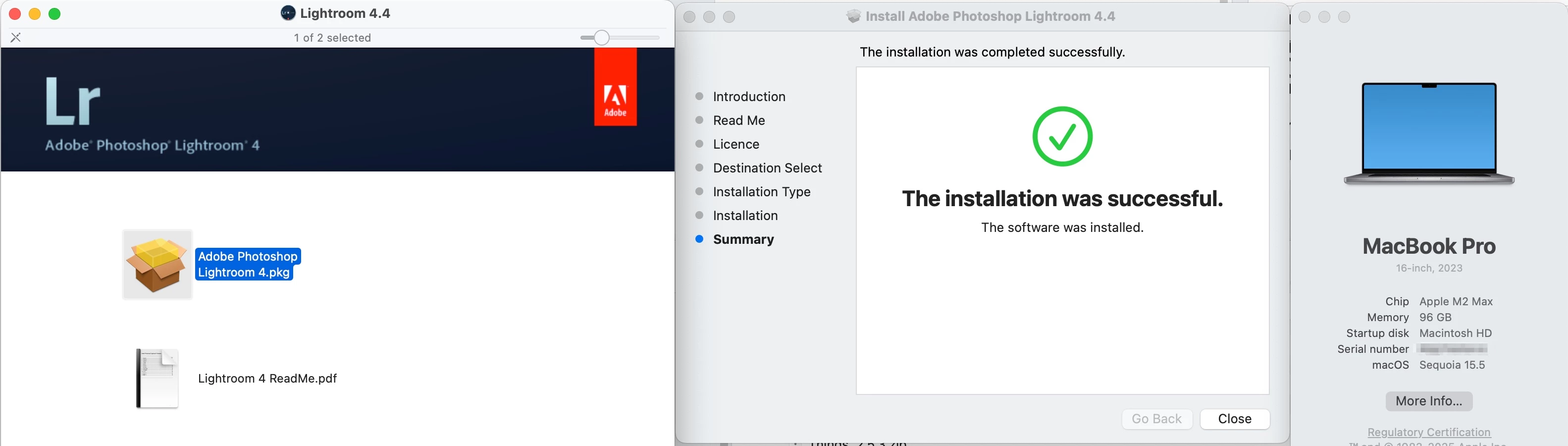


It will launch and it will create a catalog, but that's about as far as it goes. Trying to import images and it immediately crashes. 


So let's bury the myth that LR4 (and probably LR5) cannot be installed on the latest Mac hardware and software, and let's start reporting the fact that it will install but will not successfully work on any version of MacOS after Monterey.

4 replies

Participating Frequently
July 3, 2025

Lightroom 4 and older versions like Lightroom 2 are 32-bit apps and no longer supported on macOS Catalina and later, including Monterey. That’s why the Lightroom 4 upgrade disc doesn’t load; it’s incompatible with the newer OS. There’s no official workaround unless you install an older macOS in a virtual machine. The best option is to move to a current version of Lightroom Classic through the Creative Cloud Photography Plan, which is fully compatible with modern macOS.

Jim Wilde
Community Expert
Jim WildeCommunity ExpertCorrect answer
Community Expert
July 4, 2025

That's inaccurate information about Lightroom 4. It IS 64-bit code and it WILL install on all versions of MacOS. Up to Monterey it installed and ran OK, with Ventura it started to exhibit some issues so I removed it from my system. I didn't check with Sonoma, but I've just successfully installed it on my M2 Max MBP running Sequoia 15.5, as per this screenshot:


It will launch and it will create a catalog, but that's about as far as it goes. Trying to import images and it immediately crashes. 


So let's bury the myth that LR4 (and probably LR5) cannot be installed on the latest Mac hardware and software, and let's start reporting the fact that it will install but will not successfully work on any version of MacOS after Monterey.

Participant
September 16, 2025

Ugh.....mine was installed, but crashes upon import as you mentioned. Man, i was hoping for a simple fix to keep this program,. as Its not worth it for monthly subscriptions for me. I only use for particulars/simple things.

GoldingD
Legend
August 15, 2022

As you are stating Discs, I will assume you are talking about the very old pre subscription Lightroom going way back to v4, and even further to v2. As opposed to The Lightroom Ecosystem copy that is also called Lightroom Desktop and nicknamed Lightroom Cloudy 


Moving on, The older Lightroom products v6 and earlier use a installer program that is 32 bit. Now Lr6 was 64bit, but as stated the installer was 32 bit.


Starting at MACOS Catalina, the OS will not allow 32bit apps, hence you cannot install Lr6 and earlier.


You stated you could install Lr2? Completely? I do not see how. Fairly sure that not only is the installer 32 bit, but the program is also 32 bit.


Workaround is to rollback to MACOS  earlier than Catalina, install Lr, then upgrade the MACOS back. Or have a dual boot, Two OS, boot to the older OS, install, etc.


HOWEVER, If your MAC has the M1 CPU, you ate SOL, as the non Intel CPU will not support old OS.


Jim Wilde
Community Expert
Community Expert
August 15, 2022

Guys, 


Some of what you are saying is incorrect. Lightroom 4 WILL install on Apple Silicon using a 64-bit OS. I currently have both Lightroom 4 AND Lightroom 5 installed (and apparently working OK, but haven't done any extended testing) on my M1 Mac Mini running Monterey 12.5.


AFAIK, only Lightroom 6 cannot be installed on a 64-bit OS, which I suspect is related to the different license validation that was introduced with LR6, i.e. that particular piece of code is presumably 32-bit only.

John Waller
Community Expert
Community Expert
August 16, 2022
quote

Lightroom 4 WILL install on Apple Silicon using a 64-bit OS.


First report I've seen of that, Jim. Like the others, I've aways understood that it cannot be done due to the 32 bit installer.


Are you sure you installed those vintage LR versions from scratch. Not via migration?

Conrad_C
Community Expert
Community Expert
August 15, 2022

Regardess of whether you can load either disc, both are far too old to work in macOS 12 Monterey on a new Mac.


There are two reasons for this:


Lightroom 4 is 10 years old, Lightroom 2 is 14 years old. Although you might have been able to run Lightroom 4 in macOS 10.13 High Sierra, chances are it would have stopped working around macOS 10.14 or 10.15, because over the last 5 years Apple tightened the code requirements to prepare for the transition to Apple Silicon. 


If you bought a new Apple Silicon Mac, Lightroom 2 and 4 cannot run on Apple Silicon. There is no way to do it. Those old versions run only on Intel processors.


@Paul25660706svsh wrote:

Is there a fix? Other options?


The fix is to run a more recent version of Lightroom that both meets all current Apple code and security requirements, and also runs on Apple Silicon processors. The current equivalent to what you have is Lightroom Classic, (not Lightroom which is now cloud-based) Lightroom Classic is at version 11.4.


Unlike Lightroom 4, Lightroom Classic 11 takes advantage of the power of a new Apple Silicon Mac. For example Lightroom Classic uses as many CPU cores as possible, and uses the Apple Silicon GPU to accelerate some functions like the Develop module and exporting.

Rob_Cullen
Community Expert
Community Expert
August 15, 2022

No fixes!  Monterey is 64bit system and cannot install 32bit apps (ie Lr 4). You are SOL. Time to upgrade your software to match your new computer.

Options:  $9.99 PHOTOGRAPHY PLAN (USA) 


Regards. My System: Windows-11, Lightroom-Classic 15.1.1, Photoshop 27.3.1, ACR 18.1.1, Lightroom 9.0, Lr-iOS 10.4.0, Bridge 16.0.2 .
Participant
July 3, 2025

Lightroom 4 is 64-bit...

Conrad_C
Community Expert
Community Expert
July 3, 2025

If you read the rest of the thread, this was already explained: The problem is not that the application isn't 64-bit, the problem is that one of the required components is only 32-bit, and that is what blocks the whole thing.