Participant
February 7, 2017
Answered

Major problems [with LR6. Unable to fully import groups of photos from different folders]

  • February 7, 2017
  • 1 reply
  • 184 views

I purchased and loaded a copy of Lightroom 6.   Since installing I have tried to load photographs in several different methods.  Nothing I have tried has worked.  After a major shoot I tried to load photographs in 12 different groupings forming 12 separate folders.  I loaded the photos on the external HD in the directories of choice.  After numerous attempts of trying to load the photos I have 12 folders with only 1/3 to 1/2 of the photos loaded properly.  These files have been converted to DNG and renamed but the rest of the photos in that folder are untouched.  I have no idea where my mistake has been made.  I need some expert help.       Thanx.
    This topic has been closed for replies.
    Correct answer Rob_Cullen

    Perhaps you need to go back to a simpler method of Importing images.

    The "several different methods" may be confusing you.

    Note that if you are using the "Copy to DNG" method you are creating copies of your images somewhere in your computer, and 'numerous attempts' may well be creating chaos in your image folders.

    Can I suggest -back to basics.

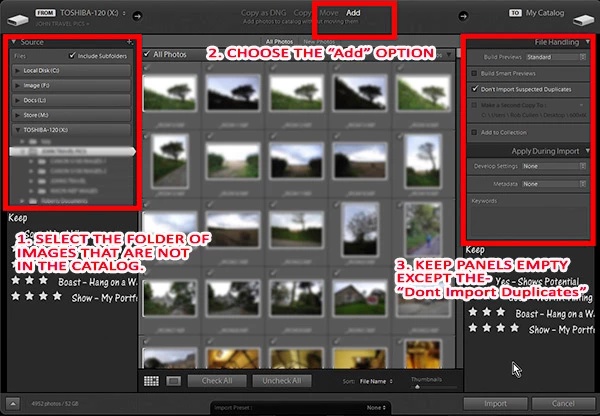
    Import from folders on your hard-drive by 1. Select the "Source" folder,  2. Choose the ''Add" option, 3. [Import]

    You can do Re-naming, add metadata, Convert to DNG, move files & folders- all at a later date.

    Use an import screen similar to this-

    1 reply

    Rob_Cullen
    Community Expert
    Rob_CullenCommunity ExpertCorrect answer
    Community Expert
    February 7, 2017

    Perhaps you need to go back to a simpler method of Importing images.

    The "several different methods" may be confusing you.

    Note that if you are using the "Copy to DNG" method you are creating copies of your images somewhere in your computer, and 'numerous attempts' may well be creating chaos in your image folders.

    Can I suggest -back to basics.

    Import from folders on your hard-drive by 1. Select the "Source" folder,  2. Choose the ''Add" option, 3. [Import]

    You can do Re-naming, add metadata, Convert to DNG, move files & folders- all at a later date.

    Use an import screen similar to this-

    Regards. My System: Windows-11, Lightroom-Classic 15.3, Photoshop 27.5, ACR 18.3, Lightroom 9.3, Lr-iOS 10.4.0, Bridge 16.0.3 .