
nai s.
Inspiring
November 28, 2023
Question

managing presets

  • November 28, 2023
  • 1 reply
  • 1013 views

hello fellow creatives,

so i've been searching the web trying to see if i can find a solution for this and i seem to hit a wall. now, i'm asking for your help. tryiing to figure how one can separate presets from those that are purchased from ones that are made by one self. similarily to how the user presets are separated by those from adobe. image below.
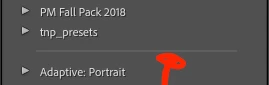
when i right click to manage presets, adobe only seems to give the option of not showing preset sets or showing them, not the option to group or separate. what am i missing? thanks in advance for any help possible.

This topic has been closed for replies.

1 reply

ManiacJoe
Inspiring
November 28, 2023

Lightroom organizes the presets into "groups" via the meta data in the xmp files.

In the LrC UI, this is done via the "move" option in the right-click popup menu.

If you open the XMP file in your favorite XML editor, you are looking for the "crs:Group" element.

You can manually move the XMP files into sub-folders one level deep for your benefit, but LrC does not use the folders for any purpose, it uses only the group name.

nai s.
nai s.Author
Inspiring
November 28, 2023

hey joe,

thank you for your reply...i'm a mac user and you lost me at xml editor. 😅 i don't code, but pretty decent with tech. 

when i right click the preset, i can move it to another folder, but it doesn't give me the desired outcome where it separates with the line. when i click "show in finder", it just takes me to the .xmp file location only. 

JohanElzenga
Community Expert
Community Expert
November 28, 2023

XML is text. You do not need some 'XML editor', a simple text editor will do. Moving the preset to another folder in the Finder is useless. Those folders are no longer used for organising the presets in Lightroom itself. You can use a plugin to restore this behavior however. https://johnrellis.com/lightroom/fixpresets.htm


The separation lines between preset groups are called 'clusters'. I don't know if the plugin arranges these as well, or if you do need to edit the presets yourself if you want to create a new cluster.


-- Johan W. Elzenga