
Participant
February 18, 2017
Answered

Map Modul: automatic geotagging - > error message

  • February 18, 2017
  • 1 reply
  • 611 views

I´m using android trackloggers "PhotoxorC1" and "GPX-Logger". All gpx-files will be loaded and displyed correctly in Lightroom Map Modul.

I loaded images from Fujifilm cameras XE-2, X-T1 and X-T2 and marked images in Lightroom Map modul.

When trying "automatic geotagging" either the menue Map -> Tracklog -> automatic tagging is not available (grey),

or if available (black) and I chose automatic tagging, this error message appears:

Lightroom

! Unexpected error performing command:

AgCommand.performCommandID could not be command:

ag.location.applyTracklog (Commanbd was disabled.)

HardCopy:
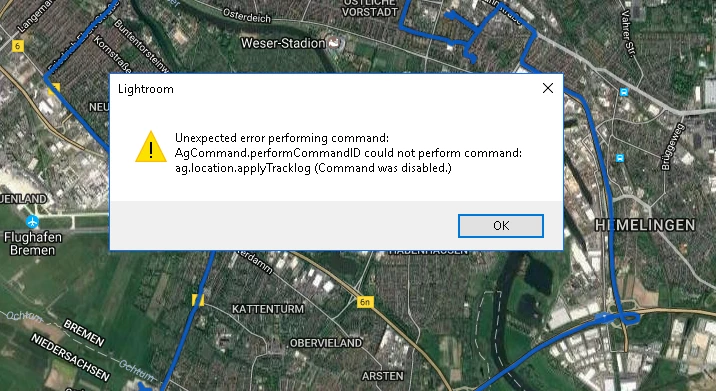

I identfied this problem in summer 2016. It still exists within all Lightroom updates.

Some system information:

Version von Lightroom: 6.8 [ 1099473 ]

Lizenz: Unbegrenzt

Betriebssystem: Windows 10

Version: 10.0

Anwendungsarchitektur: x64

Systemarchitektur: x64

Anzahl logischer Prozessoren: 8

Prozessorgeschwindigkeit: 3,4 GHz

Integrierter Speicher: 16307,5 MB

Für Lightroom verfügbarer phys. Speicher: 16307,5 MB

Von Lightroom verwendeter phys. Speicher: 490,4 MB (3,0%)

Von Lightroom verwendeter virtueller Speicher: 459,5 MB

Cache-Speichergröße: 0,0 MB

Maximale Anzahl Threads, die Camera Raw verwendet: 8

Camera Raw SIMD-Optimierung: SSE2,AVX,AVX2

DPI-Einstellung des Systems: 96 DPI

Desktop-Komposition aktiviert: Ja

Monitore/Anzeigegeräte: 1) 2560x1440

Eingabetypen: Multitouch: Nein, integrierte Toucheingabe: Nein, integrierter Stift: Nein, externe Toucheingabe: Nein, externer Stift: Nein, Tastatur: Nein

Informationen zum Grafikprozessor:

AMD Radeon R7 200 Series

Check OpenGL support: Passed

Vendor: ATI Technologies Inc.

Version: 3.3.14008 Core Profile Context 21.19.137.514

Renderer: AMD Radeon R7 200 Series

LanguageVersion: 4.50

Thanks for any help!
This topic has been closed for replies.
Correct answer johnrellis

1. First, make sure you've selected at least one photo in the filmstrip.  If you have no photos selected when you invoke Map > Tracklog > Auto-Tag Photos, then LR can give that error.  See this bug report: Lightroom: Auto-Tag Photos produces "Unexpected error" | Photoshop Family Customer Community

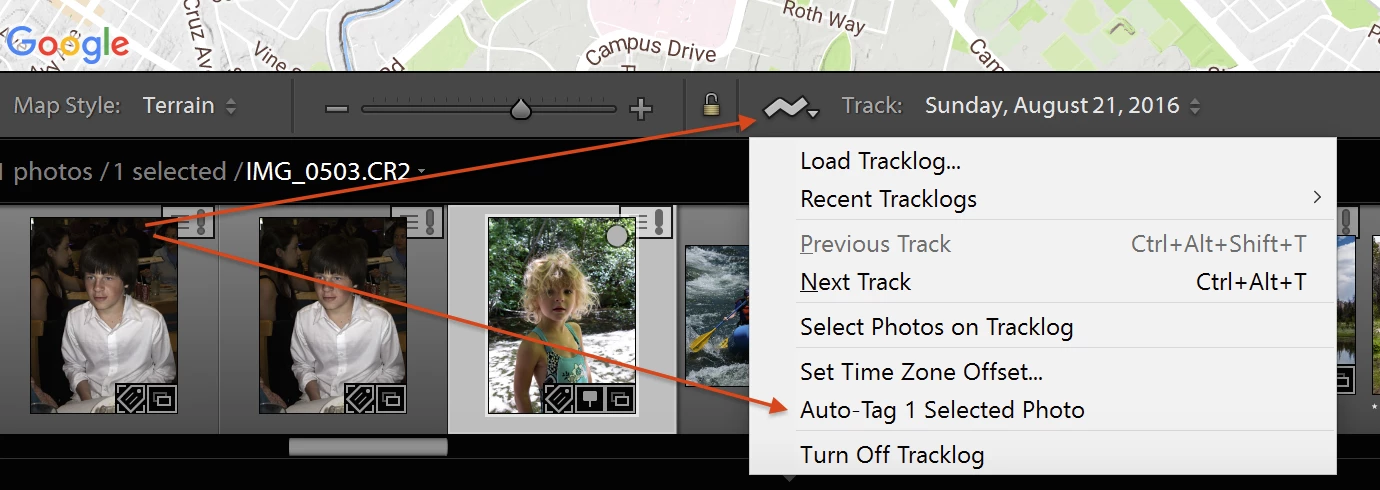
2. If you're still getting the error even when there are photos selected in the filmstrip, try using the menu button in the toolbar at the bottom of the Map module:

1 reply

johnrellis
johnrellisCorrect answer
Legend
February 21, 2017

1. First, make sure you've selected at least one photo in the filmstrip.  If you have no photos selected when you invoke Map > Tracklog > Auto-Tag Photos, then LR can give that error.  See this bug report: Lightroom: Auto-Tag Photos produces "Unexpected error" | Photoshop Family Customer Community

2. If you're still getting the error even when there are photos selected in the filmstrip, try using the menu button in the toolbar at the bottom of the Map module:

schubieAuthor
Participant
February 21, 2017

Great, you got it!

Idea 1 fails:

I did exactly as your advise. Today there is no error message but unavailable gray Menu-entry "Auto-Tag Photos".

Idea 2 works:

My toolbar was hidden, so I didn´t know about it. This way is working well and that´s the finaly solution to me.

b.t.w.

After auto-tagged photos via Idea 2,  I deleeted GPS-Positions from all photos and tried again way as Idea 1.

But either I select one or all photos in the strip, the Menu Map > Tracklog > Auto-Tag Photos still stays unavailable (gray).

Looks like a mustake, anyway ...

thank you well and good luck!

Falk

johnrellis
Legend
February 21, 2017

Please add your me-too vote and details of your configuration to the bug report I linked to above.  That will make it a little more likely Adobe might eventually fix the bug.