

ianbutty
Known Participant
November 25, 2017
Answered

Map module dragging images is HIGHLY inaccurate

  • November 25, 2017
  • 7 replies
  • 2230 views

One of my clients is a company that sell space on advertising displays.  I photograph the displays for them, it is often difficult in the photographs to tell which display is which so I need to accurately GPS tag the images.

Today is the first time I have manually geotagged images since the LR Classic upgrade, and LR is no longer placing the pins where I drop the images.
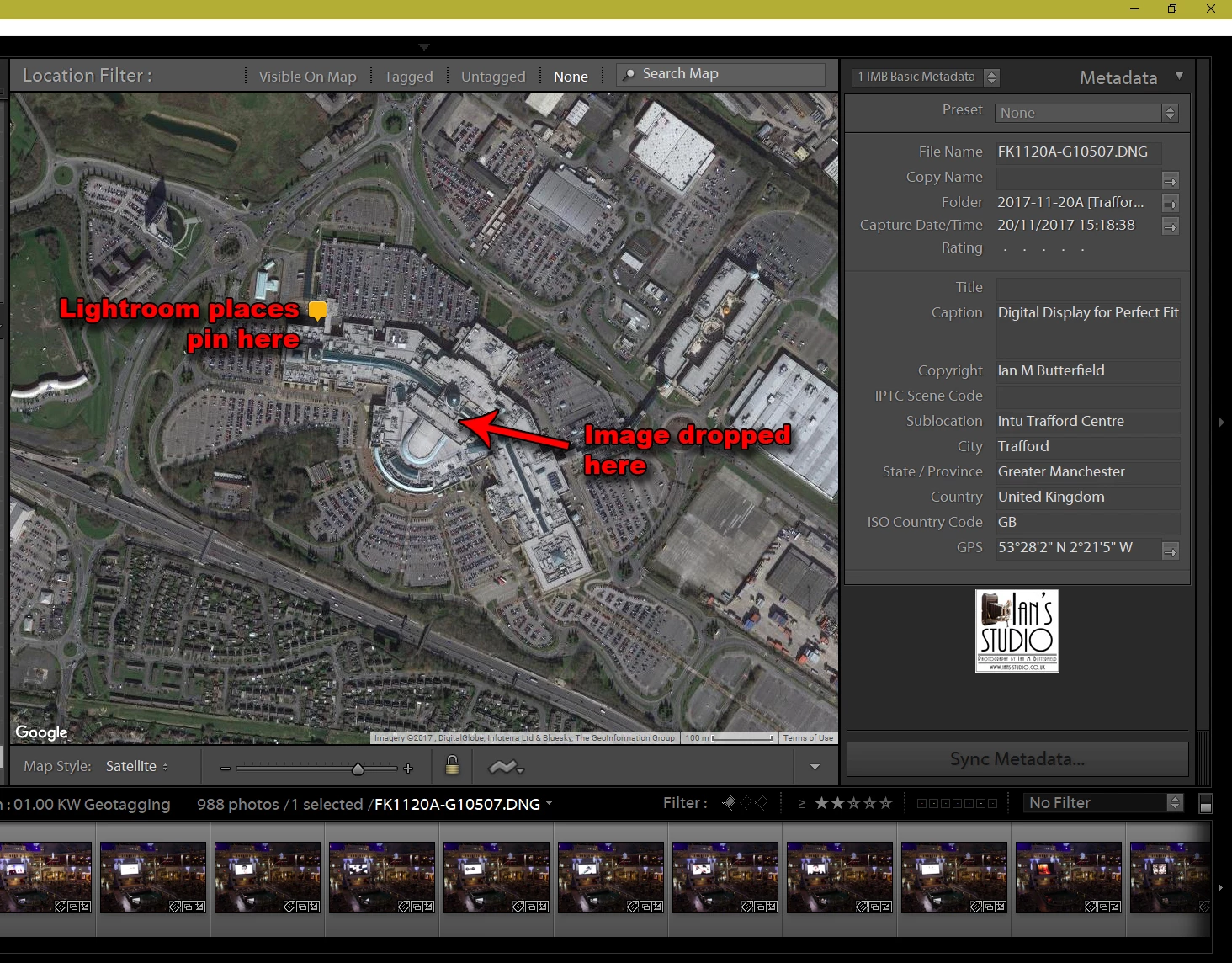
Take a look at the image above and you will see the problem.  I have 11 different locations I need tag within that shopping centre,  The level of accuracy that LR is proving is not acceptable to me (nor my client).   I used to be able to do this very accurately so that my client and I could very quickly identify which image relates to which location in the shopping centre.

I have confirmed that the GPS coordinates that are embedded in the image relate to where the pin is shown NOT to where I dropped the image.

Can anyone help, please?

This topic has been closed for replies.
Correct answer johnrellis

Windows 10.  I don't have a wired mouse - haven't used one for years.  And I never had the problem prior to LR7.  Also I have no other mouse issues in any other app so I find that hard to believe (but wouldn't rule it out).  As I said the problem still happens using the Wacom which is wired.


LR 6 has an unresolved bug with dragging photos to the map on Windows high-resolution displays: Lightroom 6: Photo placed in wrong spot on map | Photoshop Family Customer Community .  More likely than not, that bug has continued into LR 7 (Classic), which is really just an incremental release to LR 6.  Please add complete details of your issue, including screenshots and copy/paste of Help > System Info, and click Me Too at the top: Lightroom 6: Photo placed in wrong spot on map | Photoshop Family Customer Community

That bug report also contains workarounds, but you have to read through the thread carefully.

7 replies

Participating Frequently
August 12, 2023

I am having this problem with Lightroom Classic 12.4.  I am using a 4K monitor and Windows 10

Rikk Flohr_Photography
Community Manager
August 12, 2023

You’ve posted to a very old thread. It is highly unlikely that the issue described in this thread, though not impossible, is the same issue which you are currently experiencing. Rather than resurrect an old thread that is seemingly similar, you are better posting to a new thread with fresh, complete information including system information, a complete description of the problem and step-by-step instructions for reproduction. 


In the unlikely event the issue is the same, we will merge you back into the appropriate location. 


Thank you!


Rikk Flohr: Adobe Photography Org
Participant
May 25, 2022

I have the same problem on Lightroom classic release 11.3.1 running on my Windows 10 desktop PC.  My Windows settings for the display scale and layout are 100%  using the recommended resolution of 1920 * 1200.   It would be nice to get this Adobe bug fixed.

schubertt20436865
Participant
September 4, 2020

For whoever is concern, I also have the same issue using LR CC 2020.   I just troubleshoot and it worked with my setup.  This might not work on yours.

(MS Surface Pro - screen off, 2 external monitor with different resolution (or size))

When LR is closed and opened on the same screen, I do not have any issue with drag dropping pictures to specific location on the map.  

If LR is moved from one screen to another or anything related, I will run into this drag and drop misplace.


Inspiring
December 4, 2019

I have the same issue with LR CC v9.0 installed on a brand new computer (Lenovo Ideapad Flex 15.6"). I am using the built-in mouse/touchpad. The workaround I use it is to place the pointer at the right location, right click and select "Add GPS Coordinates".

Inspiring
December 4, 2019

I found the solution. The Lenovo Ideapad Flex defaults the Scale & Layout Setting under Display Settings to 125%. Lenovo warns that some apps may not work if the setting is changed. I changed the setting to 100% and now drag-and-drop images from the Filmstrip to the map works perfectly!!! Not sure why the Mp module accuracy is dependent on the display magnification.

Participant
August 17, 2020

Why can't they fix this problem? I like my monitor set at 175%. But to place photos on the map, I have to set the monitor to 150% or 200%. That's simply STUPID!!!!!!!!!! Thanks for explaining how to fix it. But Adobe should really do something about this.

ianbutty
ianbuttyAuthor
Known Participant
November 25, 2017

@ Just Shoot Me

I don't think that is the case I've just tried placing a pin in a different part of the city to check that out.  Here's what happened:

As you can see, I have zoomed out and the pin is literally miles away from where I dropped the image.

@ dj_paige

The problem occurs using both the mouse (yes it is wireless) and using my Wacom bamboo tablet (not wireless).  I have tried restarting LR too.

dj_paige
Legend
November 25, 2017

Can you try a wired mouse?

As I said, I don't have this problem with Lightroom Classic CC and a wired mouse. Also, I am using Windows 10, what is your operating system?

ianbutty
ianbuttyAuthor
Known Participant
November 25, 2017

Windows 10.  I don't have a wired mouse - haven't used one for years.  And I never had the problem prior to LR7.  Also I have no other mouse issues in any other app so I find that hard to believe (but wouldn't rule it out).  As I said the problem still happens using the Wacom which is wired.

dj_paige
Legend
November 25, 2017

I have never had this problem in Lightroom. And furthermore I am not having this problem in Lightroom Classic CC.

So please tell us: are you using a wired mouse, or a wireless mouse, or not even using a mouse and using some other type of pointing device.

Just Shoot Me
Legend
November 25, 2017

This probably has something to do with how Google refers to the address of where you dropped the image. The actual address of that center might be where Google placed the pin.