

johnrellis
Legend
May 5, 2022
Question

Map module's Add GPS Coordinates To Selected Photos often not available

  • May 5, 2022
  • 2 replies
  • 461 views

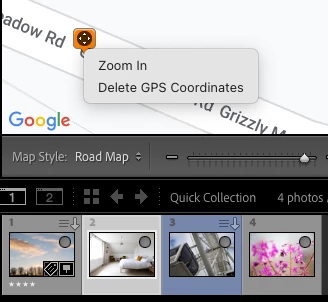
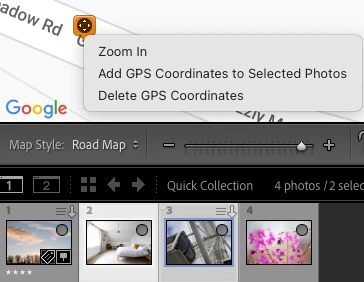
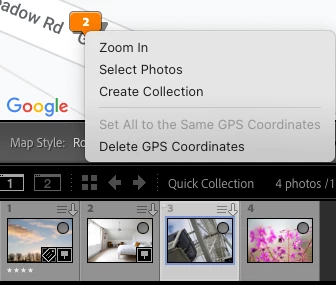
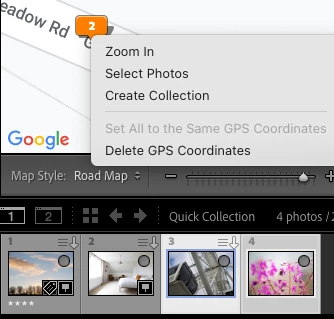
When you right-click a map pin, the command Add GPS Coordinates To Selected Photos isn't available if the map pin has two or more photos assigned to it or just one photo is selected in the filmstrip. 


This bug, along with the Set All To The Same GPS Coordinates bug, the drag-and-drop position bug on Windows, and the inability to drag a pin with more than one photo assigned make it hard to assign the same coordinates to multiple photos over time.


Here are screenshots of right-clicking on a map pin, with all combinations of one photo and two photos on the map pin and one photo and two photos selected:


One photo on the pin, one photo selected (incorrect):
 

One photo on the pin, two photos selected (correct):
 

Two photos on the pin, one photo selected (incorrect):
 

Two photos on the pin, two photos selected (incorrect):
 

Tested on LR 11.3.1 on Mac OS 12.3.1 and Windows 10.


This topic has been closed for replies.

2 replies

Rikk Flohr_Photography
Community Manager
May 9, 2022

Engineering has responded that the current behavior is as-designed: 
"The context menu options changes based on the selection and pin/cluster type"

Rikk Flohr: Adobe Photography Org
johnrellis
Legend
May 10, 2022

Rikk, did you intend to post this in the other bug report, where you mentioned engineering would get back as to as-designed?

https://community.adobe.com/t5/lightroom-classic-bugs/p-map-module-s-set-all-to-the-same-gps-coordinates-doesn-t-work/idc-p/12932647#M34338

Rikk Flohr_Photography
Community Manager
May 10, 2022

The information is correct for this post. 

Rikk Flohr: Adobe Photography Org
Bob Somrak
Legend
May 5, 2022

I can duplicat @johnrellis 's observations of this issue.

M4 Pro Mac Mini. 48GB
johnrellis
Legend
May 8, 2022

The problem also occurs with LR 8.4.1 / Mac OS 12.3.1.