Participating Frequently
May 21, 2021
Answered

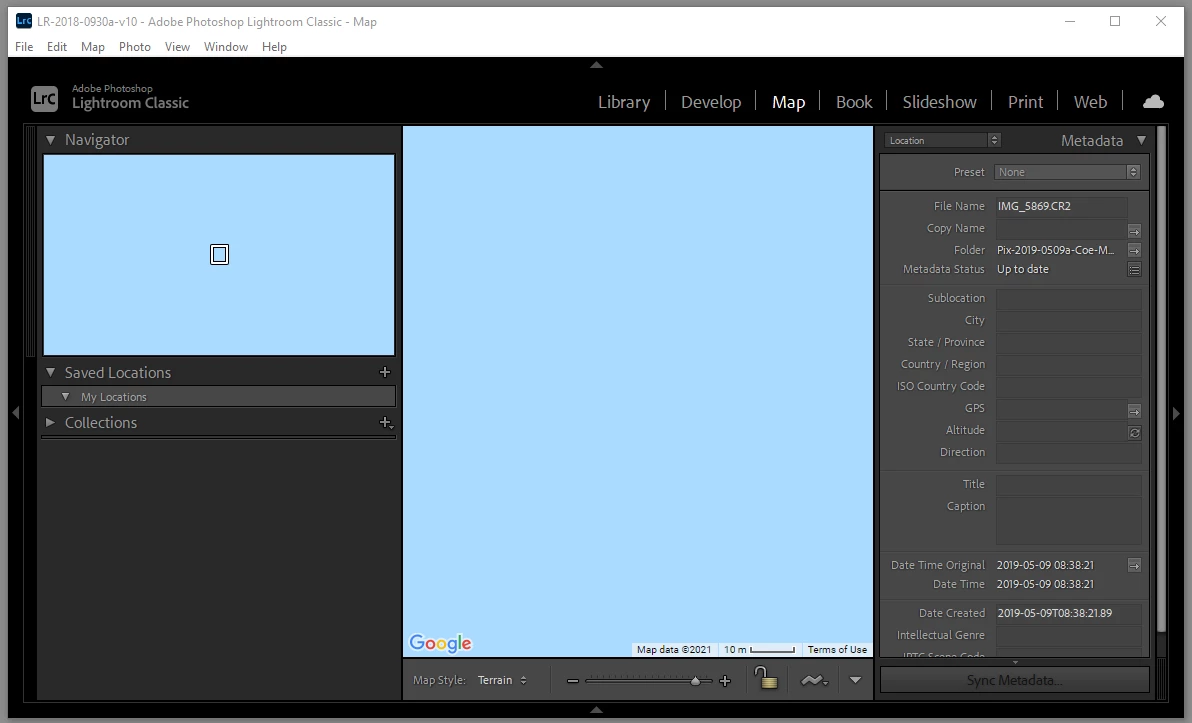
Map tab Navigator and Map both solid pale blue, LRC 10.2

  • May 21, 2021
  • 2 replies
  • 563 views

While trying to move around on the map by dragging, the map and its navigator panel both turned to a pale solid blue, except for the Google Mapdata @17324990, scale bar, and Terms of Use legend at the bottom. Oh, I see that the Navigator window has the "you are here" rectangle, too. Restarting LRC didn't help. Lightroom Classic 10.2, per Help menu.
This topic has been closed for replies.
Correct answer johnrellis

It began working a few hours later. I suppose it was a service outage. 


LR is showing you a location over the ocean. Your screenshot doesn't indicate one way or the other whether a photo with GPS coordinates is currently selected, since the filmstrip isn't showing.  


"It began working a few hours later."


Probably because you then had a photo with GPS coordinates over land selected. 

2 replies

Nancy OShea
Community Expert
Community Expert
May 21, 2021

I'm not entirely sure what you think should happen with a dynamic Google Map in a static image editor.   From where I sit, they are incompatible.  But in any case, you posted this in "Using the Community" which is for questions about using the forums.  I'm moving this to LR Classic.  Hopefully one of the experts there can help you.


Nancy O'Shea— Product User & Community Expert
Participating Frequently
May 21, 2021

I expect to see the map on which Lightroom shows the geographic locations of the files in the catalog.

Participating Frequently
May 22, 2021

It began working a few hours later. I suppose it was a service outage. 

Participating Frequently
May 21, 2021

Replying to my post to add: I restarted Windows 10 and I opened Lightroom Classic as the first application. Blue screens like I illustrated at first.


Then I opened a new Test catalog. It is empty, but the Map tab looks the same, blue.