Ok. I pressed "O" and when I moved the "Exposure" slider, the whole image was brightened or darkened, whether I selected the Subject or Background. I did as you instructed and created a new mask for the Subject, and the whole image darkened or lightened when I moved the "Exposure" slider. It did the same thing when I created a new mask for the Background also. Now I really am confused.
This business of the whole image darkening or lightening, is because you are moving sliders in the panel titled "Basic". These, and the panels further down, are all global adjustments. The local adjustment sliders appear in a different panel, which is part of the Masking interface.
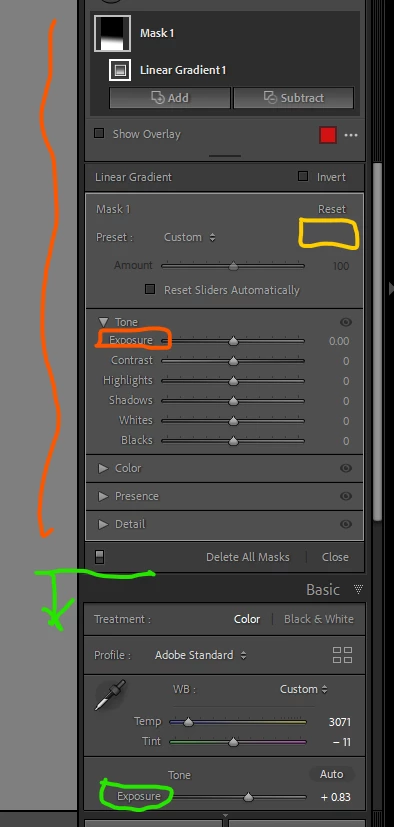
Sometimes this different panel shows collapsed so that you see only a header for choosing a local adjustment "effect" - a named local adjustment preset. Depending on your LrC version, expanding this would need clicking a triangular arrow button next to the word "effect" - where highlighted yellow below - to open up the full interface. This behaviour seems to have been removed from the version I am now running, so there is no such collapse / expand button for me and instead I can collapse subsections of the local adjustments panel.
But this collapsing of the whole thing has caught a lot of people out over time: if the first Exposure (say) slider that they see as they scan down the interface, is the one in Basic (the global one, highlighted green below).
As the screenshot below shows, the relevant Exposure slider is the one (highlighted orange) that controls your currently active Mask only.
Still the global adjustments remain usable below. So you can fluidly re-balance global adjustments, live, against whatever you are doing with the local adjustments.

 AdChoices