Participant
October 30, 2025
Answered

Masks don't save when exporting

  • October 30, 2025
  • 1 reply
  • 156 views

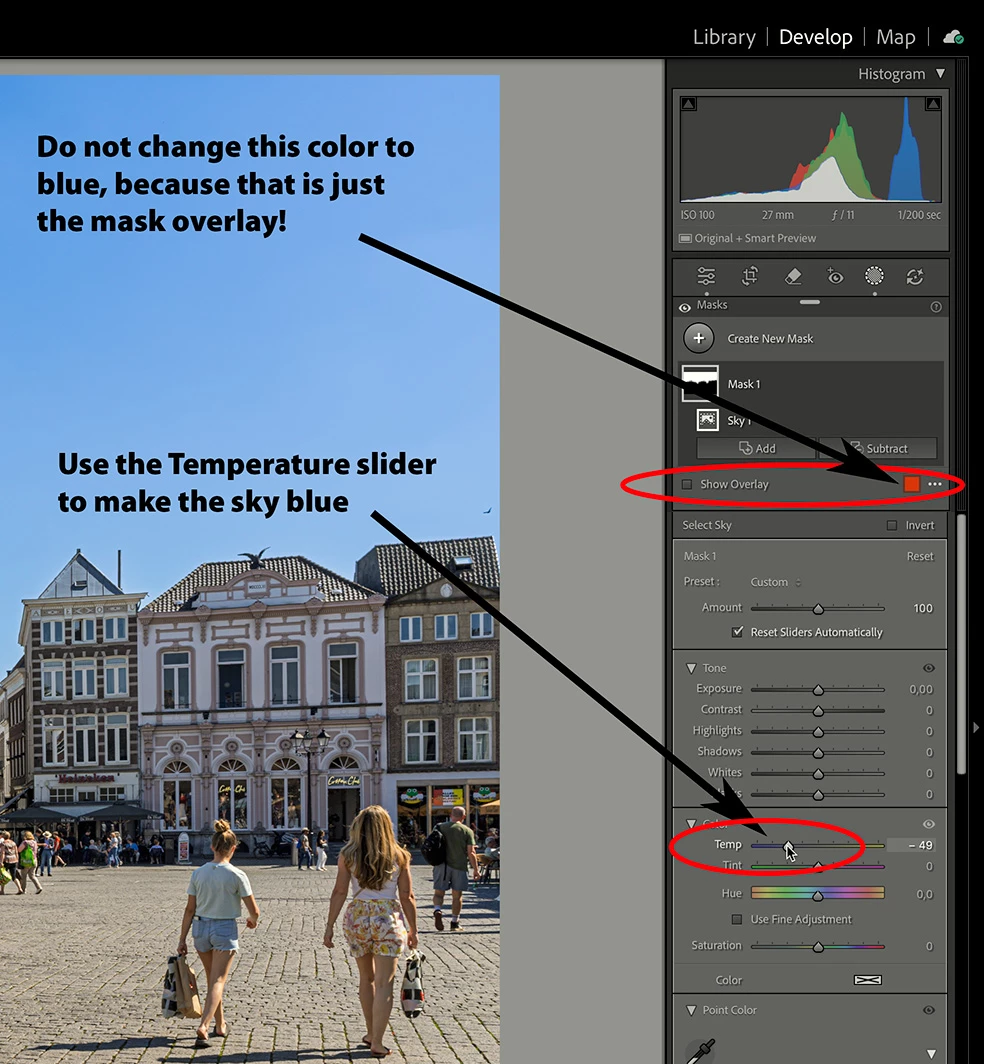
I have lightroom classic, screen shot with version 15.0 Camera Raw 18, I am creating a Panorama merged photo and then editing the resulting dng, I use the sky mask and change the colour as shown in the image, but when I export it does not contain the mask update as shown in the exported image


I have tried numerous items online, including deleting the lrcstat-data file and rebuilding the AI and followed some online examples, I am not using Save original.


I specify JPEG as shown


https://drive.google.com/file/d/1pJyxRWpXzkpJZq21slrl2UXDe4A9Wimn/view?usp=share_link 

https://drive.google.com/file/d/1PtFZPRWO9kMRi8dVgwS06szTnIOgGK-I/view?usp=sharing

https://drive.google.com/file/d/14trTrpJu2IzxYl88aQgBzi9DP7WSUsM4/view?usp=sharing

https://drive.google.com/file/d/1_mIJX0Nkghk8h7yuaorkSIViW76VWoB-/view?usp=sharing


Thanks

Steve

 

Correct answer JohanElzenga

Looks like you changed the color of the mask overlay to blue, thinking that will turn the sky blue. That is not how masks work, however. The mask overlay is just showing you what is masked and what is not masked. Usually the color that is used for this is red, but you changed it to blue. To make the sky blue using the mask, you must do that with the mask sliders. You can use the Temperatue slider, for example.


1 reply

JohanElzenga
Community Expert
JohanElzengaCommunity ExpertCorrect answer
Community Expert
October 30, 2025

Looks like you changed the color of the mask overlay to blue, thinking that will turn the sky blue. That is not how masks work, however. The mask overlay is just showing you what is masked and what is not masked. Usually the color that is used for this is red, but you changed it to blue. To make the sky blue using the mask, you must do that with the mask sliders. You can use the Temperatue slider, for example.


-- Johan W. Elzenga
JohanElzenga
Community Expert
Community Expert
October 30, 2025

By the way: post screenshots embedded in your message, not linked. Use this button:

-- Johan W. Elzenga