
dmshort
Known Participant
January 10, 2019
Question

Massive CPU Usage from Lightroom Classic CC

  • January 10, 2019
  • 12 replies
  • 18248 views

So this has been going on for quite some time starting with some version of Lightroom CC 7.x (I don't remember exactly which). Basically Lightroom is going to kill my computer and uses a massive amount of CPU power when doing things. My fans are always running at full throttle whenever I open and work in Lightroom and I haven't been able to find any solutions. I've cleaned my fans of all dirt, dust and debris and that didn't stop the fan problem. Still wouldn't explain the CPU usage problem. Anyway, it's getting ridiculous and I'm about fed up with it. But of course Adobe has me hooked and I'm not taking, nor do I have the time to try and learn another program and figure out how all of my presets I've created translate to that program.

Can anyone offer a solution short of wiping my entire computer and starting over from scratch?
This topic has been closed for replies.

12 replies

GoldingD
Legend
January 10, 2019

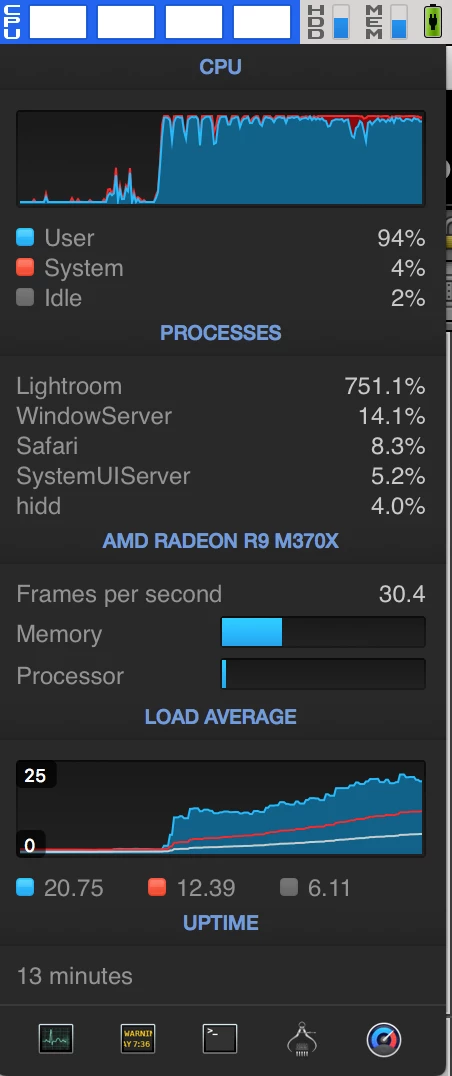
I see you are using a third party application to monitor the CPU, Does using the included Activity Monitor show the same usage?

Mind you, I brought up the Activity Moniotior, and placed it side by side with LR, Not much CPU, untill I went for a Photo Merge

For an example (and note the CPU went up higher than shown at this point)

So, see what is taping out your CPU usage,  it is probably not all the time in LR, but just when you do somethng like a photo merge, and should then go back down.

dmshort
dmshortAuthor
Known Participant
January 11, 2019

To dj_Paige: I'm on the current version of lightroom CC. This has just been happening ever since version 7.x something or another.

Importing and exporting takes up a ton of CPU but I had already read about that being a data intensive process. Basically any time I do any sort of editing work Lightroom taxes my CPU. Not so much when using the basic editing tabs but when you start to add a graduated, radial filter, or do any brush strokes it pushes the CPU usage into the hundreds. Any sort of basic editing and I'm still pushing 40-75ish percent. Switching from image to image the same happens and doing any sort of before/after view takes about 5 seconds and causes a huge spike in CPU usage. I've monitored this happening identically on both the third party app and through activity monitor.

It just seems like every update that is supposed to fix one issue or another just exasperates the issue that much more rather than solving it.

dj_paige
Legend
January 11, 2019

dmshort  wrote

To dj_Paige: I'm on the current version of lightroom CC. This has just been happening ever since version 7.x something or another.

You are NOT on the current version of Lightroom CC. You may be on the current version of Lightroom Classic CC. Thus, I repeat my request that you modify the title of this thread to say Lightroom Classic CC, not Lightroom CC.

However, until you actually state the version NUMBER of your Lightroom, we do not know that you have the "current" version. I (and many others here) do not accept the word "current" to describe versions, we only accept the version NUMBER because too many times people tell us they have the "current" version and are mistaken.

Not so much when using the basic editing tabs but when you start to add a graduated, radial filter, or do any brush strokes it pushes the CPU usage into the hundreds.

A well known and documented problem, especially if you are using a 4K or larger monitor. As far as I know, there really is no good solution within LR at this time for the speed problems caused by brushing or other local adjustments with a 4K or larger monitor.

dj_paige
Legend
January 10, 2019

First, you should update your LIghtroom Classic CC to the current version which is 8.1

Next, you need to state what actions in Lightroom cause this high CPU usage. For some actions, specifically exporting and generating previews at import, this high CPU usage is pretty much by design, you are asking the computer to do a lot of work, and it needs high CPU usage to accomplish this work.

Can anyone offer a solution short of wiping my entire computer and starting over from scratch?

If the above explanation is indeed what is happening, then wiping your computer won't help.

If you would be so kind, please edit the title of your post to say Lightroom Classic CC instead of Lightroom CC.

Participant
April 26, 2020

I also experience the same problem. Everytime i go to apply a preset the whole laptop freezes and lightroom says not responding with it using 85.6% cpu. I also recently purhcase lightroom this week and it is brand new.