



Zorojuro
Participating Frequently
January 10, 2024
Question

Merge Panorama with pre-crop taken into account?

  • January 10, 2024
  • 3 replies
  • 321 views

Hi everyone,


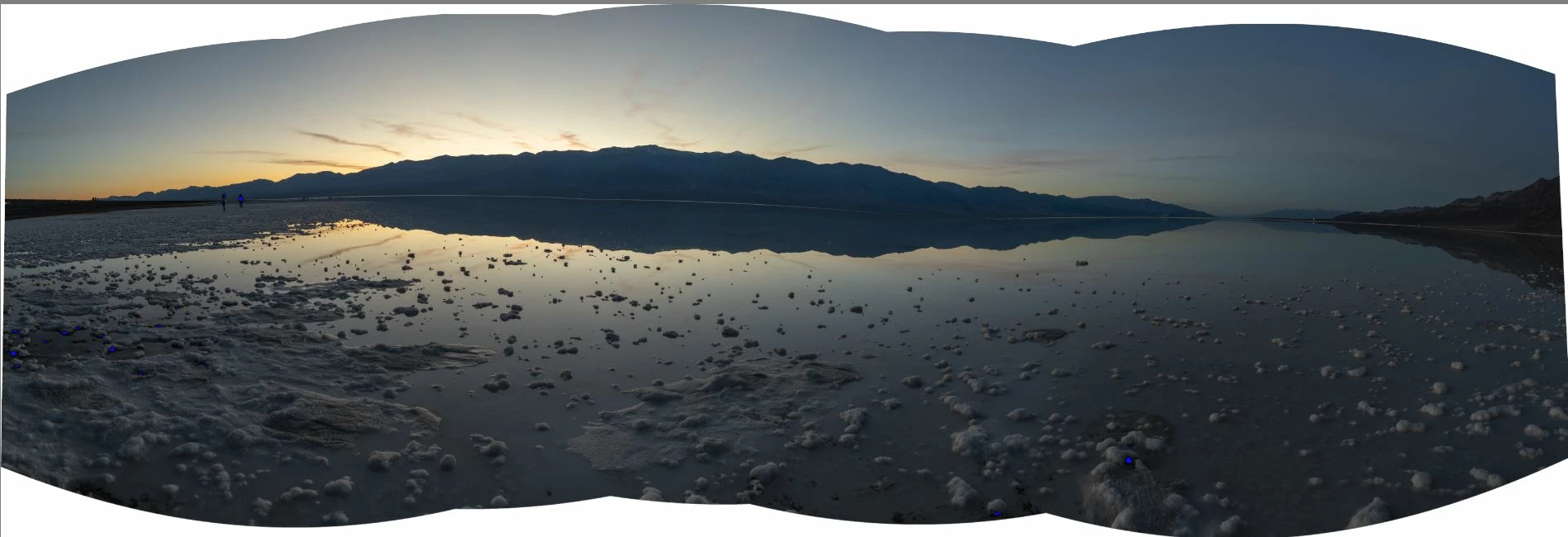
I'm using Lightroom Classic 2024 and trying to create a panorama with images that have been rotated slightly using the crop tool because the images I want merged were all tilted at different angles apparently. However, when I do a panorama merge, the images are sticked together as if the angle correction did not take place. I attached a sample of what my panorama looks like right now. It is approximately a 150 degree panorama and obviously, the lake horizon line is not supposed to be warped upwards where the mountains are. I know lightroom does non-destructive edits on photos, but since all my images are RAWs, is there any way to force it to take stuff like rotation changes into account when stiching panoramas? Thanks!
 

3 replies

larryr27751995
Participant
November 19, 2025

I had a similar problem.  I was taking a photo of a map/illustration and put a weight in the middle to make the left side lay flat.  I cropped the weight out  (I moved it between shots , and still had enough overlap to do a merge, but Lightroom used the uncrpped originals!  So exported them (after cropping) as jpg did not have to use tiff . and that worked as the exportrd photos had no record of the photo prior to the changes.

larryr27751995
Participant
November 19, 2025

In your case I am surprised it doesn't rotate to make the photos align.  And it could be it is doing that and so it will rotate them back anyway to make the over lap align.  Of course it could be it doesn't know which way is level and rotating with crop tool will work?  But if that is the case rotating the pano should work as well?

JohanElzenga
Community Expert
Community Expert
January 10, 2024

The only way to do this in Lightroom would be to export the cropped images as TIFF, import these TIFFs and merge them. If you use Photoshop merge (not Camera Raw) then you will do exactly that, because Photoshop cannot work directly with raw files. It gets RGB rendered images from Camera Raw and merges these.


-- Johan W. Elzenga
GoldingD
Legend
January 10, 2024

No.

and see:

https://jkost.com/blog/2021/09/19408.html

"not all adjustments made to individual images are applied when merging to Panorama (Local Adjustments, Upright Transformations, and Crop for example)."


and you may want to try the merge in PS


Of course, hind site does not help, as in keeping those shots in the field level.


You could attempt to export your individual corrected shots, but actually for difficult merge's try PS.


Zorojuro
ZorojuroAuthor
Participating Frequently
January 10, 2024

Thanks a lot, and just to clarify, Photoshop's merging algorithm/method is different from Lightroom?