


Participating Frequently
March 17, 2026
Question

Metadata are not saved in jpg files, even if the option is checked in Catalogue settings. Version 15.2. Content credentials are not active

  • March 17, 2026
  • 3 replies
  • 68 views

I noticed that the metadata (Develop settings) are not included in the jpg files, from a Lumix TZ-101 camera. In this way, develop settings are lost if the file is, e.g., moved to another directory and then synchronized back to the LR Classic catalogue. The file is not protected. If I force saving (CTRL+S) the process is sometimes veeeery slow. Also the scanning for metadata update is veeeeeeeeery slow. The disk where files are store is a NVMe, should be fast, and it is actually very fast for all other operations. 

OS is Windows 11, up to date.

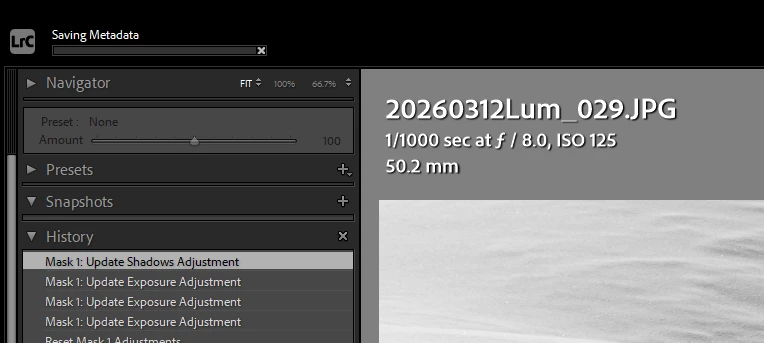
I enclose a screenshot to show the upgrade bar for the save metadata (stuck there for 1 minute or more, for a single file!).
May it depend from the amount of adjustments?
 

    3 replies

    dj_paige
    Legend
    March 17, 2026

    Please check out this thread. Scroll down to where one of the participants talks about Pausing the Save XMP option.


    Participating Frequently
    March 17, 2026

    It was! Paused, I mean.

    Thank you for the suggestion.!! And sorry i did not carefully check the thread, I only read the post here below. 
    Do you deem it may be also related with the slowing down??


    dj_paige
    Legend
    March 17, 2026

    Your screen captures show for one photo that the metadata hasn’t been saved. Does this happen on all photos? Are there other processes going on in the background on your computer that might use the disk heavily?


    develop settings are lost if the file is, e.g., moved to another directory and then synchronized back to the LR Classic catalogue


    This is wrong. First, you’d be better off not moving photos after you edit them, and in most cases I consider this a poor practice; but if you must, use your operating system to do the move, and then you reconnect in LrC, you don’t synchronize, and by reconnecting none of the metadata or edits is lost.

    Participating Frequently
    March 17, 2026

    Hello

    First of all, thank you for sharing the link about the reconnecting to LrC, I’ll read it carefully.
    And sorry for the unclear headline, I lost metadata AND develop settings. 

    To explain: I moved the  files because I realized that i did not follow my usual procedure for the file storage, and I preferred to amend the mistake. Maybe it is poor practice (and, for sure, a waste of time) but I know by experience that it is better to follow a method, whichever it is :-)
    I did it before (move by the operating system, then synchro), and I know that when the develop settings are saved “inside” the JPG, you can read them again, even if the file is physically in a different directory. 

    Yesterday i realized that it was not so: I had processed the files to BW, and suddenly (after the move) they were in colour again! Also, I lost the Location metadata, but this is not so bad, easy to add them again.  
    Today i did several trials, processing one file and moving it without “forcing” (CTRL+S) the saving, or doing it, and could observe that when I not CTRL+S the settings are not saved. When i do it, they are, but the time to save is variable, and can be very long.

    Not always long the same, which is quite puzzling me.

    Besides, when I synchro the metadata of whole folders, which is an operation that is allowed, it takes several (10 to 20) minutes, and this delay the operations which are following (like, maybe, saving the develop settings?).
    See the images below:
     

    processed JPG, no manual save; 
    same FILE, AFTER PROCESSING, no manual save, copied to a subfolder and synchronized back to LR: it shows no processing;
    the first file, AFTER CTRL+S, COPIED to the subfolder and synchro back into LrC: it is processed. N.B: to save the metadata of this single file, it took MORE THAN TWO MINUTES 

    To me it looks more like a bug, but maybe it is my mistake in doing something?
    Until solved, I’ll avoid to move files without CTRL+S, and will prepare to be very patient
     

    dj_paige
    Legend
    March 17, 2026

    As I stated above, when you move a photo outside of LrC, synchronizing folders is the wrong thing to do. Reconnecting is the proper thing to do and then you do not lose edits and you do not lose metadata. 


    If saving metadata to xmp is taking a long time, this seems to be a different problem. My first guess is that your antivirus is scanning the folder where the photos are stored, and it should not be doing that. You need to check, all antivirus software have options to stop scanning certain folders that you specify.

    JohanElzenga
    Community Expert
    Community Expert
    March 17, 2026

    Metadata are not saved to files by default. You have to select this in the preferences if you want this to happen automatically. You do not say if you did that.

    -- Johan W. Elzenga
    Participating Frequently
    March 17, 2026

    Actually, it is written in the headline “even if the option is checked in Catalogue settings”

    The settings


    JohanElzenga
    Community Expert
    Community Expert
    March 17, 2026

    Ah, I missed that. I tend to read the message, not an overly long title.

    -- Johan W. Elzenga