

Califdan2
Inspiring
October 19, 2017
Answered

Metadata has changed icon missing in grid (Classic 7.0)

  • October 19, 2017
  • 1 reply
  • 557 views

HI,

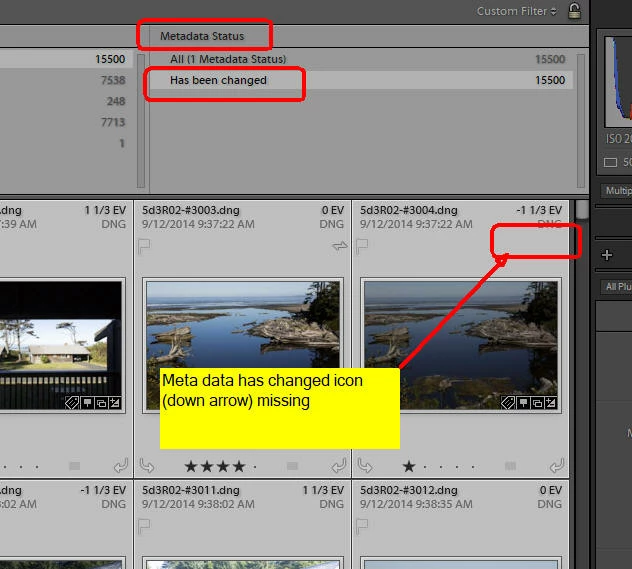
In the new LR Classic 7.0 version, the little white down facing arrow in the grid cells seems to be missing.  I filtered for "Metadata Status"  and selected "Has Changed" which gave me the subset of  images I expected, but none have the symbol indicating that status.
This topic has been closed for replies.
Correct answer johnrellis

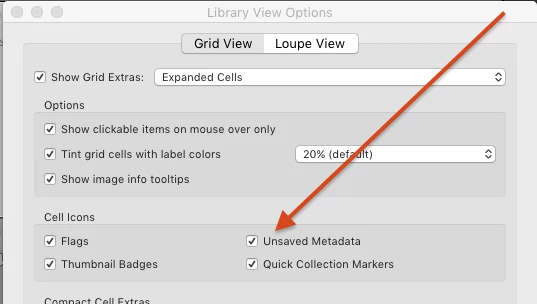
Hmm, the metadata status indicators are showing up in my LR 7. Do the menu command View > View Options and make sure that Unsaved Metadata is checked:

If it is, then try resetting LR's preferences: http://www.lightroomforums.net/showthread.php?25197-Resetting-the-lightroom-preferences-file-updated . That often fixes things when LR's user interface goes wonky.

1 reply

johnrellis
johnrellisCorrect answer
Legend
October 20, 2017

Hmm, the metadata status indicators are showing up in my LR 7. Do the menu command View > View Options and make sure that Unsaved Metadata is checked:

If it is, then try resetting LR's preferences: http://www.lightroomforums.net/showthread.php?25197-Resetting-the-lightroom-preferences-file-updated . That often fixes things when LR's user interface goes wonky.

Califdan2
Califdan2Author
Inspiring
October 20, 2017

John: That was it.  Somehow the checkbox got unchecked.  Thanks.