
Participating Frequently
March 13, 2026
Question

Metadata Injection Failure During Batch Export

  • March 13, 2026
  • 2 replies
  • 49 views

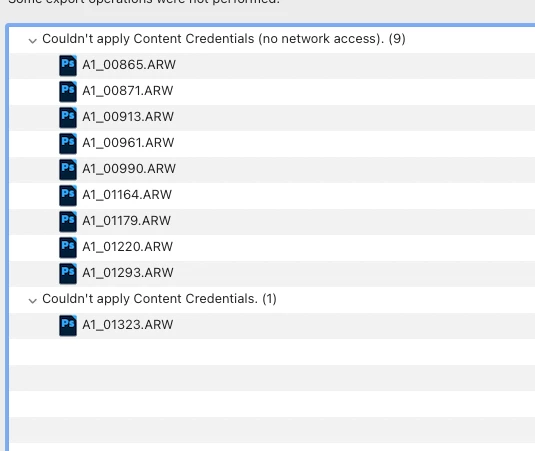
Lightroom Classic silently skips files during batch export if it fails to write Credit/IPTC metadata. Additionally, it misreports local file errors as network issues.

Steps to reproduce:

  1. Select a batch of images (e.g., 120 files).

  2. Export with a metadata preset that includes Credit/Copyright info.

  3. Observe that some files are randomly skipped.

Actual Results:

  • Only a portion of the files (e.g., 106 out of 120) are exported without a proper per-file error log.

  • A "No network access" error pops up mid-export despite a perfectly stable internet connection.

  • The export engine deletes the entire image file if the metadata write operation fails, instead of just skipping the metadata and saving the image.

Expected Results:

  • Lightroom should export the image even if metadata injection fails (best-effort export).

  • Errors should be accurately reported (local I/O failure, not "No network access").

  • A detailed log should show exactly which files failed and why.
 

    2 replies

    johnrellis
    Legend
    March 16, 2026

    [View this post in your web browser. It contains formatting and images that don't appear in email.]


    I am not sharing my private RAW files. … Export WITH Content Credentials: Fails consistently on the same 14 assets with 'Error 9 (no network access)'.​​​​​​​

    That very much sounds like a bug. Unfortunately, unless Adobe can easily reproduce the problem, they’re not likely to pay much attention. So if you’re not willing to provide a sample raw that provokes the problem (along with the rest of the Export settings), the bug will likely go unfixed until someone else provides a reproducible test case.


    The engine should not abort the entire file write just because a beta cloud-signature fails.

    That’s the way Export is designed, so Adobe wouldn’t consider this a “bug” (under their definition of “bug”). But you could file a feature request here:


    johnrellis
    Legend
    March 14, 2026

    [View this post in your web browser. It contains formatting and images that don't appear in email.]


    The error message is, “Couldn’t apply Content Credentials (no network access) (9)”  Applying Content Credentials during export (via the Content Credentials section of the Export settings window) does indeed require network access to Adobe’s servers.  It’s entirely possible that during export, LR was temporarily unable to contact Adobe’s servers for some reason.


    Adobe is unlikely to pay much attention unless they can straightforwardly reproduce the issue.  As first steps:


    1. Provide one or more full-resolution screenshots (not phone pics) showing all the settings in the Export settings window.


    2. Do the LR menu command Help > System Info and copy/paste the entire contents here so we can see exactly which versions of hardware and software LR thinks you're running and important LR options that are set.


    3. If you rerun the identical export (with the same photos), does the error message occur again?  Does it happen on the same photos or different ones?  If it happens on the identical photos, then select two of them, do the menu command Metadata > Save Metadata To File, and attach the .arws and their .xmp sidecars here.  We can see if exporting them with the same exact settings produces the same error on other LR configurations.

    Participating Frequently
    March 14, 2026

    I am providing my System Info below and the Export settings screenshot as requested.

    Regarding point 3: I am not sharing my private RAW files. However, I have performed a clear A/B test:

    • Export WITH Content Credentials: Fails consistently on the same 14 assets with 'Error 9 (no network access)'.

    • Export WITHOUT Content Credentials: 120/120 files export perfectly.

    This proves the issue is purely a logic/handshake failure within the Content Credentials (Beta) module. The engine should not abort the entire file write just because a beta cloud-signature fails.

    System Info:

    Lightroom Classic version: 15.2 [ 202602111402-ec4112e8 ]
    License: Creative Cloud
    Language setting: lv-LV
    Operating system: Mac OS 26
    Version: 26.3.1 [25D2128]
    Application architecture: arm64
    Logical processor count: 10
    Processor speed: NA
    SqLite Version: 3.36.0
    Adobe GSDK Version: 1.4.0.171

    Built-in memory: 32 768,0 MB
    Dedicated GPU memory used by Lightroom: 2 332,5MB / 25 559,0MB (9%)
    Real memory available to Lightroom: 32 768,0 MB
    Real memory used by Lightroom: 3 285,9 MB (10,0%)
    Virtual memory used by Lightroom: 432 859,5 MB
    Memory cache size: 1 447,2MB
    Internal Camera Raw version: 18.2 [ 2482 ]
    Maximum thread count used by Camera Raw: 5
    Camera Raw SIMD optimization: SSE2
    Camera Raw virtual memory: 757MB / 16383MB (4%)
    Camera Raw real memory: 790MB / 32768MB (2%)

    Cache1: 
    NT- RAM:0,0MB, VRAM:0,0MB, Combined:0,0MB

    Cache2: 
    m:1 447,2MB, n:0,0MB

    U-main: 88,0MB

    Standard Preview Size: 5120 pixels
    Displays: 1) 5120x2880, 2) 2560x1440, 3) 2560x1440

    Graphics Processor Info: 
    Metal: Apple M1 Max
    Init State: GPU for Export supported by default
    User Preference: Auto
    Enable HDR in Library: OFF
    GPU for Preview Generation: Auto (S5_24)

    Application folder: /Applications/Adobe Lightroom Classic
    Library Path: /Volumes/4TB-LEXAR/2026/2026.lrcat
    Settings Folder: /Users/kasparssilins/Library/Application Support/Adobe/Lightroom

    Installed Plugins: 
    1) AdobeStock
    2) Aperty
    3) ColorChecker Camera Calibration
    4) Export to Photomatix Pro
    5) Logi Plugin
    6) Luminar AI
    7) Luminar Neo
    8) Reblum
    9) Retouch4me Arams
    10) Topaz Photo (Studio)
    11) Topaz Photo AI

    Config.lua flags: