Known Participant
Sep 28, 2024 9:39 AM UTC
Answered

Metadata panel – hide fields such as "Genre"?

Hello, the Metadata panel of LR Classic shows differing entry fields like "Genre" or "Province" depending on the subset I select. I can select subsets such as "Minimal", "Standard", "IPTC", "Ad-hoc".


In the Metadata panel, can I HIDE certain entry fields to see only the fields I actually need? For instance I do need fields from the "IPTC" subset, but would love to hide many fields such as "Genre" and all fields about my postal address. If I switch to the  "Standard" subset instead, there are less IPTC fields, but there are other fields confusing me or missing, such as the "Town" field.


In some search, I didn't find a way to hide individual IPTC entry fields to my liking. My only solution for seeing a compact entry mask is to

- start first with the multiple-fields "IPTC" subset and

- later continue in the much more compact "Standard" subset.


But the "IPTC" subset is too full with fields, and "Standard" is too sparse. Any way to hide fields exactly to my liking?


I believe in Bridge I can hide individual fields. And I use Bridge for some tasks, which may include initial population with IPTC info – but for *adding* IPTC tags to existing tags, Lightroom Classic seems much better.


Thanks for your suggestions!

This topic is closed to new replies. Start a new post to keep the conversation going.
Per Berntsen
Per BerntsenCorrect answer
Community Expert
Sep 28, 2024 12:05 PM UTC

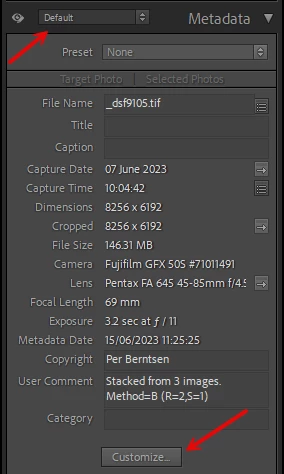
You can customize the Default view of the metadata panel by clicking Customize at the bottom of the panel.

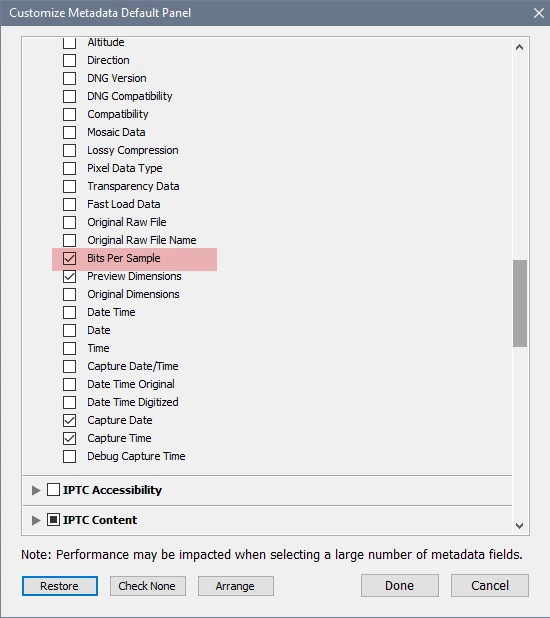
You can also rearrange the order of items by clicking Arrange at the bottom of the Customize dialog.


4 replies

Known Participant
Sep 28, 2024 12:14 PM UTC

Thanks Per, for info and screenshots, very helpful! I hadn't noticed the Customize Button so far, because i rarely used the "Default" subset (i often used "IPTC" instead); and in the other subsets, apart from "Default", the Customize Button isn't available. But now i found the Customize button und will put it to good use right away - thanks again!

Translate
johnrellis
Legend
Sep 28, 2024 2:32 PM UTC

If you want more than one custom metadata panel, see this plugin:

https://regex.info/blog/lightroom-goodies/metadata-presets

Translate
Known Participant
Sep 29, 2024 3:03 PM UTC

John, thanks, good hint!

Translate
Per Berntsen
Community Expert
Per BerntsenCommunity ExpertCorrect answer
Community Expert
Sep 28, 2024 12:05 PM UTC

You can customize the Default view of the metadata panel by clicking Customize at the bottom of the panel.

You can also rearrange the order of items by clicking Arrange at the bottom of the Customize dialog.


Translate