


HelloMikee
Inspiring
March 14, 2017
Question

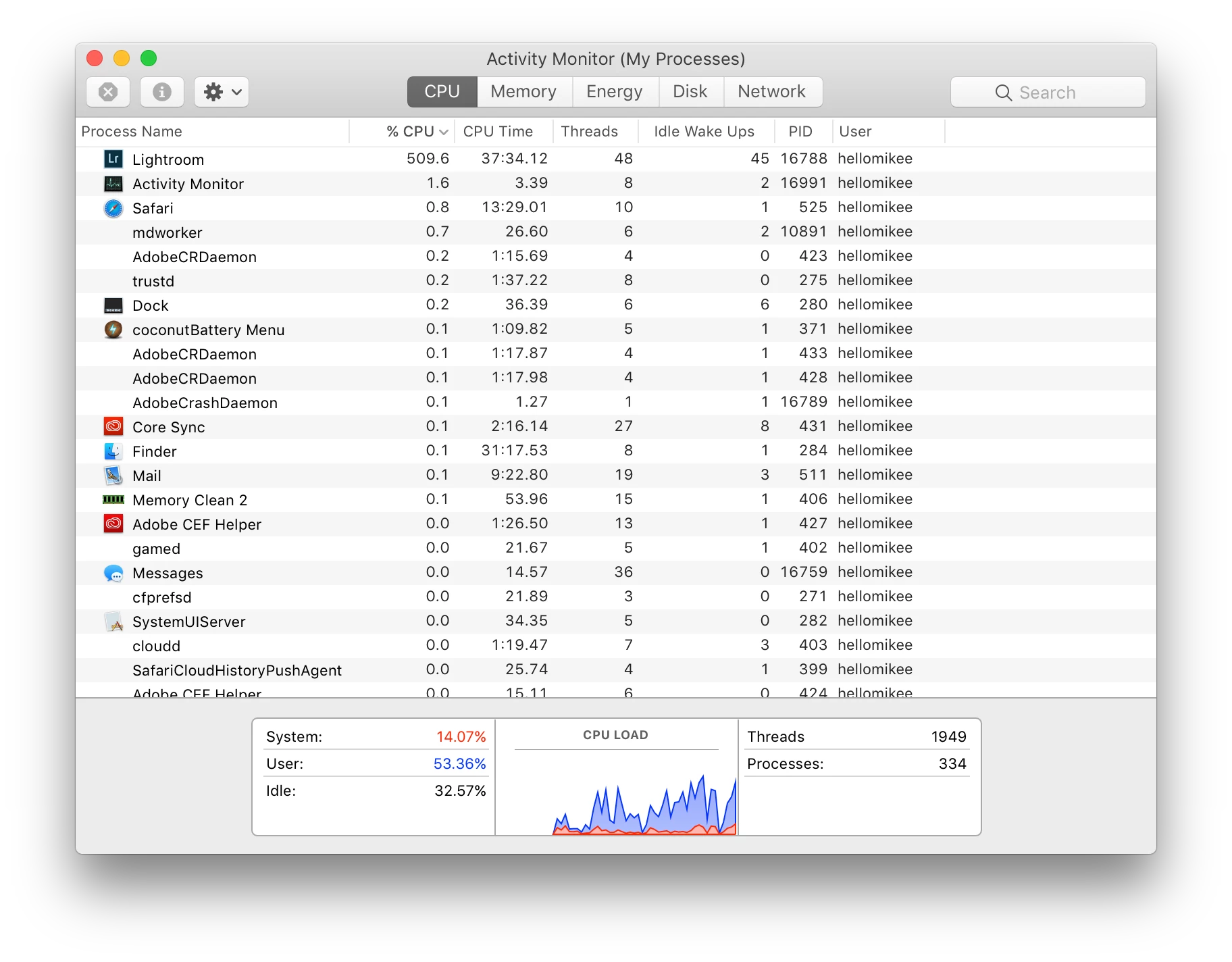
Mid-2015 MacBook Pro Retina 400-500% CPU in Lightroom (fans full blast)

  • March 14, 2017
  • 1 reply
  • 2873 views

Need some help and/or advice. I tired searching the forum for CPU issues but none seem to be updated or resolved.

While in Lightroom when I'm doing edits in the develop mode, my fans go full blast and CPU in the activity monitor jump to 400-500% usage after literally just 1-2 minutes. I'm not doing anything extensive other than basic edits in exposure, contrast, highlights, curves, colors, etc. Will sometimes use presets. I'll sync edits between photos and such.

Even if my edit are in place and I'm just browsing going from picture to picture in the develop module, CPU and fans go crazy.

I'm working with Sony raw files. Address lookup and face detection disabled. Checking or unchecking Use Graphics Processor yields no difference.

Never had a problem with my older 2012 MBPr. That laptop would take a good 30 minutes to an hour before the fans really started going and even then, it wasn't nearly as crazy as what my current laptop is doing.

Before installing my Adobe suite, I had Apple at my genius appointment reinstall a clean OS and run a diagnostics to make sure everything was ok. Everything checked out. I have since been on chat support and have run LR in safe mode with the same results. I've also recently run an online diagnostics test with them and no hardware issues or errors showed up.

My stats:

MacBook Pro (Retina, 15-inch, Mid 2015)

Running OS Sierra, version 10.12.3

2.5 GHz Intel Core i7

16 GB 1600 MHz DDR3

Intel Iris Pro 1536 MB

AMD Radeon R9 M370X

Lightroom CC

2015.9 Release

Camera raw 9.9

Please, if anyone has resolved this issue whether with Adobe or Apple please let me know. I hate that I'm putting such strain on this expensive machine for doing the basic editing tasks and tools of a photographer. I can't stop my workflow as my clients need their work delivered.
This topic has been closed for replies.

1 reply

johnrellis
Genius
March 14, 2017

1. Is there a progress bar visible in the upper-left corner of LR?  It would look like:

or

While LR is building previews or smart previews, CPU usage can get very high.

2. After you stop editing and scrolling in the Library and there's no progress bar visible, does the LR CPU usage drop down to under 10% within a few seconds?

On my Mid-2015 Retina Macbook Pro, I see sustained CPU usage above about 500% when it's building previews.  I see it spike up and down to peaks of 300-400% when I edit a large raw, and the CPU drops to under 10% as soon as I stop touching the mouse or keyboard.

It's normal for the fans to run a lot when the CPU is being used, and it doesn't hurt the machine: About the fans in your Mac - Apple Support. My fans are running constantly when I use LR.

HelloMikee
Inspiring
March 15, 2017

Thanks for the reply. No there's no progress bar unless I'm exporting/building previous. This is occuring when I'm just viewing and editing RAW files in the develop module.

And yes, CPU drops quickly after I literally just stop touching the computer.

While I understand it's normal for fans to run and CPU to spike during extensive use, I never considered editing a RAW file extensive. Not like playing a graphic intensive game would be. In fact, my older Macs don't/didn't have a problem with the same files, same os and same version of LR.

So when I'm culling through a 1000 images for project for 4 hours and the fans start at full blast with the CPU in the 400-500% range in literally a matter of a few seconds of starting my work, it's kind of concerning in my opinion.

cmgap
Community Expert
Community Expert
March 15, 2017

How many other apps do you have open when this happens? Do you have browsers open too?

I have a late 2011 17" MBP and when the fans are roaring it means I have too many applications open with large files that I have done a good deal of processing on. Eventually I can't stand the fan noise and will shut down apps/files etc. Often times the real power hog is related to something open in a web browser. If you are in a spot where you can close down browsers and other applications and perhaps even power cycle the laptop that will clear what you have in RAM.