
Participant
August 12, 2020
Question

Missing lens profiles in Lightroom Classic

  • August 12, 2020
  • 7 replies
  • 4756 views

Hi Guys,


Amongst other lenses I use the Tamron 10-24mm f/3.5-4.5 which is no where to be found under "Lens Corretions" in Lightroom Classic same goes for Lightroom.

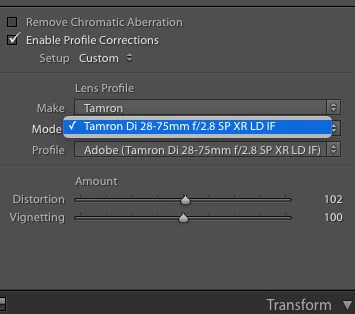
Only one Tamron lens is shown, what to do?


Thanks

Soren

This topic has been closed for replies.

7 replies

F. McLion
Community Expert
Community Expert
August 14, 2020

There's no need to import these profiles. They are accessed by LR automatically.

The profile for your 10-24 lens is available, probably this: Canon (TAMRON 10-24mm F_3.5-4.5 Di II VC HLD B023E)


(C:\Program Files\Adobe\Adobe Lightroom Classic\Resources\LensProfiles\1.0\Tamron\Canon\Canon (TAMRON 10-24mm F_3.5-4.5 Di II VC HLD B023E) - RAW.lcp)


However, I strongly suspect you are using a jpg file since the one profile you are showing in your screenshot is one that is  available for jpg also while most other profiles are available for RAW only.

--- Got your issue resolved? Please label the response as 'Correct Answer' to help your fellow community members find a solution to similar problems. ---
Participant
July 29, 2024

He said only RAW files.  Seems to be a pretty common issue. I am having the same issue.  Sony a7r3 with sony zeiss 16-35 f4.  Lens correction does nothing and clearly this lens needs it profile to get rid of its distortion. 

F. McLion
Community Expert
Community Expert
July 30, 2024

I don't see a Zeiss 16-35 in the list of supported lenses.

Anyhow, please open a new thread as this old one from 2020 discusses a different lens.


--- Got your issue resolved? Please label the response as 'Correct Answer' to help your fellow community members find a solution to similar problems. ---
GoldingD
Legend
August 13, 2020

Second off, and I will explain this after my point


If the lens profile is missing, perhaps uninstall Adobe Camera RAW, then reinstall it.


And as to my explanation. Via another members issues, I ws taught that while LrC contains its own Camera RAW coding, and does not actually use the separate Adobe Camera RAW plugin that PS uses, the two share common files on the computer. the lens profiles being on area shared.


GoldingD
Legend
August 13, 2020

Ok, first off, can you find the lens profile using your OS File Manager?


Windows Default—C:\ ProgramData \ Adobe \ CameraRaw \ LensProfiles
Windows User—C: \ Users \ [your username] \ AppData \ Roaming \ Adobe \ CameraRaw \ LensProfiles


Mac Default—Macintosh HD / Library / Application Support / Adobe/ CameraRaw / LensProfiles
Mac User—Macintosh HD / Users / [your username] / Library / Application Support / Adobe / CameraRaw / LensProfiles


Above paths not quite complete, you may need to go one more deep, and your Tamron folder will be split up into camera brand as well


Participant
August 14, 2020

Thanks David,


When I go to - Macintosh HD / Library / Application Support / Adobe/ CameraRaw / LensProfiles


I see all the profiles there....


I tried to manual import them to Lightroom via File > Import Profiles & Presets, it looks like it is importing but nothing shows up... 


Participant
August 13, 2020

I'm shooting with a Canon D90 only RAW (CR3)....

But shouldn't I be able to see all the supported lenses in the drop down menu, not matter what lens or camera I'm using?

 
GoldingD
Legend
August 12, 2020
Just Shoot Me
Legend
August 12, 2020

And what File Type is selected? RAW or a JPG. Lenses noramlly only show up for RAW files.

August 12, 2020

Moving to the Lightroom Classic forum from Photoshop