


Peter Wendl
Participant
December 7, 2023
Question

Missing metada in the library module

  • December 7, 2023
  • 3 replies
  • 147 views

I have updated from Catalina to Sonoma on my mac as I purchased a new computer and were able to make this update.

I could now updatel Lightroom Classic as well to latest version.

Ever since I am using it I have this problem.


The exif data is being imported all the time from my camera but I cannot make any selections in the Library module when using grid view. There is no option to select cameras or lenses...  The rest is selectable (iso, shutter, focal length....), even the camera serial number. I am attaching a picture of it.
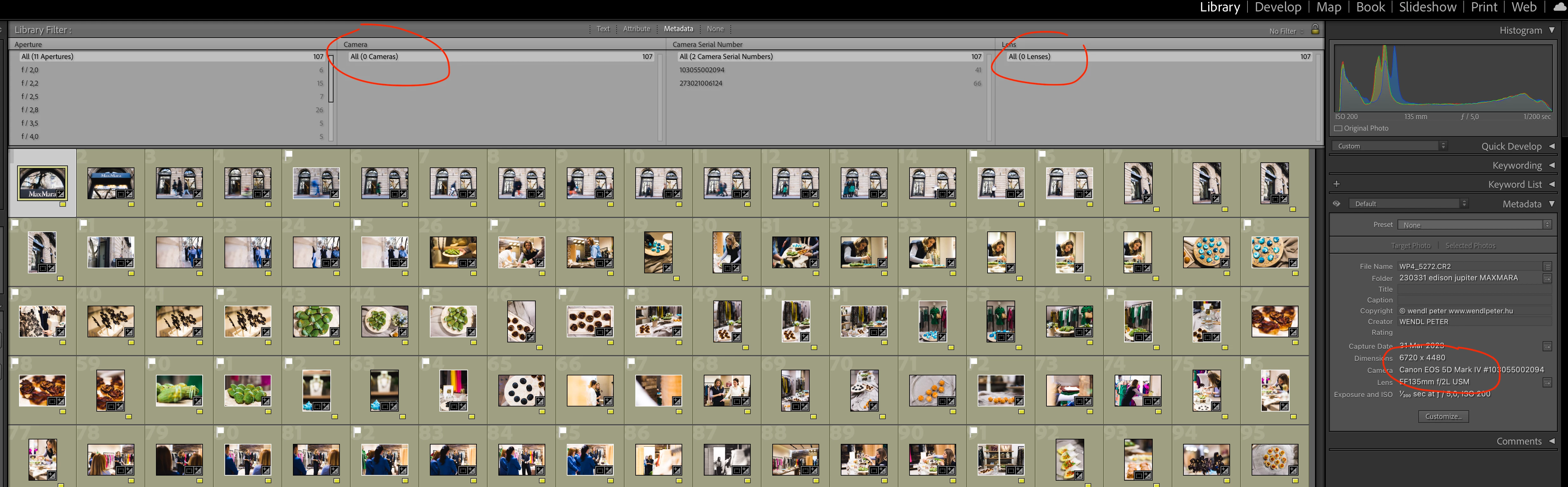


Does anyone know a quick fix for this?

I would really appreciate it.


This topic has been closed for replies.

3 replies

Peter Wendl
Participant
January 31, 2024

Thank you all for the help. As usual as strange as it gets with these glitches... The problem is just solved itself with the next software update coming and being installed...

GoldingD
Legend
December 7, 2023

In the area, the row, just above the Camera selection that you have circled, select something else, then select camera again.


dj_paige
Legend
December 7, 2023
johnrellis
Legend
December 7, 2023

I recall another thread with similar symptoms in the last couple months, but I can't find it. 


Try dj_paige's suggestion of resetting preferences first. If that doesn't help:


1. Click the Library Filter bar's preset menu (at the right end of the bar) and do Restore Default Presets. Rarely LR will corrupt the column settings of filter presets, and this will restore them, without deleting any custom presets you might have saved.


2. Try deleting the Helper.lrdata folder:


a) Do Catalog Settings > General > Show to open Finder / File Explorer on the current catalog folder.
b) Exit LR.
c) In that folder, delete the folder "<catalog> Helper.lrdata".
d) Restart LR, and it will rebuild the folder.


The Helper.lrdata folder caches information about metadata, keywords, folders, collections, and other things to speed the performance of LR and it can sometimes get corrupted. In recent versions, LR has used it more heavily to improve the speed of displaying metadata, and there have been a fair number of bugs with it.


If neither of those options work, there are more involved methods that might fix the problem.