

Participant
April 24, 2018
Answered

Missing Minimize, Expand, Close Buttons

  • April 24, 2018
  • 5 replies
  • 13083 views

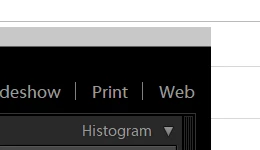
In Lightroom CC I'm missing the minimize, Expand and close buttons

Correct answer JP Hess

And shift + F will toggle through the different screen modes.

5 replies

lecycliste
Participant
April 16, 2019

In Lightroom Classic CC, pressing Shift F repeatedly cycles you through different desktop views for the program. One of them will include the minimize / maximize / close buttons in the upper left corners in Windows 10.

John Lastar
Inspiring
September 9, 2018

You can try Ctrl Alt F. That will bring up the Normal Screen.

JP Hess
JP HessCorrect answer
Inspiring
September 9, 2018

And shift + F will toggle through the different screen modes.

selondon
Community Expert
Community Expert
April 25, 2018

Have you installed the cloud based Lightroom CC (that has a slimlined interface and less feature) instead of the traditional folder based Lightroom Classic that you may have intended?

Jim Wilde
Community Expert
Community Expert
April 25, 2018

No, Reed...that screenshot is from Classic.

It looks as though the old full-screen mode has been employed, so Shift-F a couple of times to toggle through the various full-screen displays until the 'normal' screen mode is restored.

selondon
Community Expert
Community Expert
April 25, 2018

Haha, indeed Jim, my post wasn't the best constructed ever! My thinking was that DSW5 was missing the interface in the screengrab

Kanikas
Legend
April 24, 2018
DSW5Author
Participant
April 24, 2018

I'm using  Windows if that helps
