[This post contains formatting and embedded images that don't appear in email. View the post in your Web browser.]
Google translation: "Presets modules no longer working. I wanted to save a new preset and after saving the preset parameters module no longer wants to be displayed correctly. I reinstalled LR Classic 11.5 without success, downgraded to 11.4.1 without success. I also deleted the preset in question from CameraRAW's "settings" folder without success. Is there a solution to fix it? Thanks in advance for answers"
Troubleshooting steps that usually fix this problem:
1. Click the + menu in the Presets panel and then Manage Presets:
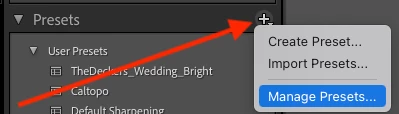
Make sure all your preset groups are checked.
2. I see that at one point there is a lot of blank space in your Presets panel. That often indicates a corrupted preferences file. Try resetting LR's preferences:
https://www.lightroomqueen.com/articles-page/how-do-i-reset-lightrooms-preferences/
LR sometimes soils its preferences file, and resetting it can fix all sorts of wonky behavior. That article explains how to restore the old preferences if resetting doesn't help.



 AdChoices