


Participant
August 14, 2025
Answered

Moving from PC to Mac - Catalogue not appearing to be visable

  • August 14, 2025
  • 3 replies
  • 196 views

I have just purchased my first Macbook Pro coming from PC. Copied everything from PC to external drives. (Images always been on another external drive). Tried to open the catalogue to which it asks for an update, do that and then.........nothing! It asks me to import images as there is none, but there is also no catologue - no edits, nothing at all.......HELP!

Correct answer dj_paige

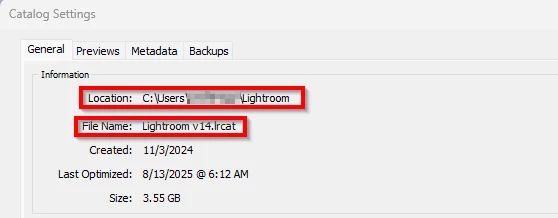
You are most likely trying to open the wrong catalog file from your PC. On the PC, open LrC, and then find the exact file name and location of your current catalog. That can be seen in Catalog Settings, as shown below. That's the one you want to open on the Mac.


3 replies

dj_paige
dj_paigeCorrect answer
Legend
August 14, 2025

You are most likely trying to open the wrong catalog file from your PC. On the PC, open LrC, and then find the exact file name and location of your current catalog. That can be seen in Catalog Settings, as shown below. That's the one you want to open on the Mac.


JohanElzenga
Community Expert
Community Expert
August 14, 2025

That means Lightroom Classic lost the connection to the upgraded catalog, and so it created a new, empty catalog. That has been reported before. Look inside the old catalog folder to see if you can find the upgraded catalog (it should have the same name, but there should be a folder with the old catalog as well indicating that the upgrade was successful). Double-click the upgraded catalog file so Lightroom Classic knows which catalog it should open from now on.


P.S. The question how the external drive is formatted is a valid one. MacOS can read NTFS drives, but not write to them, so Lightroom can't upgrade a catalog on such a drive and so it will open a new catalog, saved by default on the internal drive.


-- Johan W. Elzenga
Inspiring
August 14, 2025

What file system is the external drive formatted to?