The interface for this takes some getting used to, being quite unusual. The Save button does not do what one might first suppose: it in effect means "Save As a New Preset" - thus it will not accept any preset name which already exists, since that would not be a new name. Rather a strained logic maybe but that's how it is.
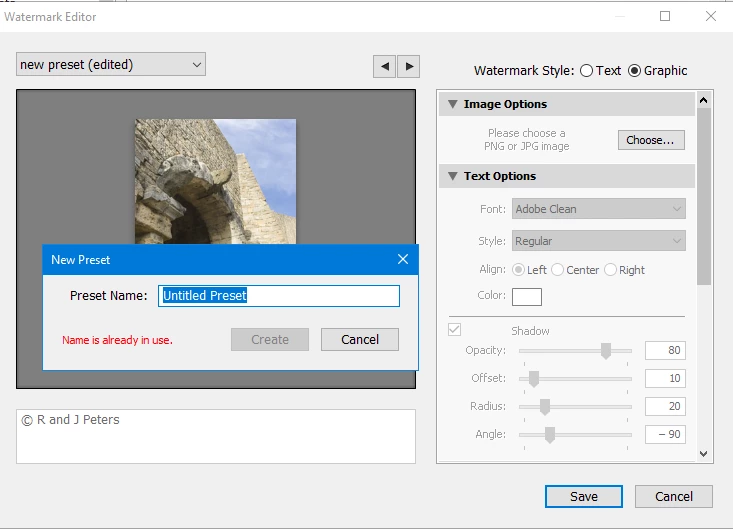
In the example below, " I am editing "new preset" and clicking Save, LrC defaults to trying to create its default name for fresh new presets "Untitled Preset" but a different preset called that is already in place (from a previous occasion), so that particular name is refused for saving. The same would happen if I re-typed "new preset" into the box instead, because that also already exists.
The way to apply changes to a pre-existing preset, while retaining its same name is: not Save, but Update.
[edit: I see you've had this advice already; it should work but if still problematic, I suggest switch to a text based watermark, update preset, switch back to image based watermark and re-browse to the image concerned, then update preset again]
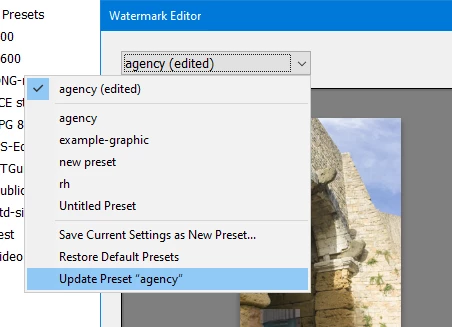
Here I made a change to a different watermark preset called "agency", and then chose the menu option highlighted in this second screenshot, which drops down from the selector titled "agency (edited)".
A similar approach shows up elsewhere in LrC, of updating previously-made presets of other kinds.



 AdChoices