
Known Participant
August 12, 2017
Question

Multiple unknown catalogue files (.lrcat) in Lightroom folder?

  • August 12, 2017
  • 2 replies
  • 1878 views

Hi all.

I have been doing some optimization and freeing up storage on my MacBook Pro and came across something strange in my Lightroom catalogue folder.
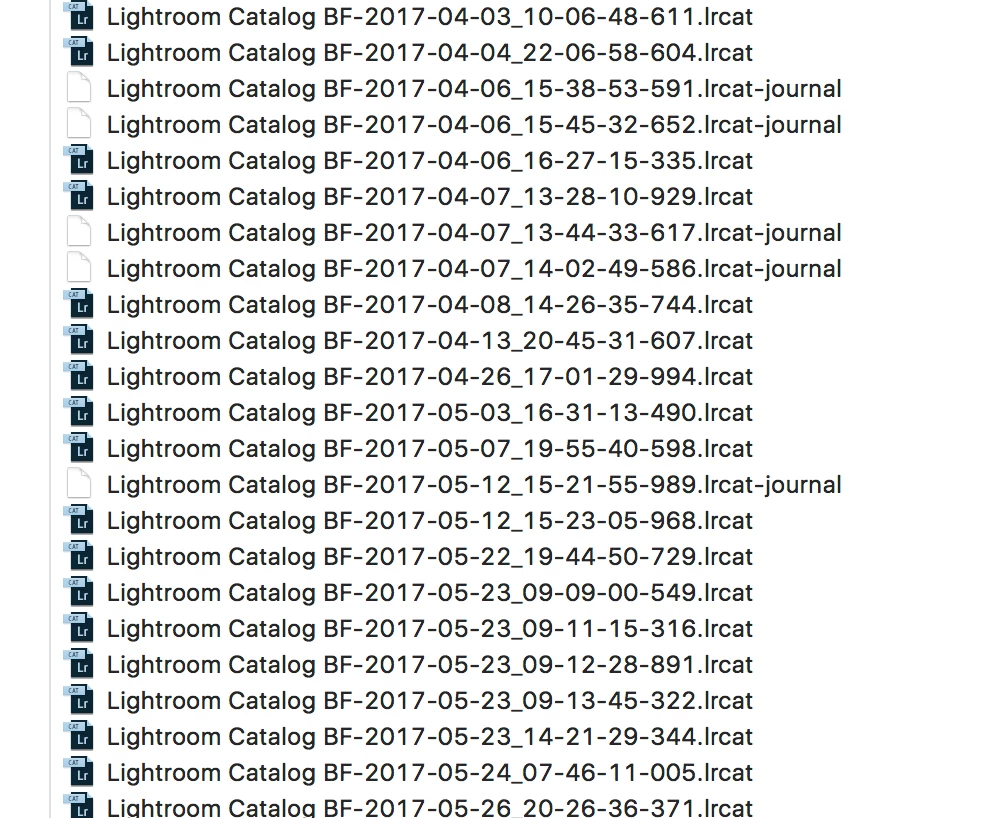
There are over 60 of these files. All the .lrcat files are roughly 400MB and the .lrcat-journal files are between 200kb and 6MB. These files are not my active library (according to LR catalogue settings). There is a separate backup folder with weekly backup files).

The strange thing is that the files keep getting updated/edited (according to the finder file info). Since I use only 2 catalogues (private and business) I can't understand why there would be more.

I really haven't got a clue what these files are. Haven't found anything online either. I hope someone here could tell what these files are, if I can delete them and how to prevent them from being created again (if they are useless).

This topic has been closed for replies.

2 replies

Just Shoot Me
Legend
August 12, 2017

What version of LR are you using. Please be specific. Go to Help then About Adobe PS LR or Sys info and post the exact version number.

Known Participant
August 12, 2017

Hi. Below a Adobe Sys Info screenshot. (Sorry it's in dutch)

Just Shoot Me
Legend
August 12, 2017

Since you are using the CC/6 version the backups would be in a ZIP file format.

Are you somehow creating a new catalog every time you open LR? Because that is what it looks like. Do you have some type of backup, cloning, software installed and running on your system as there are several files with the same date, 5 files dated 2017-05-23, and different time stamps. 4 of them with a time stamp within 6 minute.  Like something is creating a backup copy every time the catalog changes.

Open the LR Catalog settings on the general tab and select "When LR next exits" in the Backup part then close LR to bring up the backup dialog and check the folder being used.

dj_paige
Legend
August 12, 2017

And yet, you haven't shown us this finder file info that you say is meaningful in this situation. Please show it to us.

It is entirely possible that you are accidentally opening one of these catalog files. How do you launch Lightroom?

Known Participant
August 12, 2017

Good point. Here you go. 2 examples of the Finder info for 2 of the files. I have just been working within 1 catalogue (which is called 'Lightroom Catalog BF'). Which I do daily btw. I really haven't got a clue why these files would be created every few days.

Backup's are created as they should in a separate folder.

dj_paige
Legend
August 12, 2017

Since I don't recognize the language used, what about these screen captures indicates that these files have been recently created? Does it show the actual operating system information for the date created or date modified?

The date in the file name would indicate that these might be actual Lightroom backups, being created in a different folder than the one you want them to be created into. Have you checked the folder that you claim backups are being created into in order to make sure that there are backups being created into this folder in the recent time period?