
My Collections and Albums are not showing up in the Library
I'm hoping this is a simple fix and I'm just being an idiot, but I've been googling this for almost 2 hours now and can't find anything where someone has a similar issue, so hopefully my Lightroom Catalog isn't broken in some way..
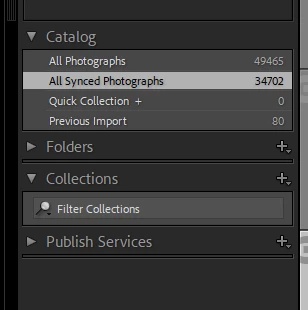
I just opened Lightroom to upload a few photos and immediately that all of my Collection Sets and Collections/Albums are not there - the photos are all still there and appear to syncing (minus this most recent batch) but I have zero organization. And I can no longer create new collections, so something is clearly bugged, I just can't figure out if it's a serious catalog issue or if I just need to delete a preference file or some weird thing.
I'm using 12.0.1 on Windows and had collections as of a few days ago, so no idea what happened here. And I've tried rebooting, relaunching, rebuilding previews, rebuilding sync data, etc. If you have any advice at all, I would greatly appreciate it!
 AdChoices