
Participating Frequently
April 29, 2024
Question

My computer changes the color of my RAW images

  • April 29, 2024
  • 6 replies
  • 2642 views

Hello everyone,

this is something that has never happened to me before.
When taking photos with my Canon 5D Mark IV and exporting them to my MacBook Pro. The colors were always accurate to what I was seeing on the screen. However, now it does some "correction" and changes the hues and contrasts for me.

What is this? How can I fix it?
It's like when I take my photo in monochrome and it automatically changes it to color.

Here is an example of what happens. The image on the left is the "original" to the one on the right as it looks on my computer and in Lightroom.
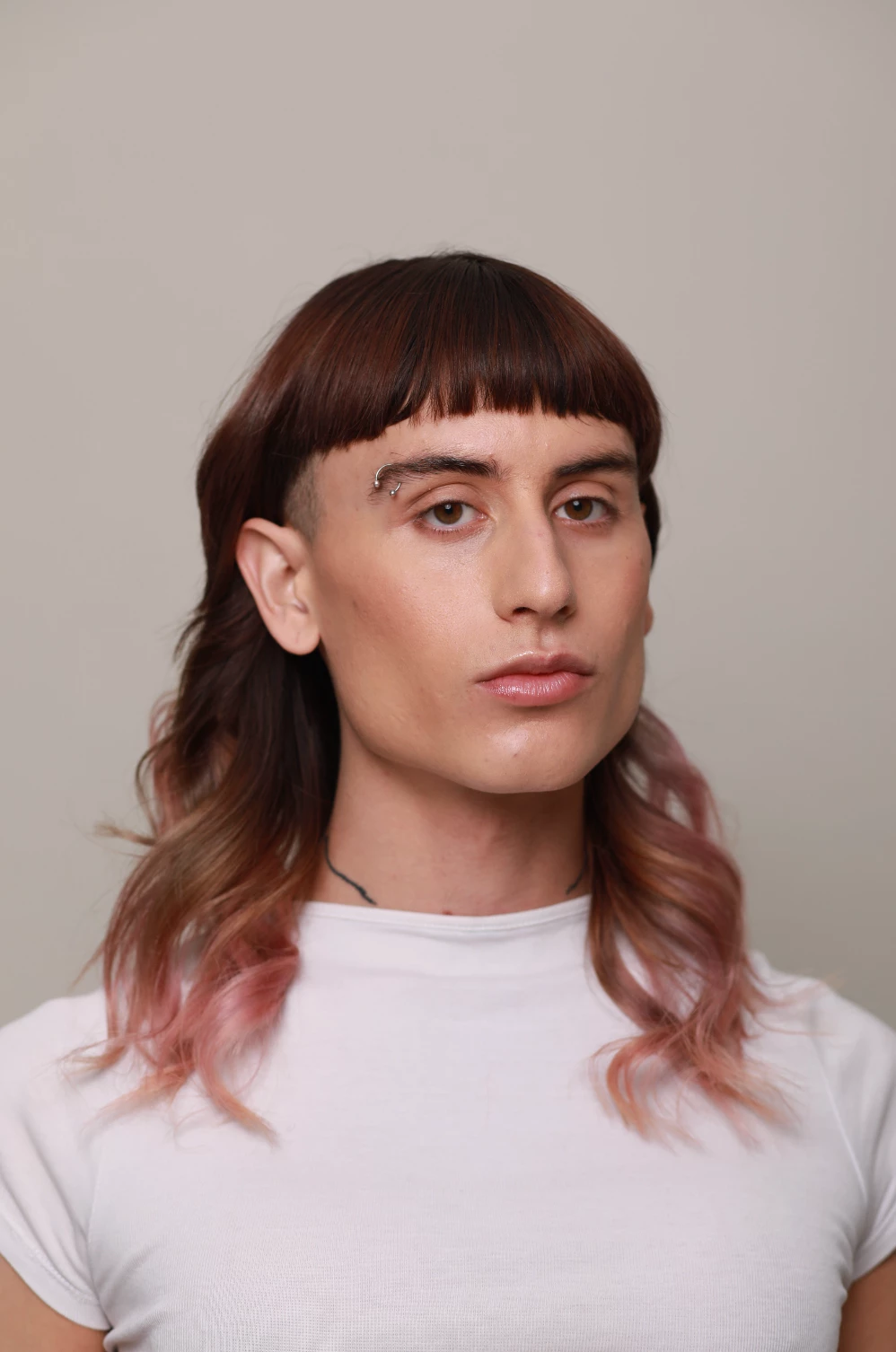
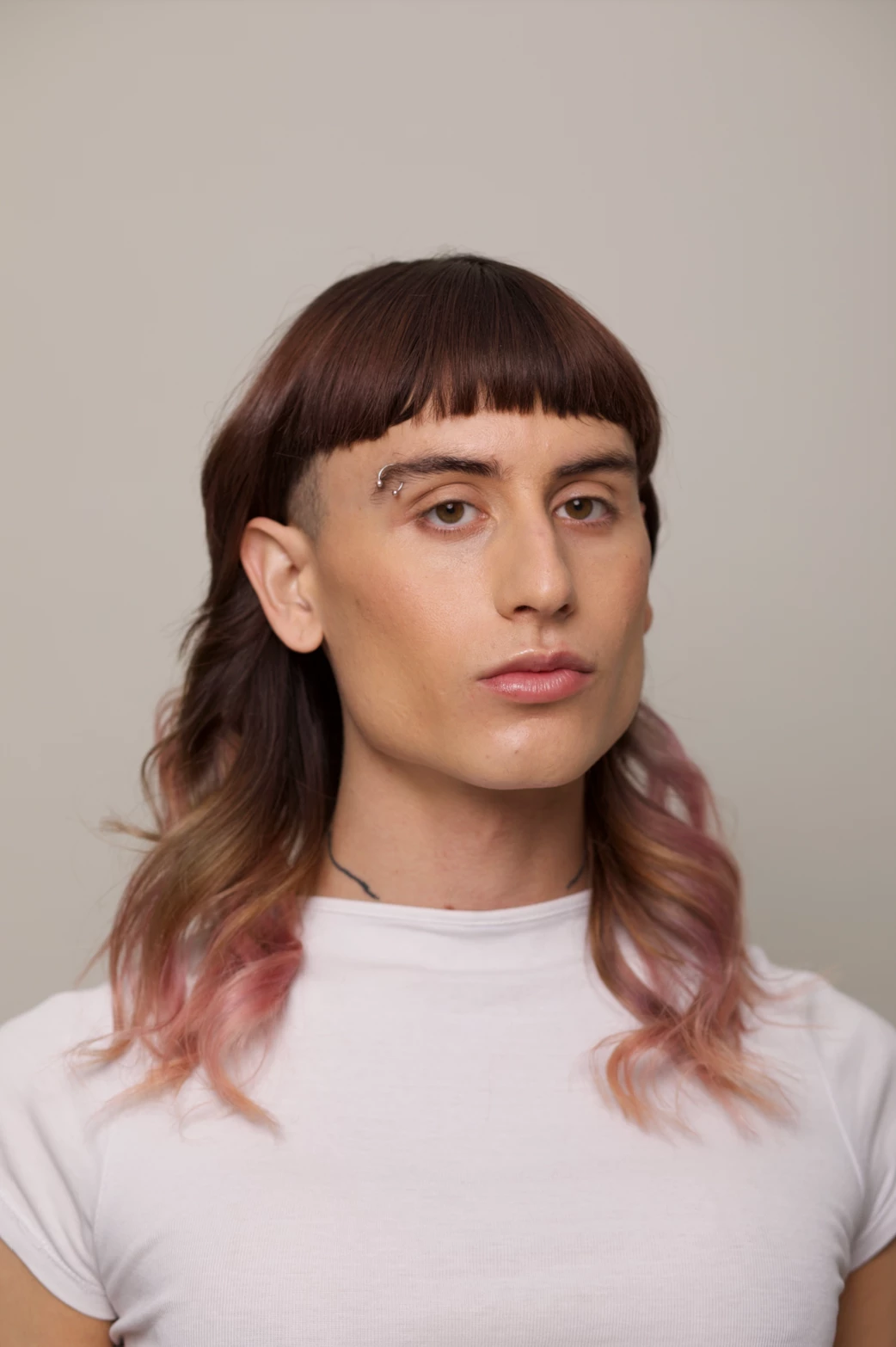


Thank you for your time. 

Regards! 

6 replies

Participant
May 15, 2025

my canon camera raw files suddenly changes a lot after last updated, anyone having same experiences?

AxelMatt
Community Expert
Community Expert
May 15, 2025

@Pekky_Wirawan6710  I worked also with Canon RAW files (.CR3 from Canon's R5) and I can't seee such changes.

Please described more detailed what you're doing and where and which changes you see. If possible post some screenshots to show us before and after.

We need also informations about your system. Please provide a copy of your 'System Info'. This can be get from the LrC Help > System Info menu item. There's a copy button in the System Info dialog. Press this button and paste the info into your next forum post.

What has been changed on your system before the errror occur? 

In the meantime try to reset the preferences of Lightroom Classic:  How to reset Lightroom Classic preferences (adobe.com)

It's recommended to backup your preferences before you reset the preferences to the default settings: 

https://helpx.adobe.com/lightroom-classic/kb/preference-file-and-other-file-locations.html


My System: Intel i7-8700K - 64GB RAM - NVidia Geforce RTX 3060 - Windows 11 Pro 25H2 -- LR-Classic 15 - Photoshop 27 - Nik Collection 8 - PureRAW 5 - Topaz Photo
Per Berntsen
Community Expert
Community Expert
April 29, 2024
quote

Here is an example of what happens. The image on the left is the "original" to the one on the right as it looks on my computer and in Lightroom.


Thank you for your time. 

Regards! 


By @camila.berrio.photo


In what application are you viewing the "original" ?

If you are shooting raw, and viewing the raw file in an image viewer that cannot render raw files, it will display the jpg preview embedded in the raw file.

Any settings from the camera (like Picture styles, or whatever Canon calls them) will be applied to the jpg preview, but LrC doesn't understand these proprietary settings, and ignores them.

So maybe you changed a setting in the camera?

D Fosse
Community Expert
Community Expert
April 29, 2024

Every raw processor - including the one in the camera - will produce different results. They will not, and are not supposed to, match.


There is no such thing as an "original" raw file. A raw file is just a data dump from the camera sensor  - a very dark, tonally compressed monochrome image. To turn it into a useful image, it needs to  be processed, and that processing is always an interpretation.


The point of shooting raw is that you don't need to just accept the camera interpretation. You can make your own interpretation.


Participating Frequently
May 3, 2024

It is very clear to me, thank you for your help.

Legend
April 29, 2024

Are you shooting RAW photos? If so, those have NO settings when they come off the memory card. Adobe has default settings which can be applied but those may or may not match the embedded JPEG (which would look like a file from the camera if you were in fact shooting JPEGs instead of RAW.)

You may want to look at this article:

https://helpx.adobe.com/lightroom-classic/help/raw-defaults.html

https://www.lifeafterphotoshop.com/dont-just-accept-lightrooms-default-adobe-color-profile/

Participating Frequently
May 3, 2024

Hello, thank you for your reply.

I will look at the information you send me.
All the images are in RAW.

dj_paige
Legend
April 29, 2024

Are you talking about Lightroom Classic (LrC icon) or Lightroom (Lr icon)? What version number?

Participating Frequently
April 29, 2024

Adobe Lightroom Classic. The last version. 

🙂

dj_paige
Legend
April 29, 2024

We always request the version NUMBER. Words like "last version" don't really have concrete meaning. Thanks!

AxelMatt
Community Expert
Community Expert
April 29, 2024

In a first step try is to reset the preferences to the default settings by following the steps below:

  • Close Lightroom.
  • Mac: Hold down [Opt]+[Shift] while restarting Lightroom.
  • Overwrite the Preferences when prompted by the dialog.
  • Close Lightroom.
  • Restart Lightroom.


It's recommended to backup your preferences before you reset the preferences to the default settings: 

https://helpx.adobe.com/lightroom-classic/kb/preference-file-and-other-file-locations.html


If this doesn't help please check you import dialog if there are a preset that's applied during import.


Another point is to check you monitor profile if it has a fault.

How do I change my monitor profile to check whether it’s corrupted? | The Lightroom Queen


My System: Intel i7-8700K - 64GB RAM - NVidia Geforce RTX 3060 - Windows 11 Pro 25H2 -- LR-Classic 15 - Photoshop 27 - Nik Collection 8 - PureRAW 5 - Topaz Photo
Participating Frequently
April 29, 2024

Thank you so much! I will give it a try.